zhunzhong07/Random-Erasing
Occlude your images, improve your model
A dead-simple augmentation that randomly slaps a gray patch over training images and somehow makes CNNs generalize better.
Not currently ranked — collecting fresh signals.
star history
What it does
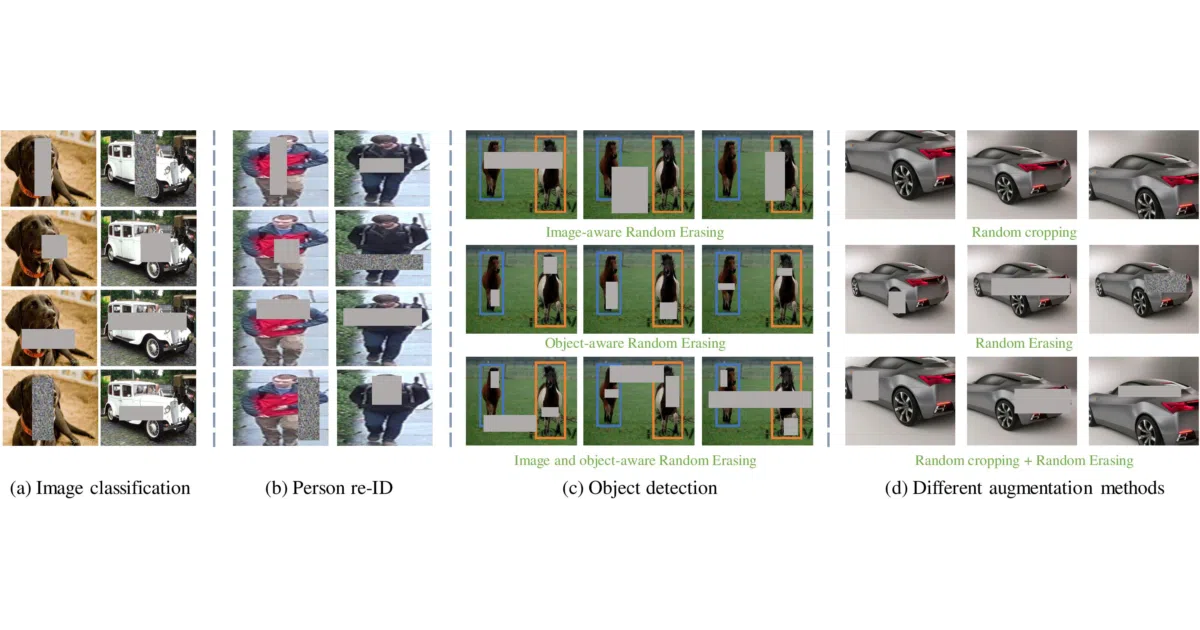
Random Erasing picks a random rectangle inside an image and fills it with noise, a solid color, or the mean pixel value during training. It’s essentially Cutout’s less disciplined cousin: instead of a fixed black square, you get a random position, size, and fill strategy every time. The repo provides PyTorch training scripts for CIFAR-10, CIFAR-100, and Fashion-MNIST with a single --p 0.5 flag to turn it on.
The interesting bit
The technique is now officially baked into torchvision.transforms.RandomErasing, which tells you something about how well it worked. The paper (AAAI 2020) showed consistent but modest gains—roughly 0.3–0.7 percentage points of error reduction across ResNet depths. Not dramatic, but cheap enough that you might as well.
Key highlights
- Three fill modes: black, white, or random noise (the gifs in the README make this viscerally clear)
- One hyperparameter:
--pcontrols erasing probability; 0.5 is the default sweet spot - Supports ResNet-20 through ResNet-110 and Wide ResNet-28-10 out of the box
- Results table shows gains on all three datasets, with WRN-28-10 getting the biggest bump on CIFAR-10 (3.80 → 3.08)
- Fashion-MNIST results may not reproduce exactly on newer dataset versions (acknowledged in README)
Caveats
- The code is research-grade: single-file scripts, no pip package, no config system
- You’ll need to dig into
cifar.pyorfashionmnist.pyto adapt this for your own data - No ImageNet examples here; for that, the README points you to
timminstead
Verdict
Worth a look if you’re training small-scale image classifiers and want a quick augmentation win without reaching for heavier artillery like MixUp or AutoAugment. If you’re already using modern torchvision transforms, you already have this—just call RandomErasing and move on.
Frequently asked
- What is zhunzhong07/Random-Erasing?
- A dead-simple augmentation that randomly slaps a gray patch over training images and somehow makes CNNs generalize better.
- Is Random-Erasing open source?
- Yes — zhunzhong07/Random-Erasing is open source, released under the Apache-2.0 license.
- What language is Random-Erasing written in?
- zhunzhong07/Random-Erasing is primarily written in Python.
- How popular is Random-Erasing?
- zhunzhong07/Random-Erasing has 733 stars on GitHub.
- Where can I find Random-Erasing?
- zhunzhong07/Random-Erasing is on GitHub at https://github.com/zhunzhong07/Random-Erasing.