yilewang/llm-for-zotero
Your Zotero library finally grew a brain
A Zotero plugin that turns your PDF hoard into a conversational research agent with citations that actually jump back to source passages.
Velocity · 7d
+11
★ / day
Trend
→steady
star history
What it does
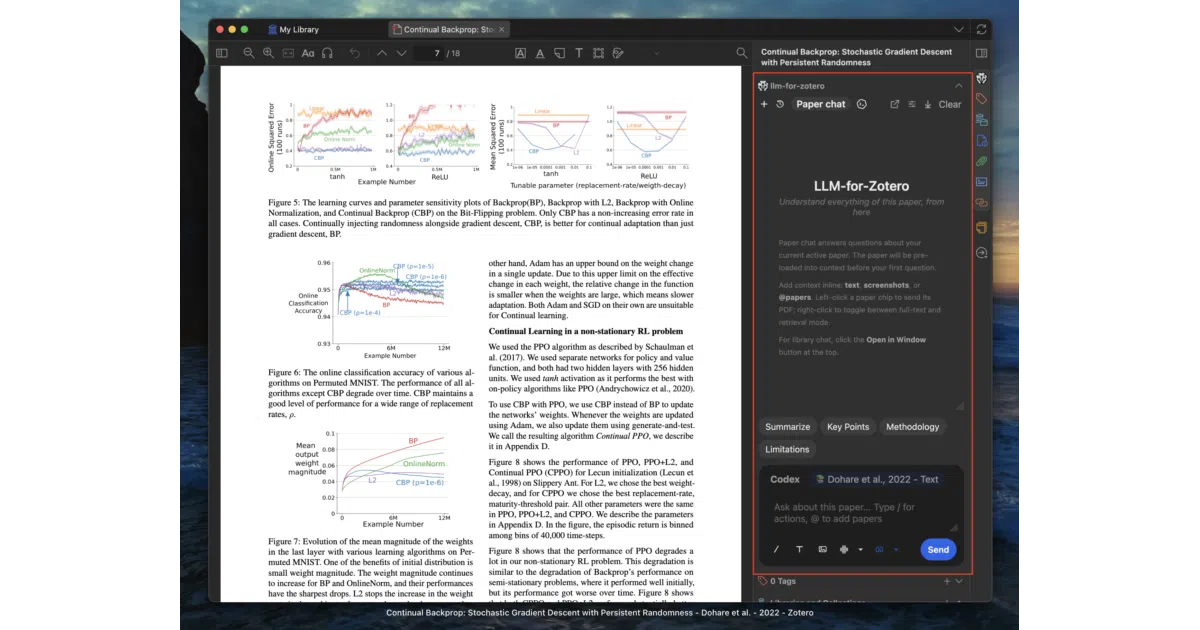
This Zotero plugin embeds an LLM assistant directly into the PDF reader. Ask questions about the current paper, summarize methodology, compare across multiple open tabs, or interrogate figures via screenshots. Answers come with clickable citations that snap back to the exact passage in Zotero—not the vague “see page 7” hand-waving you get from dumping PDFs into ChatGPT.
The interesting bit
The “Agent Mode” (beta) treats your entire Zotero library as a tool-equipped environment: read, search, tag, draft notes, even edit metadata, with confirmation cards and session undo. The plugin also writes Markdown notes with Pandoc citation syntax straight into Obsidian or Logseq vaults—complete with YAML frontmatter and copied figures from MinerU-parsed PDFs. It’s trying to be the operating system for your literature, not just a chat window.
Key highlights
- Citation navigation that verifies page locations before claiming them, plus quote-based jump-to-source
- Cache-aware agent context: stable paper evidence persists across long sessions, with automatic transcript compaction when context windows crowd
- Eight built-in “Skills” for customizing research workflows, plus a portal to build your own
- Multiple backend support: standard APIs, local OpenAI-compatible models, ChatGPT WebChat, Codex App-Server, and Claude Code (experimental)
- MinerU integration for higher-fidelity extraction of tables, equations, and figures with bulk parsing tools
- File-based notes export to external Markdown directories or internal Zotero notes
Caveats
- Agent Mode is beta and disabled by default; write operations require explicit confirmation
- Claude Code mode is explicitly experimental and lacks native Zotero API operations
- The README is enthusiastic about features but sparse on actual accuracy metrics or benchmark comparisons
Verdict
Grad students and researchers drowning in PDFs who already live in Zotero should install this immediately. If your “research workflow” is already just copy-pasting into ChatGPT and losing track of which paper said what, this gives you structure without leaving your reference manager. Everyone else—casual readers, people who own fewer than twenty PDFs—will find the setup overhead excessive.
Frequently asked
- What is yilewang/llm-for-zotero?
- A Zotero plugin that turns your PDF hoard into a conversational research agent with citations that actually jump back to source passages.
- Is llm-for-zotero open source?
- Yes — yilewang/llm-for-zotero is open source, released under the AGPL-3.0 license.
- What language is llm-for-zotero written in?
- yilewang/llm-for-zotero is primarily written in TypeScript.
- How popular is llm-for-zotero?
- yilewang/llm-for-zotero has 3.4k stars on GitHub and is currently holding steady.
- Where can I find llm-for-zotero?
- yilewang/llm-for-zotero is on GitHub at https://github.com/yilewang/llm-for-zotero.