opencv/opencv_zoo
OpenCV’s pre-trained menagerie, benchmarked on real silicon
Because guessing whether your face-detection model will choke on a Raspberry Pi is a bad deployment strategy.
Not currently ranked — collecting fresh signals.
star history
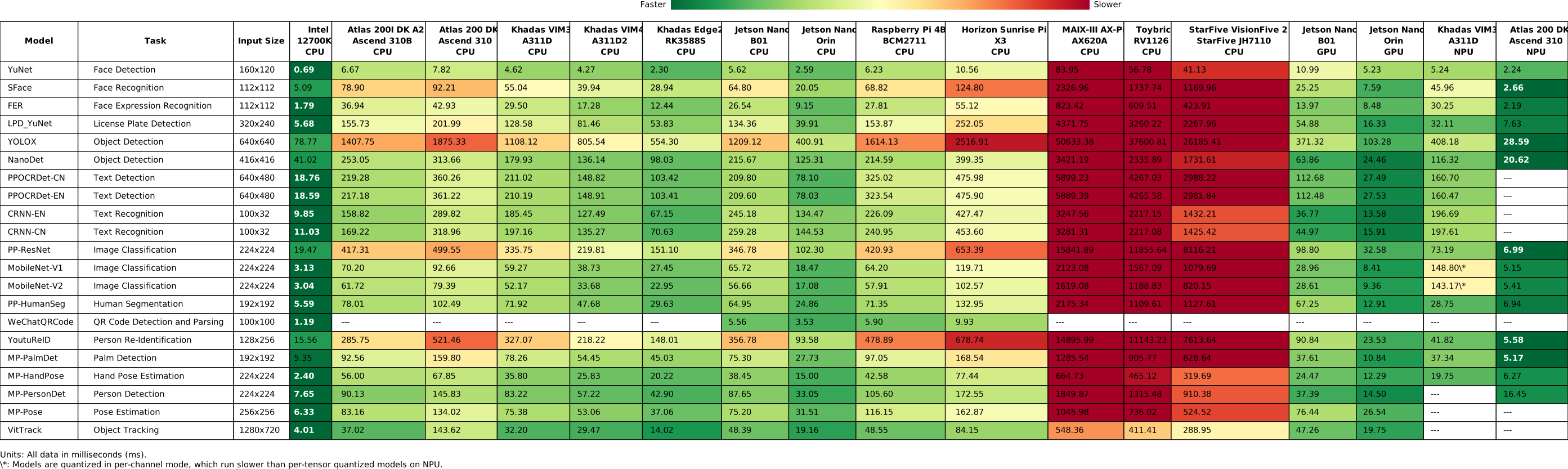
What it does The repository collects pre-trained computer vision models—face detectors, pose estimators, text recognizers, and more—packaged specifically for OpenCV’s DNN module. It also publishes inference benchmarks across a sprawling hardware matrix that includes x86 desktops, ARM SBCs, NVIDIA Jetson boards, RISC-V dev kits, and various NPUs. Think of it as a compatibility and speed report card for running vision networks without leaving the OpenCV ecosystem.
The interesting bit
The breadth of hardware is the real star: Khadas VIM3, Jetson Nano, Atlas 200, even a single-core RISC-V Allwinner D1. The project doesn’t just dump models; it records mean inference times (preprocess, forward, postprocess) per device, marking unsupported combinations with a blunt ---. That honesty saves developers from discovering dead ends on their own bench.
Key highlights
- Covers roughly a dozen model categories, from YuNet face detection and YOLOX object detection to EfficientSAM segmentation and MediaPipe hand tracking.
- Benchmarks span x86-64, ARM, and RISC-V architectures, with per-tensor quantized runs on NPU-equipped boards like the Khadas VIM3.
- Each result is the mean of 10 timed runs after warmup, with batch size fixed at 1.
- The project now hosts its models and online demos on Hugging Face, though the original GitHub repo remains the benchmark source.
Caveats
- RISC-V support is still thin; the Allwinner Nezha D1, for example, only lists YuNet results so far.
- The README warns that the project is now primarily hosted on Hugging Face, so the GitHub repo may lag as a distribution channel.
- Some model-hardware pairings simply do not run, shown as
---in the benchmark table.
Verdict Grab this if you are building with OpenCV DNN and need to pick a model that actually fits your target hardware. Skip it if you are already locked into PyTorch or ONNX Runtime pipelines and have no interest in OpenCV’s built-in inference engine.
Frequently asked
- What is opencv/opencv_zoo?
- Because guessing whether your face-detection model will choke on a Raspberry Pi is a bad deployment strategy.
- Is opencv_zoo open source?
- Yes — opencv/opencv_zoo is open source, released under the Apache-2.0 license.
- What language is opencv_zoo written in?
- opencv/opencv_zoo is primarily written in Python.
- How popular is opencv_zoo?
- opencv/opencv_zoo has 1.1k stars on GitHub.
- Where can I find opencv_zoo?
- opencv/opencv_zoo is on GitHub at https://github.com/opencv/opencv_zoo.