LiCinCan/blender-ai-mcp-addon
A copilot for Blender that actually looks at your scene first
A Blender addon that pairs a visual chat workspace with a built-in MCP server, so AI assistants can inspect, build and edit 3D scenes rather than guessing at them.
Feature · 18 Oct 2026
The AI Assistant That Moved Into Blender's Sidebar
mcp-for-blender-pro puts the chat, the approvals, and the agent team inside the DCC itself — and is refreshingly blunt about what it isn't.
Read the in-depth article →
Collecting fresh signals — velocity needs a few days of history.
collecting data…
star history
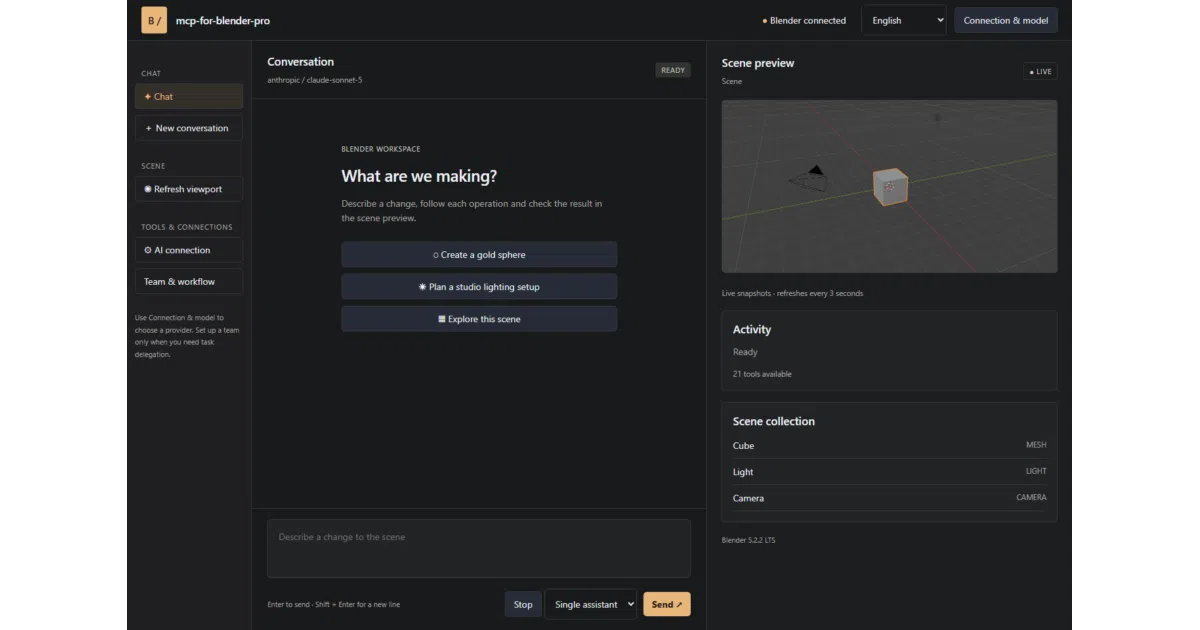
What it does mcp-for-blender-pro is a Blender extension (4.2+) that adds an AI assistant with 21 scene tools: inspecting objects, creating primitives, editing materials, parenting, running Python, taking viewport screenshots, searching asset libraries and exporting scenes. It ships with a companion “Studio” window combining chat, a scene object list, viewport snapshots, an approvals flow and a task board. Under the hood it also runs a local MCP server over authenticated Streamable HTTP, so external clients like OpenCode can drive Blender too.
The interesting bit Beyond single-model chat, you can configure a multi-agent team — a manager that decomposes requests, workers that perform scene operations, and reviewers that approve or bounce results. Tasks run sequentially to keep edits ordered, a blocked task gets exactly one correction attempt, and a second failed review halts the workflow. It’s a small pipeline with real discipline, not just agents talking to each other.
Key highlights
- Works with OpenAI, Claude, Gemini, OpenRouter, Ollama, OpenCode Zen and custom endpoints (OpenAI/Anthropic/Ollama protocols)
- 21 MCP tools, from
get_scene_infotobpy_api_lookupandexecute_code - Asset integrations with Poly Haven, Sketchfab and Poly Pizza
- Operation approvals, cancellation and named undo steps for mutations
- Interface available in English, German, French, Spanish and Chinese
Caveats
- The release bundle targets Windows x64 only, with Blender 4.2 or later
- Python tool validation “helps catch disallowed operations” but is explicitly not a security sandbox
- Chat history is session-only; credentials live in your user settings
Verdict Worth a look if you automate repetitive 3D work or want to wire an MCP client into Blender. If you’re on macOS/Linux or want a hardened execution sandbox, wait and see.
Frequently asked
- What is LiCinCan/blender-ai-mcp-addon?
- A Blender addon that pairs a visual chat workspace with a built-in MCP server, so AI assistants can inspect, build and edit 3D scenes rather than guessing at them.
- Is blender-ai-mcp-addon open source?
- Yes — LiCinCan/blender-ai-mcp-addon is open source, released under the MIT license.
- What language is blender-ai-mcp-addon written in?
- LiCinCan/blender-ai-mcp-addon is primarily written in Python.
- How popular is blender-ai-mcp-addon?
- LiCinCan/blender-ai-mcp-addon has 975 stars on GitHub.
- Where can I find blender-ai-mcp-addon?
- LiCinCan/blender-ai-mcp-addon is on GitHub at https://github.com/LiCinCan/blender-ai-mcp-addon.