LiCinCan/blender-ai-mcp-addon · 18 Oct 2026 · Feature
The AI Assistant That Moved Into Blender's Sidebar

Andrei Popescu
Staff Writer
mcp-for-blender-pro puts the chat, the approvals, and the agent team inside the DCC itself — and is refreshingly blunt about what it isn't.
LiCinCan/blender-ai-mcp-addon
★975 stars
There is a specific genre of GitHub project that has proliferated over the past two years: the Blender-MCP bridge. The formula is well established by now — expose Blender’s Python API as Model Context Protocol tools, point an LLM client at it, and let natural language drive scene construction. The original community plugin in this space, ahujasid’s mcp-for-blender, has accumulated 244 commits, a PyPI presence, and support across Claude Desktop, Cursor, VS Code, Windsurf, and half a dozen other clients. The Blender Foundation itself has shipped an experimental MCP server in its lab. Commercial outfits are circling the same territory from the cloud side. Into this crowded doorway steps the repo under review — hosted at anujasid/blender-ai-mcp-addon but branding itself mcp-for-blender-pro — and its distinguishing move is architectural: instead of Blender being a passive target that external AI clients poke at, it brings the entire AI workspace inside the application.
The inversion that matters
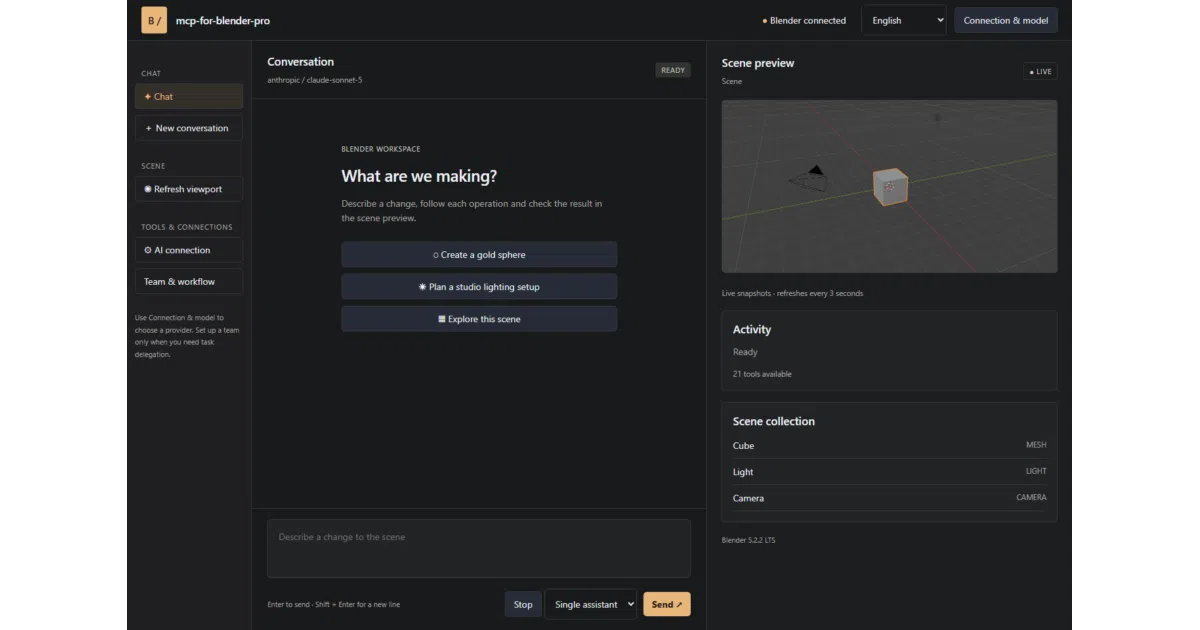
Nearly every other project in this space treats Blender as a server and the LLM as a remote operator. You chat in Claude Desktop or Cursor; Blender sits in another window, mutating on command. mcp-for-blender-pro inverts this. The addon ships a companion “Studio” window with chat, a scene object list, viewport snapshots, an approval mechanism, and a task board — all running locally, all inside the Blender session. The artist never leaves the viewport.
This sounds like a cosmetic difference. It isn’t. The history of DCC tooling is a history of context — the reason Blender’s own addon ecosystem thrived while standalone scripting tools languished is that artists work where their scene is. A chat panel that can see the scene, capture viewport screenshots, and surface them mid-conversation closes the feedback loop that external-client setups leave awkwardly split across windows. The 3D-Agent project, an independent multi-agent system built on Blender’s MCP and Python API, made this point bluntly on the Blender developer forum: without vision feedback, an agent “drifts” after a few steps and produces what its author called “geometry soup.” With viewport verification, errors self-correct. mcp-for-blender-pro bakes that verification loop into the product — image-capable models can interpret viewport screenshots directly, and the Studio window surfaces them as part of the conversation.
The boring part is where the value is
Strip away the AI framing and what you have is 21 tools wrapping Blender’s Python API: scene inspection (get_scene_info, list_objects, get_object_info), primitive creation, transforms, parenting, materials, screenshots, code execution, scene export, and asset search across Poly Haven, Sketchfab, and Poly Pizza. There is also a bpy_api_lookup tool that lets the model consult Blender’s own API documentation before acting — a small detail that matters more than it looks, since hallucinated bpy calls are the failure mode that plagues every project in this category.
This is, candidly, glue code. Well-organized, thoughtfully scoped glue code, but glue code — the interesting engineering is not in any single tool but in the orchestration wrapped around them. And that orchestration is genuinely more considered than most of its competition.
Consider the agent-team feature. Users can configure a chain of manager, workers, and reviewers, each with its own instructions and model. The manager decomposes a request into assignments with acceptance criteria; workers perform scene operations; reviewers approve or return findings. The design choices here reveal actual thought about failure modes: tasks run sequentially so scene edits stay ordered — a direct answer to the non-determinism that the 3D-Agent author flagged — and a blocked task gets exactly one correction attempt before a second failed review halts the whole workflow. That is a deliberately conservative policy. Most agent frameworks in this space retry aggressively or run until the token budget dies; this one assumes the agent will fail and designs the stop condition first.
The control surface is similarly pragmatic. Chat supports operation approvals, cancellation after the current step, and named undo steps for mutations. The README is explicit that Python tool validation “helps catch disallowed operations; it is not a security sandbox” — a sentence worth pausing on, because it’s the kind of honesty the field needs more of. The Blender Foundation’s own lab MCP server carries a prominent warning that it executes LLM-generated code without guards against data removal or exfiltration, and recommends running it in a virtual machine. mcp-for-blender-pro doesn’t solve that problem either — execute_code is execute_code — but it scopes the blast radius with approvals and undo, and it says so in plain language rather than burying the caveat.
A field converging from three directions
To understand why this repo exists in its particular shape, it helps to see the three forces squeezing the Blender-AI space.
First, the open-source MCP bridges, led by ahujasid’s project and now the Blender lab server itself. These are developer tools — they assume you already run an MCP client, and their value is protocol plumbing. The lab server’s own demos are telling: scene analysis for performance bottlenecks, data-block renaming, natural-language queries about which objects use a material. Useful, unglamorous, and honest about reliability — the lab page notes its initial LLM analysis missed a Solidify modifier that doubled an object’s polygon count.
Second, the commercial cloud platforms. Autodesk Flow Studio unifies image, video, and audio models with editable 3D scenes, rigging, and mocap, exporting to Maya, Blender, Unreal, and 3ds Max via USD. Meshy auto-rigs and animates characters in the browser. V2Fun does cloud motion retargeting. These generate assets; they don’t sit in your scene and iterate on it. They’re a different product category that happens to share keywords.
Third, the in-Blender assistants: Vibe4D, a chat-panel addon distributed through Gumroad that has drawn 51,000 views on the Blender Artists forum, and 3D-Agent, a commercial plugin claiming 10,500+ artists and clean-quad topology repair. mcp-for-blender-pro lives in this third category but tries to absorb the first: it ships its own authenticated Streamable HTTP MCP server, so external clients like OpenCode can connect to the same Blender instance the Studio window is driving. One assistant inside, a protocol endpoint outside, one scene.
The skepticism file
The community’s guardedly unimpressed response to this whole category is documented and worth repeating. In a GameDev.tv forum thread on MCP Blender addons, a user who tested many such tools reported that they “never perform as shown in promotional videos” — the impressive demos are “more like a vision of the future.” A teaching assistant on the same thread agreed the technology “has to start somewhere” but is “not much use as it is,” suggesting the real target audience is people with no Blender skills who want game-usable low-poly assets, not professionals.
mcp-for-blender-pro’s own example prompts — a product-display scene with a pedestal, camera, and three lights; a duplicated object in a spaced row — sit squarely in the territory that skeptic identified as the honest ceiling: simple, structured, low-poly scene assembly. The README doesn’t oversell beyond that, which is to its credit, but the ceiling is real. Nothing in the provided materials demonstrates the addon handling complex geometry, animation, or production-scale scenes, and the field’s collective experience — including the Blender lab’s own modifier-miss — suggests reliability degrades fast as scene complexity rises.
There are also practical rough edges visible without digging: the release bundle targets Windows x64 with Blender 4.2 or later, full stop — no macOS or Linux story in the README. Chat history lasts only for the current session. And the naming is a hazard: the repo lives at anujasid/blender-ai-mcp-addon, the product is called mcp-for-blender-pro, and the README’s keyword list includes “mcp-for-blender” — which is the name of the established, unrelated ahujasid project on PyPI. Whether that’s homage, confusion, or SEO opportunism, the sources don’t say, and users searching for one will find the other. The README does state clearly that it’s an independent project not affiliated with the Blender Foundation or any AI provider.
What to watch
The unresolved question for this project, and for the entire category, is whether in-app assistants converge with the official lab server or get obsoleted by it. The Blender Foundation’s server requires Blender 5.1 and carries the Foundation’s credibility but none of the workflow niceties — approvals, undo steps, task boards, the Studio window. mcp-for-blender-pro has the workflow layer and none of the institutional backing. If the Foundation’s experiment matures, the durable value here is the orchestration design: sequential task ordering, bounded retries, review gates, and the recognition that an agent editing a live scene needs a brake pedal more than it needs horsepower.
The project’s own adoption numbers, if any exist, aren’t visible in the provided materials — so whether the current attention is a genuine spike or the usual early-release churn is unclear. What is clear is that the design reflects lessons the rest of the field is still learning in public: agents drift, scenes are stateful, undo is sacred, and the person at the viewport should get to say no. That’s not a revolution. It’s just engineering that respects the room it’s working in.
Sources
- MCP Server
- Buy Official Flow Studio
- 3D-Agent Blender AI Assistant - Built a multi-agent system ...
- ahujasid/mcp-for-blender: Community plugin to control ...
- Are there any AI tools that could generate 3D animations? ...
- 3D-Agent | Blender AI Plugin for 3D Modeling
- Blender MCP | AI-Powered 3D Modeling with Claude ...
- AI 3D Animation Tool
- The Blender AI Assistant - Released Add-ons and Extensions
- MCP Blender addon - AI in your project - Talk
- AI 3D Animation Generator: 600+ Motions, FBX & GLB
- Blender Can Do AI Now (and it's insane)