zouyuxuan122/Deepseek-Harness-EAC
When your AI harness needs a window, not a terminal
It wraps the official DeepSeek Harness CLI in a self-contained desktop client so you can skip the Node.js install, YAML editing, and browser tabs.
Feature · 17 Aug 2026
DeepSeek Harness EAC: The Desktop Chassis for a Plugin-Everything Agent
An Electron wrapper bundles Node.js, skins, and a plugin market to turn DeepSeek’s command-line agent harness into a double-clickable desktop citizen.
Read the in-depth article →
Collecting fresh signals — velocity needs a few days of history.
star history
What it does
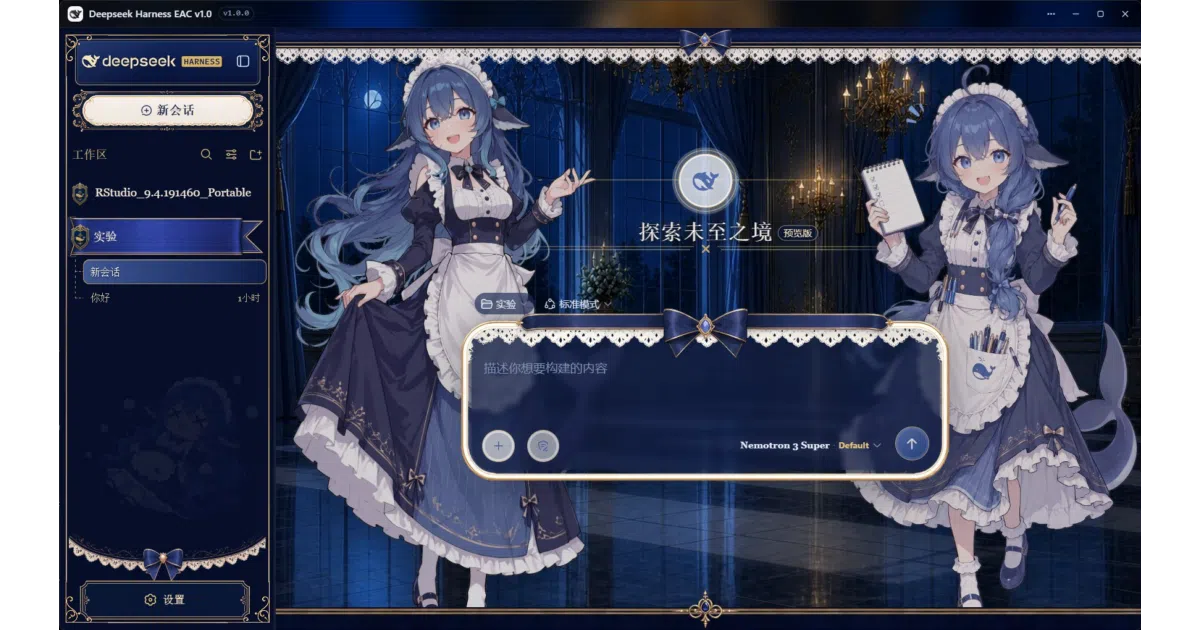
Deepseek Harness EAC bundles the official DeepSeek Harness agent with its own Node.js runtime and serves it inside a native desktop shell. You get a borderless window, system tray integration, and visual controls instead of juggling browser tabs and hand-editing configuration files. It reads the same DSH_HOME directory as the official CLI, so existing sessions and API keys simply carry over.
The interesting bit Rather than forking the harness, the app runs the unmodified official web UI and layers desktop conveniences on top: a built-in plugin marketplace, file-change tracking with line-level diffs, session-embedded PowerShell terminals, and ten community UI skins ranging from Windows XP to Hatsune Miku. Updates are similarly cautious—the client overlays new agent versions atomically and rolls back automatically if the launch fails.
Key highlights
- Fully self-contained: includes a Node.js runtime, so it runs offline with zero system prerequisites
- Ten built-in skins (XP, QQ98, Minecraft, a deep-sea maid workshop, and others) with mutual-exclusive switching and full license attribution
- Native borderless glass window with system tray minimization and Windows task-completion notifications
- Session-aware file tree with line-level diff tracking and one-click per-file or bulk restore
- Portable mode stores data beside the executable; the README literally advertises USB-drive readiness
- Visual setup page that imports skills, MCP servers, and memories from Codex or Claude Code directories
Caveats
- The README explicitly warns that Chinese characters in the installation path crash the Chromium renderer within seconds; keep the path strictly English.
- Linux packages (pacman, deb, rpm, AppImage) are community-maintained and rely on the system package manager rather than the in-app auto-updater.
- One bundled skin (“maid-atelier”) is licensed CC BY-NC-SA 4.0, meaning commercial use of that theme is off-limits.
Verdict Windows and Linux users who want the official DeepSeek agent experience without the command-line setup tax should grab this. macOS users and developers already comfortable with the official Node-based CLI can safely skip it.
Frequently asked
- What is zouyuxuan122/Deepseek-Harness-EAC?
- It wraps the official DeepSeek Harness CLI in a self-contained desktop client so you can skip the Node.js install, YAML editing, and browser tabs.
- Is Deepseek-Harness-EAC open source?
- Yes — zouyuxuan122/Deepseek-Harness-EAC is an open-source project tracked on heatdrop.
- What language is Deepseek-Harness-EAC written in?
- zouyuxuan122/Deepseek-Harness-EAC is primarily written in JavaScript.
- How popular is Deepseek-Harness-EAC?
- zouyuxuan122/Deepseek-Harness-EAC has 1.2k stars on GitHub.
- Where can I find Deepseek-Harness-EAC?
- zouyuxuan122/Deepseek-Harness-EAC is on GitHub at https://github.com/zouyuxuan122/Deepseek-Harness-EAC.