zouyuxuan122/Deepseek-Harness-EAC · 17 Aug 2026 · Feature
DeepSeek Harness EAC: The Desktop Chassis for a Plugin-Everything Agent

Conor Walsh
Staff Writer
An Electron wrapper bundles Node.js, skins, and a plugin market to turn DeepSeek’s command-line agent harness into a double-clickable desktop citizen.
zouyuxuan122/Deepseek-Harness-EAC
★1.2k stars
star history
DeepSeek’s agent framework is architecturally ambitious. Built on the Cordis plugin system, DeepSeek Harness treats every capability—models, tools, skills, sessions, sandboxes, storage, loops, scheduling, even the UI—as a swappable plugin managed by a central kernel. It offers four runtime modes, from a full coding agent to a minimal bash shell, and records every run in an append-only session log that can be replayed, forked, or searched. In theory, it is an open, composable answer to the closed coding assistants that currently dominate the market.
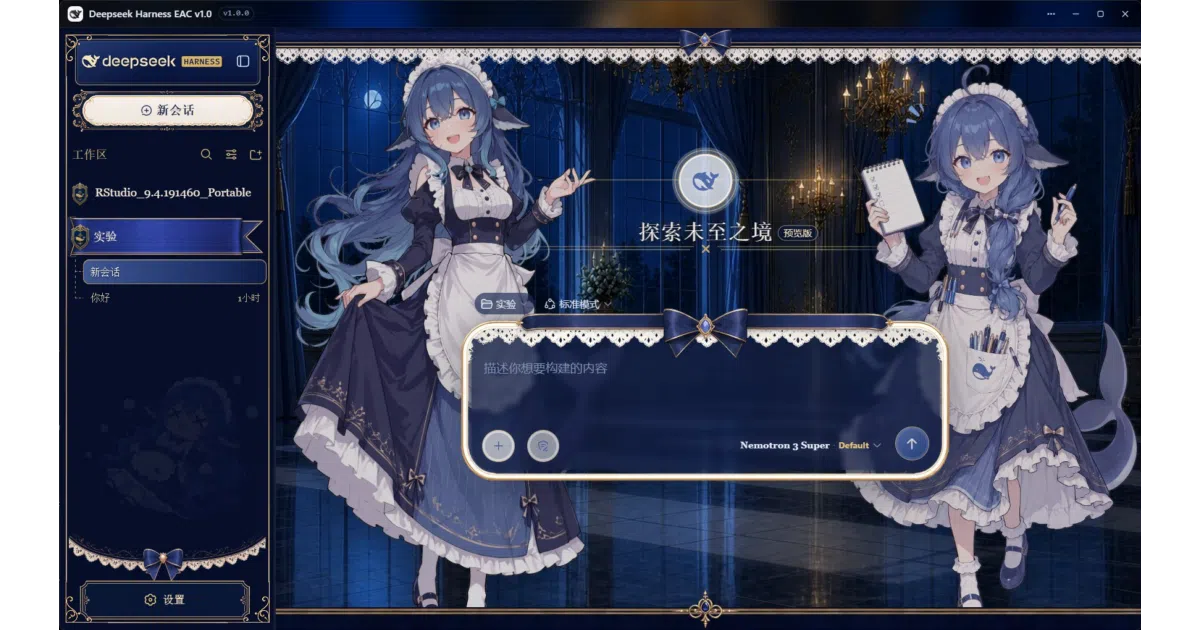
In practice, it is a Node.js command-line package that launches a local web server and expects you to bring your own browser, YAML editor, and patience.
That gap between architectural promise and desktop reality is exactly where DeepSeek Harness EAC inserts itself. EAC—which the project renders as “Embracing All Creation,” or 揽尽万象—is not a fork of DeepSeek Harness. It is an Electron shell that wraps the official dsh CLI, bundles a private Node.js runtime, and attempts to deliver the kind of out-of-the-box experience that turns an open-source framework into something resembling a product.
The Harness and the Hassle
DeepSeek Harness sits in a crowded but high-stakes space. The DeepSeek API already powers mainstream terminal coding agents such as Claude Code, Aider, Cline, and OpenCode, and the company has positioned Harness as its own open-source, reusable framework for building similar agentic tools. The model is the “soul,” in the project’s own phrasing, while the harness provides the infrastructure for understanding environments, calling tools, and operating continuously.
The framework’s plugin architecture is genuinely flexible. Every component is hot-swappable without touching core source code, and the Trajectory view treats session logs as first-class data structures rather than afterthoughts. But flexibility exacts a toll in ergonomics. Running the official harness requires installing Node.js, invoking npx @deepseek-ai/dsh web, and working inside a browser tab. Configuration is manual YAML. Updating is npm update. Skins, plugins, and memory layers require hunting down npm packages and editing profiles by hand.
EAC’s core insight is that this friction is a distribution problem, not an architecture problem. The project keeps the kernel untouched and instead wraps the existing dsh web command in a native desktop application. It spawns the bundled Node runtime, resolves the local URL, and loads the interface into an Electron window that behaves like a standalone program rather than a stray browser tab.
What the Wrapper Adds
If EAC were merely a self-extracting archive with a WebView, it would be a footnote. The project’s actual weight lies in the companion systems it grafts onto the harness.
The most visible layer is cosmetic. EAC ships with ten Web UI skins—ranging from a Windows XP homage to a Miku-themed interface—sourced from community repositories and toggled mutually exclusively inside a settings panel. These are browser-only client plugins synchronized into the web profile, and the project is careful to preserve license attribution, including a non-commercial Creative Commons skin from a community “maid atelier” project. Default behavior leaves the native appearance untouched, which suggests the authors understand that not every user wants their coding agent dressed as a 1998 instant-messenger client.
Beneath the surface, EAC adds several productivity affordances that the CLI lacks. A file-change tracker watches the current session’s working directory and surfaces line-level diffs with one-click revert, treating the session log as a read-only data source so upgrades do not corrupt history. A terminal tab launches a persistent PowerShell instance inside the session’s project directory, streaming output over server-sent events with reconnection logic. A balance widget queries the DeepSeek API and displays per-round cost and remaining credit inline, removing the need to open a billing portal in another browser tab.
The project also bundles a plugin market that browses the community-curated registry and allows one-click installation or uninstallation into the active profile, queued during the service restart window so the current conversation is not interrupted. Additional companion plugins handle external vision models via OpenAI-compatible endpoints, structured long-term memory ported from Tencent Cloud’s Agent Memory stack, and hot-reloading persona files so the agent can role-play without restarting.
All of this runs inside a borderless native window with a glass-style title bar, system tray integration, and Windows-native notifications when an agent task completes. A portable mode keeps the data directory adjacent to the executable, allowing the entire environment to travel on a USB drive.
Architecture as Honest Glue
EAC is refreshingly transparent about what it is. The repository’s architecture diagram shows a thin Electron main process handling window management, session watching, and dual update engines, sitting atop a vendored node.exe that executes the official dsh package. The client updater checks GitHub Releases and performs in-place replacement or guided reinstall; the agent updater overlays newer npm versions of @deepseek-ai/dsh onto the user’s data directory, with atomic switching and a one-click rollback if the newer version fails to start. Path resolution follows a simple priority: user-directory overlay wins over the built-in package, so upstream improvements flow through without waiting for a new EAC release.
This is, in essence, a distribution and integration layer. It does not modify the Cordis kernel, and it shares the DSH_HOME directory with the CLI so existing API keys and sessions remain valid. The value proposition is not a better agent; it is a better container for the same agent.
Position in the Desktop Agent Rush
The timing is notable. The current market for desktop AI agents is expanding rapidly, with products such as Manus My Computer, Claude Cowork, and Perplexity Computer all vying to turn natural language into local file operations, multi-step workflows, and persistent background tasks. Most of these are closed, subscription-backed systems with cloud dependencies or proprietary models.
EAC occupies a different niche. It is an open-source wrapper around an open-source framework that consumes an API compatible with both OpenAI and Anthropic formats. It does not bring its own model weights or local inference stack; it is not a “local AI agent” in the Ollama-and-LM-Studio sense that recent roundups emphasize. Instead, it is a local client for a cloud-capable harness, betting that users want the ergonomics of a desktop agent without surrendering control of the underlying framework.
That positioning carries risks. DeepSeek Harness itself remains in developer preview, and its core plugins and APIs are explicitly described as evolving. EAC inherits that instability. If the upstream web UI changes its DOM structure or plugin registration protocol, the skin system and companion plugins may need immediate repair. The project’s own healing script already exists to auto-fix module shadowing issues such as “prompt section already registered,” which suggests the authors are well aware that they are building on shifting ground.
Limits and Rough Edges
For all its polish, EAC is still a wrapper with sharp corners. It supports Windows 10/11 and Linux x86_64, but macOS is absent from the release matrix. On Windows, the Chromium rendering process crashes if the executable lives under a path containing Chinese characters—a bug severe enough that the README warns users to avoid installing to directories such as D:\迅雷下载\. The Linux build, contributed by a community packager, relies on the system package manager for updates and does not participate in the in-app auto-update channel used by the Windows portable and installer editions.
Moreover, the project’s scope is inherently bounded by DeepSeek’s own roadmap. EAC can make the harness easier to run, but it cannot make the harness’s model reasoning better, its sandbox safer, or its plugin ecosystem larger. Those remain upstream concerns. The broader DeepSeek integration catalog lists dozens of third-party editors, browser extensions, and automation tools that consume the same API backend, suggesting the harness is entering an already crowded accessory market.
Outlook
The most interesting aspect of EAC may be its update philosophy. By separating client updates from agent updates, and by allowing the user to overlay newer dsh versions on top of a stable bundled base, the project creates a buffer between the fast-moving upstream preview and the slower-moving desktop application. It is a pragmatic admission that the harness will change faster than the wrapper.
Community contribution is already visible: a third-party maintainer provided the Linux multi-distro packaging, and skin authors maintain separate repositories that EAC consumes rather than forks. This suggests a healthy, if small, ecosystem forming around the harness rather than inside it.
Whether that ecosystem justifies a standalone desktop shell in the long run is an open question. If DeepSeek eventually releases its own first-party desktop client, or if the harness stabilizes enough that a simple npm install feels sufficient, EAC’s value may narrow to its skins and companion plugins. Until then, it serves as a reminder that open-source projects often win on architecture and lose on ergonomics—and that sometimes the most impactful contribution is simply the installer.
Sources
- DeepSeek Harness - Its a Big Deal! - YouTube
- 9 Best AI Coding Agent Desktop Apps in 2026 (Ranked by Real-World ...
- DeepSeek API Docs: Your First API Call
- DeepSeek Harness developer preview: Everything is a plugin
- Agent Workspace Software | NiCE
- Integrate the DeepSeek API into popular software · GitHub
- What Is DeepSeek Harness? The Plug-In Coding Agent Explained
- The 5 Best AI Agents for Your Desktop in 2026 - Manus
- All the Ways to Use DeepSeek and DeepSeek API for Coding, Chatbots ...
- DeepSeek Harness launches as open source rival to Claude Code ...
- Top 10 Open Source AI Agents You Can Run Locally (2026) - Fastio
- What's deepseek API? - Reddit