zilliztech/claude-context
Stop feeding entire directories to your AI agent
Claude Context exists to stop AI coding agents from eating token budgets by loading entire directories; it indexes your repo into a vector database and retrieves only the relevant bits via MCP.
Not currently ranked — collecting fresh signals.
star history
What it does
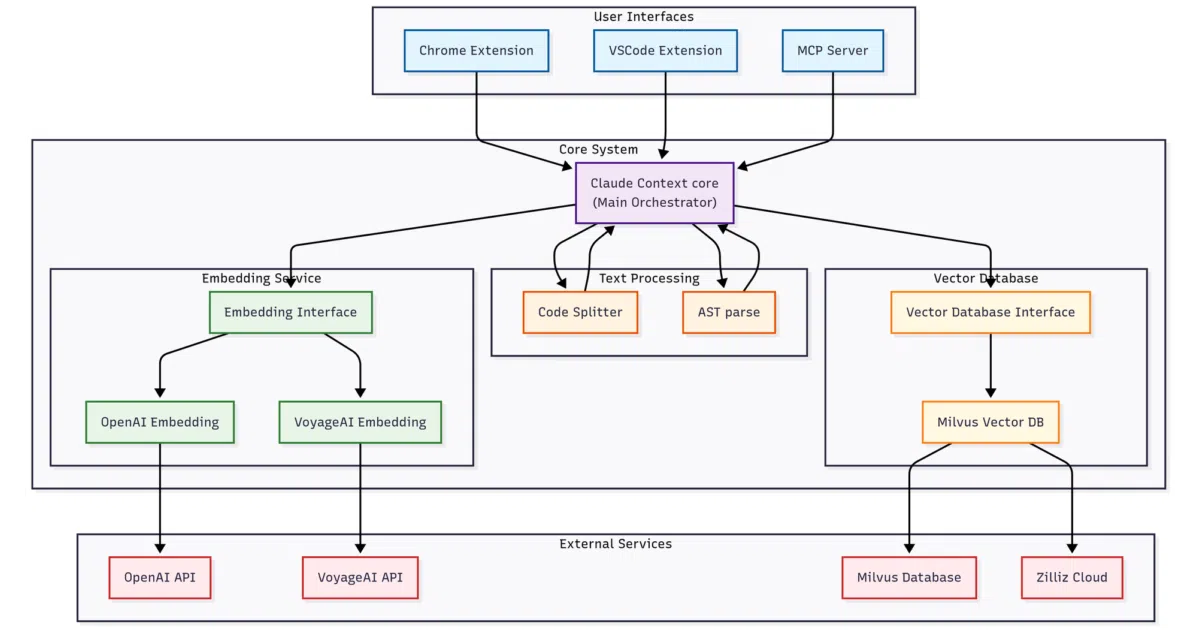
Claude Context is an MCP server that sits between your codebase and AI coding agents like Claude Code, Cursor, or Gemini CLI. It indexes your repository into a vector database and performs semantic search to find relevant code snippets, feeding only those into the agent’s context window instead of dumping entire directories. The README pitches it as a cost-control tool: less irrelevant code in the prompt means fewer tokens burned per request.
The interesting bit
The project’s real work is the unglamorous plumbing—chunking code, generating embeddings via OpenAI, and querying a vector store—so your agent doesn’t have to play twenty questions to discover which file contains the function it needs. That turns a brute-force context dump into a retrieval loop for coding tasks.
Key highlights
- Plugs into a wide roster of MCP clients, including Claude Code, OpenAI Codex CLI, Cursor, Windsurf, and VS Code via MCP-compatible extensions.
- Retrieves code by semantic meaning rather than grepping filenames or directory trees.
- Stores embeddings in a vector database to keep large codebase interactions affordable; the README defaults to Zilliz Cloud.
- Targets repositories up to “millions of lines,” though the README offers no hard indexing limits or latency numbers.
Caveats
- Requires external accounts: an OpenAI API key for embeddings and a Zilliz Cloud vector database; the README does not document a fully offline or self-hosted path.
- The documentation is overwhelmingly a list of MCP client configuration templates, leaving indexing behavior, update frequency, and privacy controls largely unexplained.
Verdict
Worth wiring up if you are paying to stuff a monorepo into a context window and want your agent to stop guessing. Skip it if you need a self-contained, offline solution.
Frequently asked
- What is zilliztech/claude-context?
- Claude Context exists to stop AI coding agents from eating token budgets by loading entire directories; it indexes your repo into a vector database and retrieves only the relevant bits via MCP.
- Is claude-context open source?
- Yes — zilliztech/claude-context is open source, released under the MIT license.
- What language is claude-context written in?
- zilliztech/claude-context is primarily written in TypeScript.
- How popular is claude-context?
- zilliztech/claude-context has 12.6k stars on GitHub.
- Where can I find claude-context?
- zilliztech/claude-context is on GitHub at https://github.com/zilliztech/claude-context.