yjid/kensaku
The launcher that reads your screenshots back to you
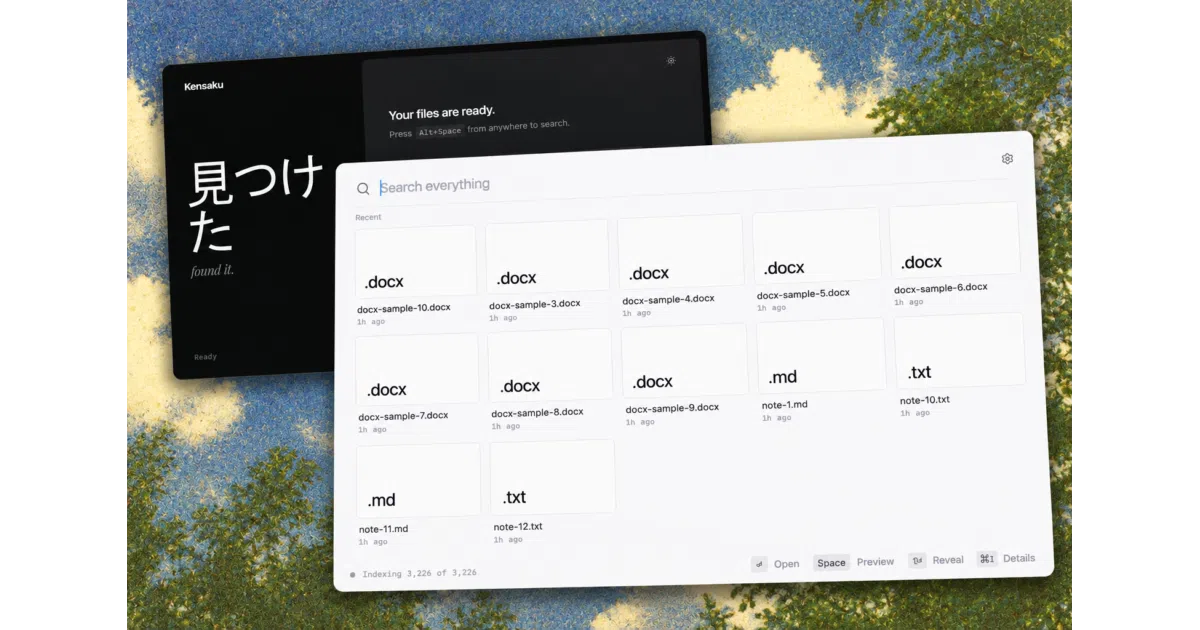
Kensaku is a free, local-first desktop search that indexes file contents — including OCR'd screenshots — and lets your AI agents query the same index.
Collecting fresh signals — velocity needs a few days of history.
collecting data…
star history
What it does
Kensaku (Japanese for “search”) is a Rust/Tauri launcher for Windows, macOS, and Linux that searches not just filenames but the text inside PDFs, Office docs, code, and images. It runs OCR on screenshots by default, so “that CUDA error I screenshotted” is a findable query. Everything stays on your machine — no account, no telemetry, no cloud.
The interesting bit
It exposes the local index to AI agents over MCP, read-only by default, with responses size-budgeted and file content returned as data rather than instructions — a rare bit of prompt-injection hygiene in agent tooling. The CJK-aware tokenizer (unigram + bigram for Chinese, Japanese, Korean) is also homegrown rather than borrowed.
Key highlights
- Filename search over ~100,000 files in ~1.3 ms average, ~12 MB of memory for the name index
- Full-text search across 50+ code/data formats plus PDF, DOCX, EPUB, and more
- OCR via bundled PP-OCRv6, with an optional higher-quality Indra engine (~27 MB) and Tesseract fallback
- Natural-language time queries (“screenshots from last week”) and a proper query language (
type:pdf,re:"fn \w+_test") - Ships a CLI (
kensaku-cli) alongside the GUI; MCP over stdio or loopback HTTP with a bearer token
Caveats
- Builds aren’t code-signed, so expect OS warnings on first run; the auto-updater isn’t wired up yet
- Benchmarks are Linux-only, and the author admits the comparison against
plocate/fdisn’t apples-to-apples (in-app fuzzy search vs. cold process starts) - Windows gets the most real-world testing; macOS and Linux builds are CI-shipped and “would benefit from more hands”
Verdict
Worth a look if you’re on Windows and hoard screenshots, PDFs, and logs — it’s the rare content search that’s free, local, and agent-friendly. If you live in Spotlight or Raycast on macOS, the pitch is weaker until those builds get more mileage.
Frequently asked
- What is yjid/kensaku?
- Kensaku is a free, local-first desktop search that indexes file contents — including OCR'd screenshots — and lets your AI agents query the same index.
- Is kensaku open source?
- Yes — yjid/kensaku is open source, released under the MIT license.
- What language is kensaku written in?
- yjid/kensaku is primarily written in Rust.
- How popular is kensaku?
- yjid/kensaku has 571 stars on GitHub.
- Where can I find kensaku?
- yjid/kensaku is on GitHub at https://github.com/yjid/kensaku.