xintaofei/codeg
A shared office for Claude, Codex, and their friends
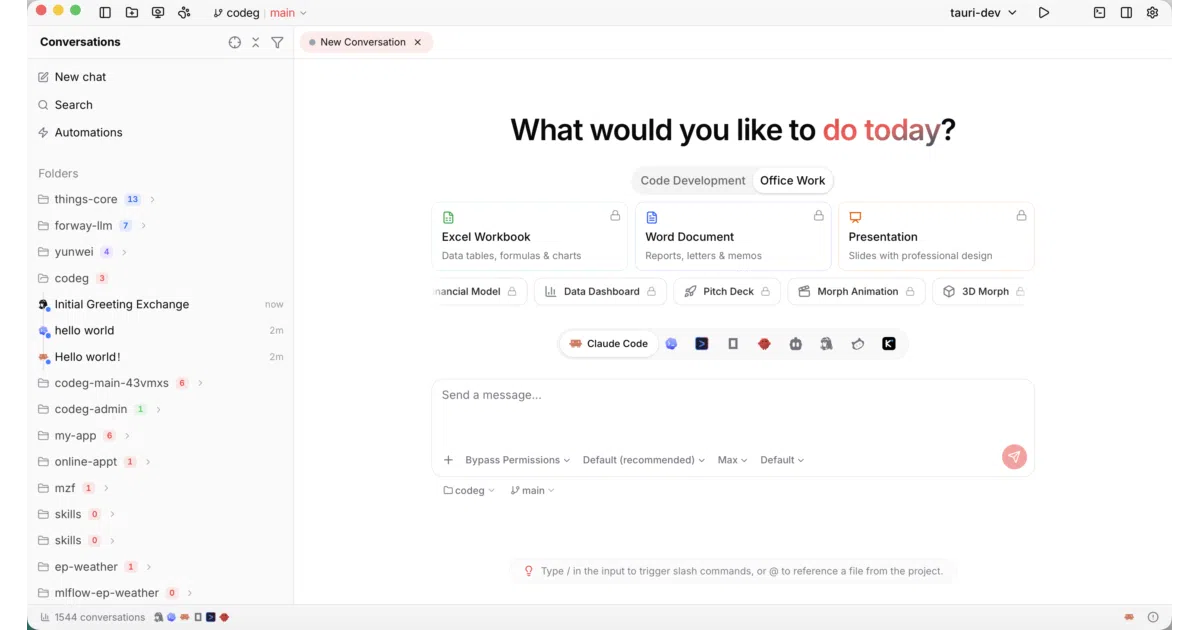
Codeg aggregates sessions from multiple AI coding agents into one workspace and lets them delegate tasks to each other.
Velocity · 7d
+51
★ / day
Trend
↗accelerating
star history
What it does
Codeg is a Tauri-based desktop app and browser-accessible server that pulls coding sessions from disparate AI agents into one place. It reads session data from Claude Code, Codex CLI, OpenCode, Gemini CLI, Cline, and OpenClaw, then renders them in a shared workspace with file trees, diffs, git controls, and a terminal. You can also kick off new projects through a visual scaffolding tool or manage MCP servers and skills from the same UI.
The interesting bit
The clever part is a dedicated codeg-mcp companion binary that exposes a delegate_to_agent tool to the various agent CLIs. This lets one agent—say, Claude Code—spawn a sub-task on Codex or Gemini CLI mid-session, with each running independently while Codeg tracks the parallel chatter. It turns a collection of incompatible command-line tools into a networked team, complete with chat-channel bridges to Telegram, Lark, and Weixin so you can approve permissions from your phone.
Key highlights
- Imports and displays sessions from Claude Code, Codex CLI, OpenCode, Gemini CLI, OpenClaw, and Cline in a unified workspace.
- True multi-agent delegation: a primary agent can spawn sub-agents of different types via a
codeg-mcpsidecar, each running independently. - Built-in
git worktreeflows for parallel branch work without cloning the repository again. - Visual project scaffolding with live preview, though currently limited to shadcn/ui-based setups.
- Chat channels for Telegram, Lark, and iLink (Weixin) that let you monitor and steer agents from your messaging apps.
Caveats
- The
codeg-mcpbinary must reside next to its parent binary at runtime; if it is missing, agent delegation is skipped and only a single warning is logged. - Project scaffolding currently supports only shadcn/ui, with a tab-based design waiting for additional project types.
- Chat channels are limited to Telegram, Lark, and iLink; Discord, Slack, and others are listed as planned but not yet available.
Verdict
Worth exploring if you already use several AI coding CLIs and want one place to watch them all, or if you need agents to delegate work across tool boundaries. If you are happily committed to one agent and do not need server deployments or chat-channel oversight, it is likely overkill.
Frequently asked
- What is xintaofei/codeg?
- Codeg aggregates sessions from multiple AI coding agents into one workspace and lets them delegate tasks to each other.
- Is codeg open source?
- Yes — xintaofei/codeg is open source, released under the Apache-2.0 license.
- What language is codeg written in?
- xintaofei/codeg is primarily written in TypeScript.
- How popular is codeg?
- xintaofei/codeg has 2.3k stars on GitHub and is currently accelerating.
- Where can I find codeg?
- xintaofei/codeg is on GitHub at https://github.com/xintaofei/codeg.