wxtsky/CodeIsland
Turn your MacBook notch into an air-traffic control tower for AI agents
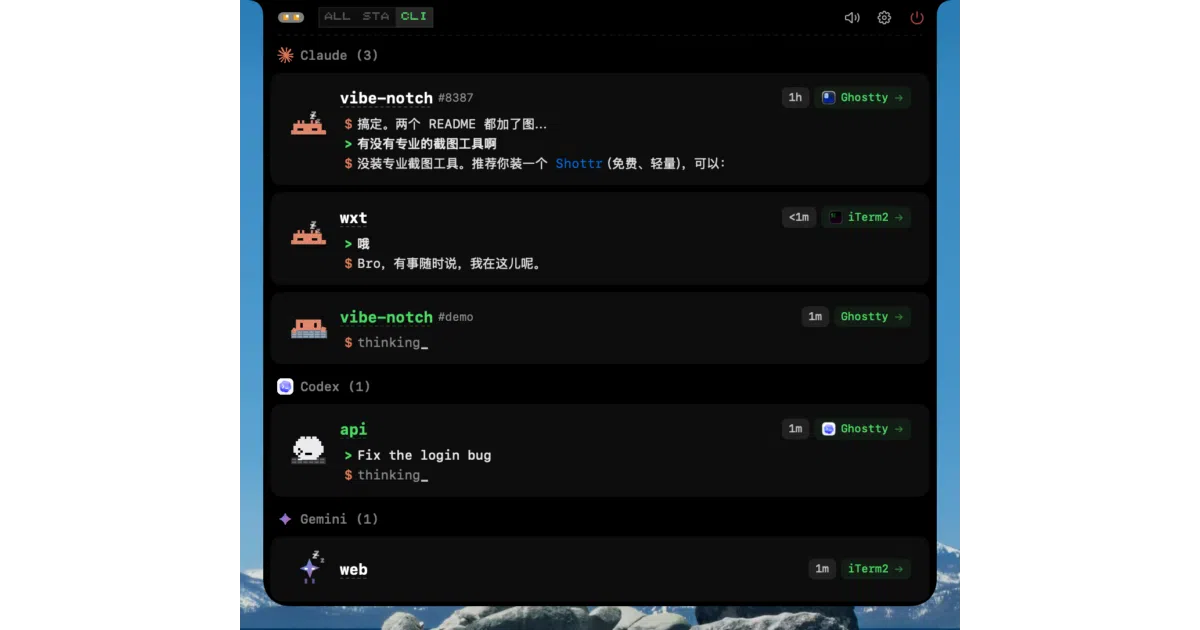
CodeIsland turns the macOS Dynamic Island into a real-time command center for AI coding agents, letting you approve tool calls and reply to prompts without switching windows.
Velocity · 7d
+1.9
★ / day
Trend
→steady
star history
What it does
CodeIsland is a macOS utility that turns your MacBook’s notch into a live heads-up display for AI coding agents. It tracks sessions, tool calls, and permission requests from 13 supported tools—including Claude Code, Cursor, and Gemini CLI—so you don’t have to keep peeking at terminal windows to see what your agent is begging for.
The interesting bit
Instead of cloud APIs or heavy integrations, the app injects lightweight hooks into each CLI tool’s config and streams events through a local Unix socket via an 86KB Swift bridge binary. It also ships with an open-source iPhone and Apple Watch companion that mirrors status over your local network and Bluetooth, with no external server or account required.
Key highlights
- Notch-native panel that expands when your agent is busy and tucks away when idle, complete with pixel-art mascots for each tool.
- Tab-level terminal awareness: it suppresses notifications only when you’re actively looking at the specific session tab, not merely because Terminal is frontmost.
- One-click jumps directly to the relevant terminal tab or IDE window for any active session.
- Support spans 13 tools, though depth varies; Claude Code and Cursor get full event coverage, while Codex currently surfaces only three event types.
- Optional 8-bit sound effects and bilingual UI that auto-detects English or Chinese.
Caveats
- Requires macOS 14 (Sonoma) or later, and the notch-centric layout is clearly optimized for notched MacBooks.
- Integration depth is uneven: the README marks Codex support as “Basic” (three events) versus “Full” for most others, so expect varying granularity depending on your agent.
Verdict
Worth installing if you run multiple AI agents and want ambient awareness without window clutter. Look elsewhere if you’re on older macOS, or if you expect uniformly deep instrumentation across every supported tool.
Frequently asked
- What is wxtsky/CodeIsland?
- CodeIsland turns the macOS Dynamic Island into a real-time command center for AI coding agents, letting you approve tool calls and reply to prompts without switching windows.
- Is CodeIsland open source?
- Yes — wxtsky/CodeIsland is open source, released under the MIT license.
- What language is CodeIsland written in?
- wxtsky/CodeIsland is primarily written in Swift.
- How popular is CodeIsland?
- wxtsky/CodeIsland has 2.5k stars on GitHub and is currently holding steady.
- Where can I find CodeIsland?
- wxtsky/CodeIsland is on GitHub at https://github.com/wxtsky/CodeIsland.