volcengine/MineContext
This open-source app screenshots your life, then summarizes it
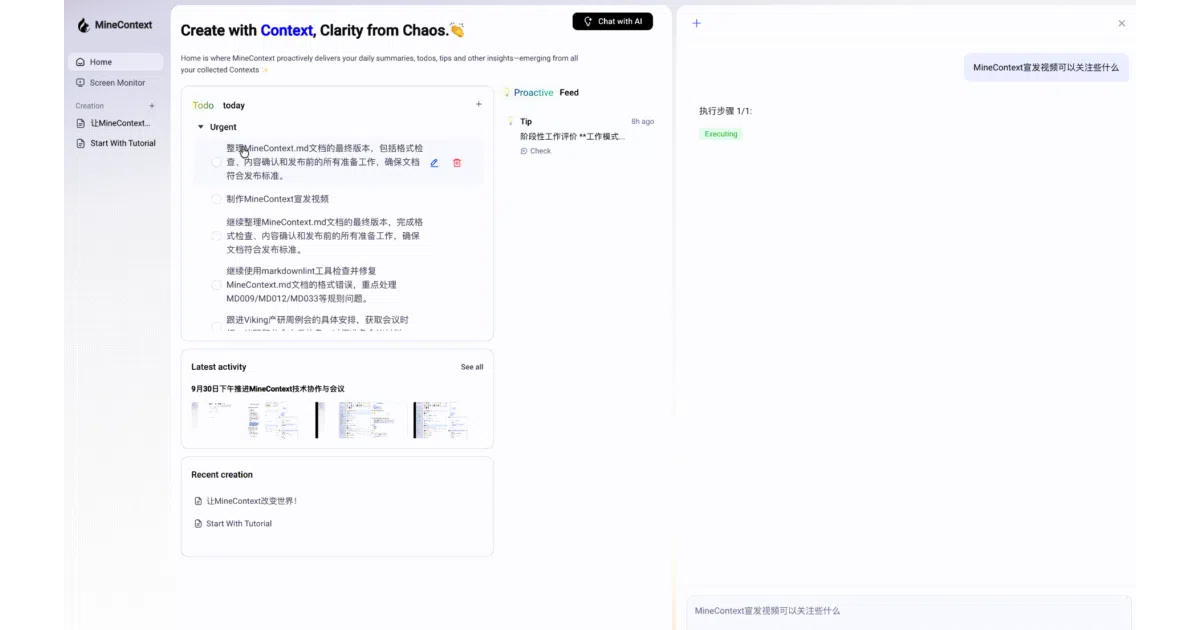
An open-source desktop companion that passively captures your screen and proactively delivers summaries, to-dos, and insights.
Not currently ranked — collecting fresh signals.
star history
What it does
MineContext is an open-source desktop application that periodically captures screenshots of your activity and feeds them through vision-language and embedding models to build a searchable local memory of your digital context. It then proactively pushes summaries, to-do lists, and activity records back to you. The pitch is “context engineering”: managing the full lifecycle of your digital breadcrumbs so you can focus on work instead of documentation.
The interesting bit
Rather than waiting for a query, MineContext runs as a persistent desktop process—Electron on the frontend, Python on the backend—and actively surfaces insights to your homepage. It is also explicitly local-first: all captured data lives in ~/Library/Application Support/MineContext/Data, and LLM calls can be routed to entirely local models via any OpenAI-compatible endpoint.
Key highlights
- Proactive, not reactive: generates daily and weekly summaries, tips, and to-dos in the background and pushes them to you rather than operating on-demand.
- Local-first storage: screen captures and context data stay on disk locally; model inference can be kept entirely offline through LMStudio or similar local OpenAI-compatible servers.
- Flexible model backends: supports Doubao (ByteDance’s models), OpenAI, or any custom endpoint using the OpenAI API format, though it requires both a vision-language model and an embedding model.
- Cross-platform desktop app: packaged for macOS and Windows with a standard Electron/React/TypeScript frontend and a Python backend.
Caveats
- The README is heavy on setup animations and light on technical specifics; it references “six types of intelligent context” without clearly defining them, and much of the backend architecture detail sits behind a truncated section.
- The current implementation is screenshot-centric, with broader multimodal support—documents, videos, code, external application data—explicitly marked as future work.
- At v0.1.8, the project is early enough that it includes a comparison table positioning itself against ChatGPT Pulse and Dayflow to explain its niche.
Verdict
Best suited for developers who want a self-hostable alternative to commercial “AI memory” tools and are comfortable with an Electron app that requires screen-recording permissions. Less appealing if you expect a fully offline, zero-configuration experience—the current version routes most inference through cloud or self-hosted API endpoints and is still defining its broader multimodal ambitions.
Frequently asked
- What is volcengine/MineContext?
- An open-source desktop companion that passively captures your screen and proactively delivers summaries, to-dos, and insights.
- Is MineContext open source?
- Yes — volcengine/MineContext is open source, released under the Apache-2.0 license.
- What language is MineContext written in?
- volcengine/MineContext is primarily written in Python.
- How popular is MineContext?
- volcengine/MineContext has 5.5k stars on GitHub.
- Where can I find MineContext?
- volcengine/MineContext is on GitHub at https://github.com/volcengine/MineContext.