ronak-create/FableCut
Your video editor is a JSON file, and Claude can edit it
It exposes an entire Premiere-style timeline as a hot-reloading JSON document so AI agents and humans can edit the same cut simultaneously.
Velocity · 7d
+22
★ / day
Trend
↗accelerating
star history
What it does
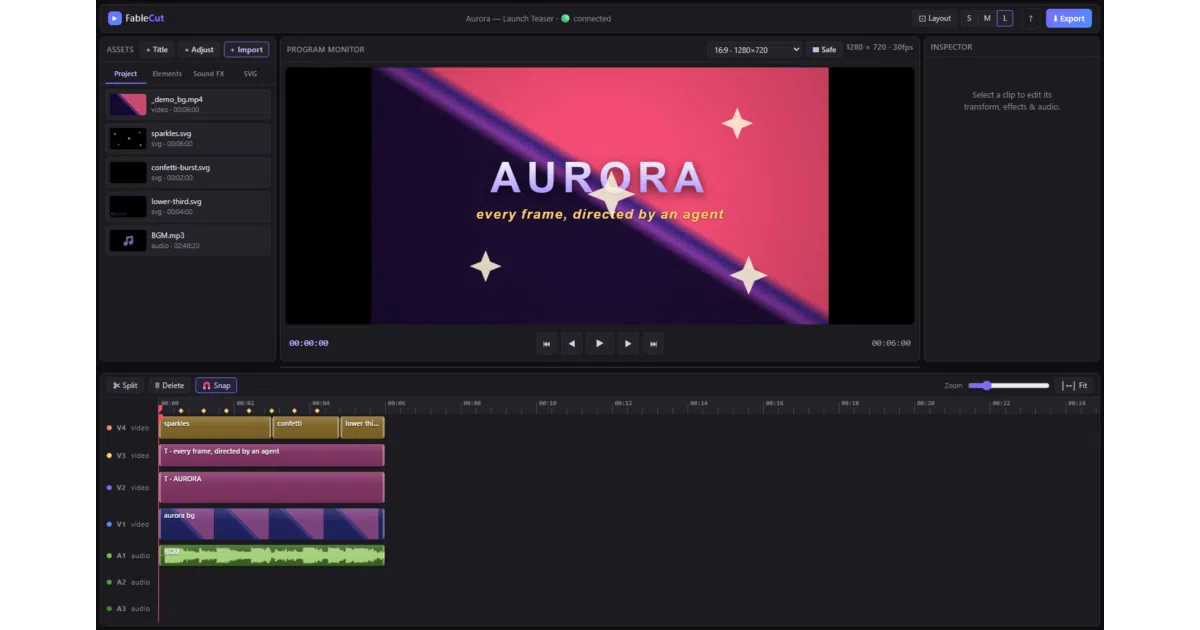
FableCut is a browser-based non-linear editor with three video tracks, four audio tracks, keyframes, color grading, chroma key, and a full text engine. The entire state — every clip, transition, and effect — lives in a single project.json file that the UI hot-reloads via server-sent events. A lightweight Node server handles the REST API, MCP gateway, and ffmpeg export pipeline, while the editor frontend itself ships without npm dependencies.
The interesting bit
The project treats its timeline as source code: any process that can write JSON can edit video, and the bundled MCP server lets Claude Code patch the timeline with small, token-efficient operations while the browser preview updates in roughly 150 ms. A revision counter prevents agents from silently overwriting human edits — or vice versa — which makes concurrent editing actually safe.
Key highlights
- Full NLE in the browser: drag/trim/split, direct monitor manipulation, rubber-band multi-select, beat markers, J/K/L shuttle, and 17 transitions including glitch and whip-pan.
- Agent-native control surfaces: MCP tools, REST endpoints, or direct
project.jsonwrites, all documented inCLAUDE.mdfor end-to-end agent operation. - Reference-video analysis extracts shot boundaries, BPM, beats, loudness curves, and the music track from a reel you like, producing a blueprint to rebuild the edit with your own footage.
- Animated SVG clips render frame-accurately in preview and export, letting agents generate lower-thirds or confetti overlays as plain
.svgfiles. - Speed ramps time-remap both video and the export audio mix, and the engine supports adjustment layers, film grain, chroma key, and in-browser AI background removal via MediaPipe.
Caveats
- ffmpeg is optional for fast export and remuxing; without it the tool falls back to a realtime MediaRecorder capture, which is less frame-accurate.
- AI background removal fetches its model from a CDN on first use, so that feature is not fully offline.
- The server binds to localhost by default; LAN access requires explicit host and allowed-host configuration.
Verdict
A solid curiosity for developers who want to script video edits via JSON or collaborate with an MCP-speaking agent in real time. Not a replacement for DaVinci Resolve if you need professional color science or team-scale cloud workflows.
Frequently asked
- What is ronak-create/FableCut?
- It exposes an entire Premiere-style timeline as a hot-reloading JSON document so AI agents and humans can edit the same cut simultaneously.
- Is FableCut open source?
- Yes — ronak-create/FableCut is open source, released under the MIT license.
- What language is FableCut written in?
- ronak-create/FableCut is primarily written in JavaScript.
- How popular is FableCut?
- ronak-create/FableCut has 746 stars on GitHub and is currently accelerating.
- Where can I find FableCut?
- ronak-create/FableCut is on GitHub at https://github.com/ronak-create/FableCut.