proma-ai/Proma
A local-first desktop that turns Feishu pings into agent tasks
Proma wraps the Claude Agent SDK into an Electron workbench that keeps your data in local JSONL files and lets colleagues trigger file-editing agents from Feishu group chats.
Not currently ranked — collecting fresh signals.
star history
What it does
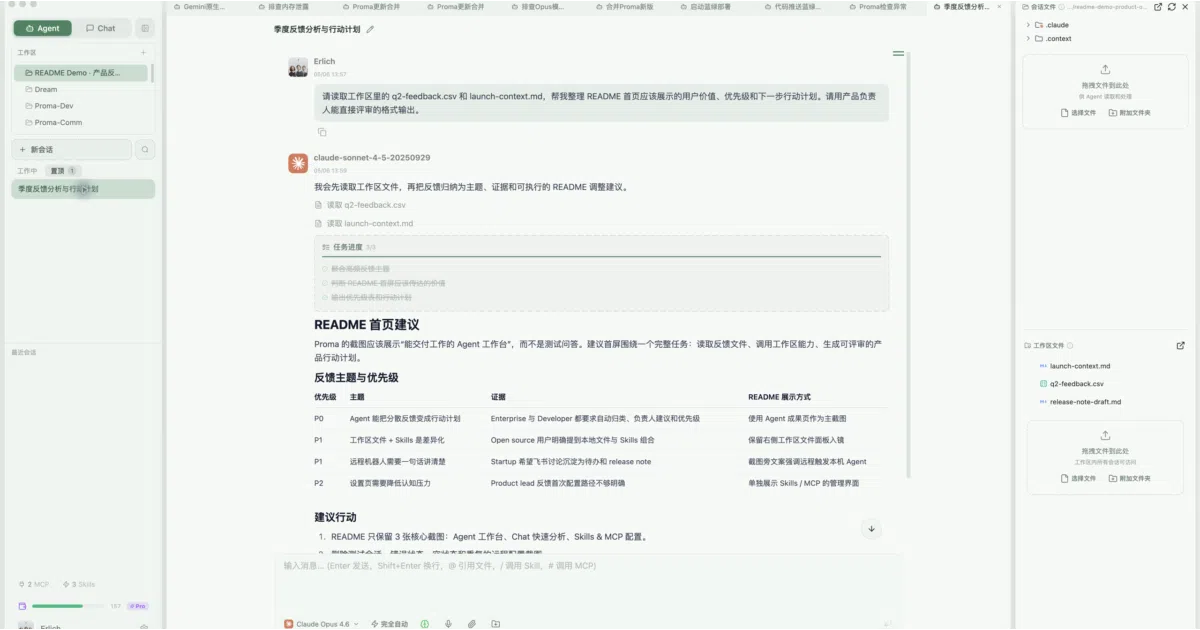
Proma is an Electron desktop app that combines multi-model chat with a task-running Agent mode built on the Claude Agent SDK. It stores sessions, workspaces, skills, and MCP configurations as plain JSON and JSONL in ~/.proma/, encrypting API keys via Electron safeStorage. The pitch is workflow accumulation rather than idle conversation: Chat mode handles questions and comparisons, while Agent mode edits files, runs shell commands, and drafts reports with permission checks and plan confirmations.
The interesting bit
The project bridges local desktop automation with Chinese enterprise chat. You can wire Feishu, DingTalk, or WeChat group messages to trigger agent tasks on your own machine, effectively turning a mobile ping into a local file operation. Workspaces also isolate skills and MCP servers per project, so each repository can carry its own reusable tooling context.
Key highlights
- Local-first by default: no database server; everything lives in
~/.proma/as JSON/JSONL. - Agent mode supports workspace isolation, permission prompts, sub-agent task splitting, and long-running streamed output.
- Per-workspace Skills and MCP server management (stdio and HTTP) let different projects load different tool contexts.
- Remote bot bridges for Feishu/Lark, with entry points for DingTalk and WeChat.
- Chat mode includes side-by-side model comparison, Mermaid diagrams, KaTeX, and streaming voice input via Doubao—including a global hotkey that works outside the app.
- Agent mode works with Anthropic, DeepSeek, Kimi, Zhipu, MiniMax, Doubao, and Tongyi Qianwen via Anthropic-compatible protocols.
Caveats
- Agent mode requires an Anthropic or Anthropic-compatible provider; OpenAI and Google Gemini channels are Chat-only for now.
- Running agents assumes local toolchain availability—Git, Node.js/Bun, and a working shell—so it is not a fully self-contained sandbox.
- An open-source edition and a commercial edition with built-in API channels are maintained in parallel by the same authors.
Verdict
Try it if you want a desktop-native agent bench that keeps data local and integrates with Feishu or DingTalk. Pass if you need a lightweight browser client or a provider-agnostic agent backend.
Frequently asked
- What is proma-ai/Proma?
- Proma wraps the Claude Agent SDK into an Electron workbench that keeps your data in local JSONL files and lets colleagues trigger file-editing agents from Feishu group chats.
- Is Proma open source?
- Yes — proma-ai/Proma is open source, released under the AGPL-3.0 license.
- What language is Proma written in?
- proma-ai/Proma is primarily written in TypeScript.
- How popular is Proma?
- proma-ai/Proma has 2.2k stars on GitHub.
- Where can I find Proma?
- proma-ai/Proma is on GitHub at https://github.com/proma-ai/Proma.