notatestuser/ds4-control
A menu-bar bouncer for DeepSeek V4
It babysits a local DeepSeek V4 server from your menu bar, handling downloads, RAM feasibility checks, and resource monitoring so you don’t have to.
Not currently ranked — collecting fresh signals.
star history
What it does
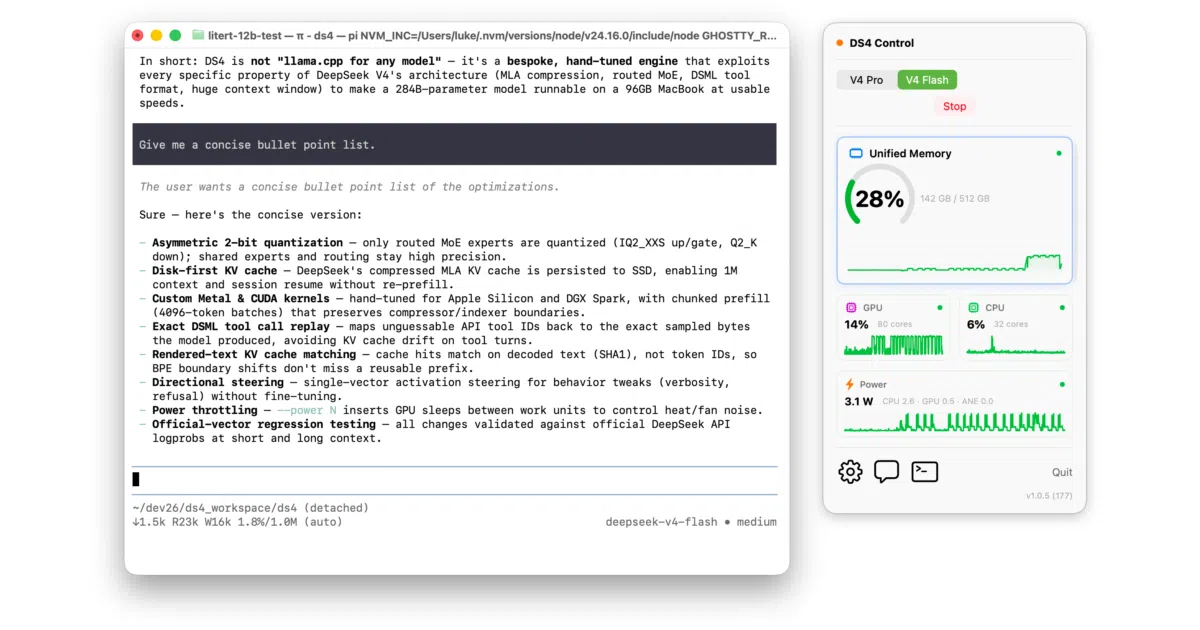
DS4 Control lives in your macOS menu bar and manages the full lifecycle of a local ds4-server process running DeepSeek V4. It downloads model weights with a built-in parallel downloader, lets you toggle between V4 Pro and V4 Flash variants, and enforces strict RAM feasibility checks before launch. A set of mini widgets tracks unified memory, GPU, CPU, and power draw, while shortcuts can spawn chat or agentic coding sessions. It is, at heart, a polished supervisor and UI layer over the actual inference engine.
The interesting bit
The app treats your Mac’s physical memory and Metal wired limit as a hard gatekeeper: it blocks you from starting a model variant if the working set won’t fit, and even walks you through raising iogpu.wired_limit_mb when necessary. That same feasibility logic is pure Swift with full unit-test coverage, as is the resumable chunk-bitmap downloader and the supervisor’s stderr-readiness parser.
Key highlights
- Apple Silicon only.
- Supports up to 1M token context for Pro and high-RAM Flash configs, defaulting to 256K on 96–127 GiB machines.
- Native model downloader with resume across restarts and live progress bar.
- Real-time resource widgets sampling CPU, memory, GPU, and power via Mach/IOKit every 2 seconds.
- Signed and notarized with an Apple Developer ID; distributed as a
.dmg. - End-to-end tests run against a fake
ds4-serverso CI doesn’t need to download hundreds of gigabytes.
Caveats
- Requires substantial RAM: V4 Pro demands ≥ 512 GiB, Flash q4 needs ≥ 256 GiB, and Flash q2 needs at least 96 GiB with possible wired-limit tweaks.
- Reported throughput (~14 tok/s Pro, ~35 tok/s Flash) was measured only on a Mac Studio M3 Ultra with 512 GiB; expect different numbers on lesser hardware.
Verdict Worth a look if you are running DeepSeek V4 locally on Apple Silicon and want a menu-bar dashboard instead of a terminal tab. Everyone else—especially anyone without a workstation-class Mac and hundreds of gigabytes of RAM—can safely skip it.
Frequently asked
- What is notatestuser/ds4-control?
- It babysits a local DeepSeek V4 server from your menu bar, handling downloads, RAM feasibility checks, and resource monitoring so you don’t have to.
- Is ds4-control open source?
- Yes — notatestuser/ds4-control is open source, released under the MIT license.
- What language is ds4-control written in?
- notatestuser/ds4-control is primarily written in Swift.
- How popular is ds4-control?
- notatestuser/ds4-control has 916 stars on GitHub.
- Where can I find ds4-control?
- notatestuser/ds4-control is on GitHub at https://github.com/notatestuser/ds4-control.