niuzaisheng/ScreenAgent
This agent controls your computer by staring at screenshots
It hands a visual language model a mouse and keyboard to see if it can plan, click, and correct its way through real desktop tasks without ever touching an application API.
Not currently ranked — collecting fresh signals.
star history
What it does
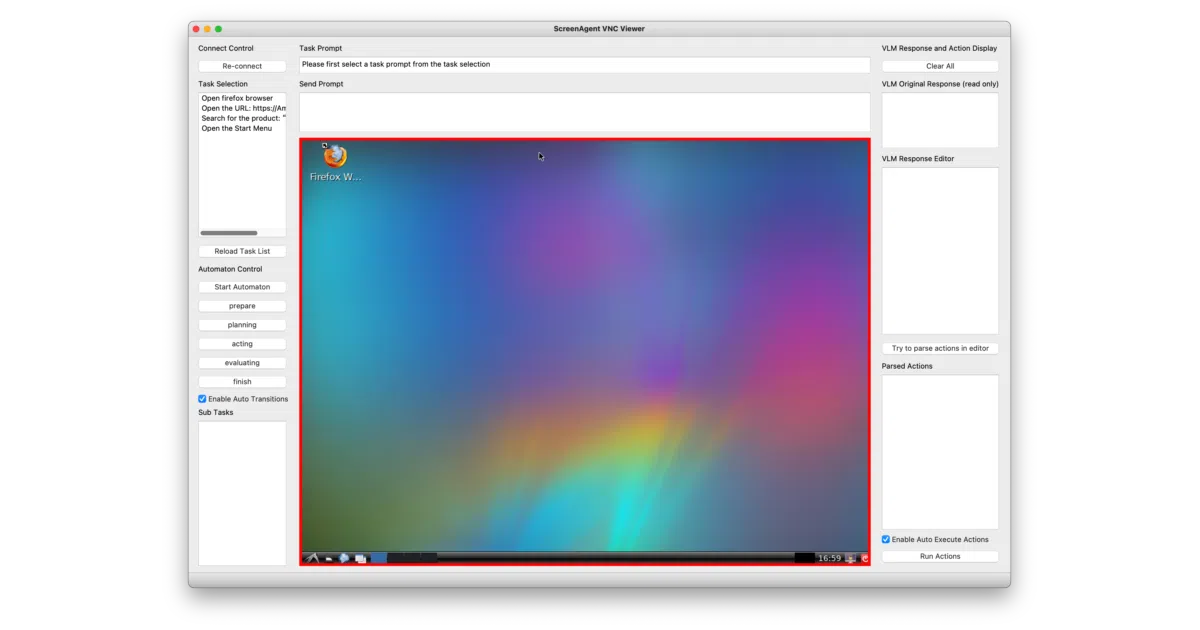
ScreenAgent is a research framework that turns a visual language model into a literal desktop user. It connects to a computer over VNC, feeds the model live screenshots, and translates the model’s output into raw mouse coordinates and keystrokes to complete multi-step jobs like file management or web browsing. A PyQt5 controller orchestrates the loop, shuttling screen pixels and prompts to the model and executing whatever clicks come back.
The interesting bit
Instead of calling application APIs, the agent must physically navigate the GUI by predicting exact screen coordinates for every click, making the approach universal across operating systems but brutally dependent on the model’s visual grounding. The authors formalized this into a continuous “planning-execution-reflection” cycle that forces the model to re-evaluate its own progress after every single action.
Key highlights
- Supports GPT-4V, LLaVA-1.5, CogAgent, and a custom fine-tuned ScreenAgent model.
- Action space is deliberately low-level—basic mouse and keyboard ops over VNC—so it requires no app-specific hooks.
- Ships with a manually annotated dataset covering file operations, web browsing, and even gaming scenarios.
- Includes training code and model workers for both local inference and remote API calls.
- The controller runs as a standalone PyQt5 application that maintains the state machine and prompt templates.
Caveats
- Unicode text input relies on a separate clipboard service that the README admits can fail with cryptic pyperclip errors; without it, you are limited to ASCII keystrokes.
- The VNC session can hang during operation, and the controller’s suggested fix is a manual “Re-connect” button.
Verdict
Researchers probing GUI automation or VLM spatial reasoning will find a complete, ready-to-run sandbox. If you need production-grade RPA, this is still an academic exercise with visible duct tape.
Frequently asked
- What is niuzaisheng/ScreenAgent?
- It hands a visual language model a mouse and keyboard to see if it can plan, click, and correct its way through real desktop tasks without ever touching an application API.
- Is ScreenAgent open source?
- Yes — niuzaisheng/ScreenAgent is an open-source project tracked on heatdrop.
- What language is ScreenAgent written in?
- niuzaisheng/ScreenAgent is primarily written in Python.
- How popular is ScreenAgent?
- niuzaisheng/ScreenAgent has 615 stars on GitHub.
- Where can I find ScreenAgent?
- niuzaisheng/ScreenAgent is on GitHub at https://github.com/niuzaisheng/ScreenAgent.