ningzimu/codex-ppt-skill
Your AI agent becomes a slide deck designer—sort of
A Codex skill that turns documents into image-based PowerPoint decks via gpt-image-2, with enough guardrails to keep the agent from going off the rails.
Feature · 20 Jun 2026
When AI Agents Stop Editing Slides and Start Rendering Them
A reusable agent workflow turns articles and reports into whole-page image decks, trading editability for visual consistency in the age of large-scale image generation.
Read the in-depth article →
Velocity · 7d
+38
★ / day
Trend
↘cooling
star history
What it does
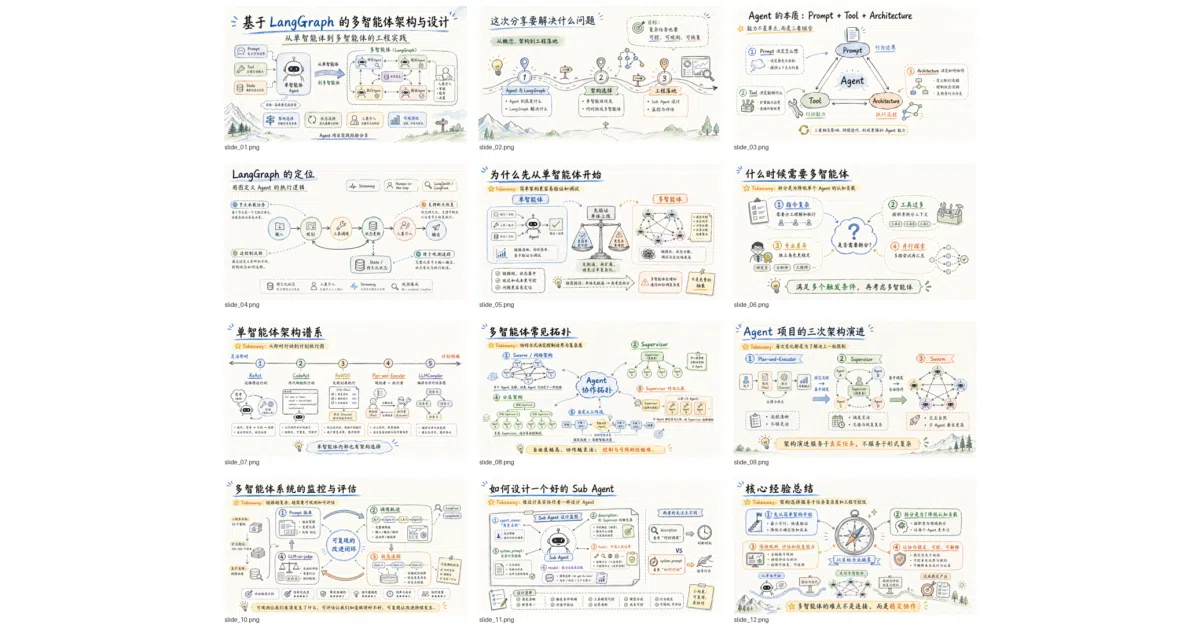
Feed it an article, report, or even a PDF, and this SKILL.md-based agent orchestrates a staged pipeline: confirm an outline and visual style, generate each slide as a 16:9 image via gpt-image-2, then assemble the PNGs into a .pptx with speaker notes. It works in Codex (preferred), Claude Code, OpenClaw, or Hermes Agent, with fallback to third-party OpenAI-compatible image APIs when built-in generation isn’t available.
The interesting bit
The author treats the skill itself as a living template meant to be forked. The README explicitly tells you to let the AI rewrite the skill after you’ve found your preferred route—fixing your image backend, style, output directory, and whether to use sub-agents. It also encourages building a personal references/ style library by feeding in PPTs or images you like, so the agent learns your aesthetic rather than guessing each time.
Key highlights
- 10 built-in visual styles (clean professional, McKinsey, hand-drawn technical, e-ink magazine, etc.) with preview images to choose from before generation starts
- Supports inserting existing images (paper figures, screenshots, architecture diagrams) into specific slides, with layout adapted around them
- Multi-agent concurrency: sub-agents can generate pages in parallel and self-check for text clarity and style consistency
- Generates
speech.mdwith talking points, auto-embedded into PPTX speaker notes - Output is intentionally image-based: high visual consistency, but not directly editable in PowerPoint; a separate companion skill exists for conversion to editable slides
Caveats
- The workflow is deliberately complex to stay generic across environments, which the README admits introduces “instability or redundancy”; most users will want to simplify it after first use
- Image-based output means you can’t tweak text or colors in PowerPoint afterward without regenerating
- Third-party API configuration for non-Codex environments is manual and requires reading your provider’s
gpt-image-2docs
Verdict
Worth a look if you regularly turn long documents into presentation decks and prefer visual polish over editability. Skip it if you need collaborative slide editing or pixel-perfect control over every text box—the whole point is letting the agent handle the design.
Frequently asked
- What is ningzimu/codex-ppt-skill?
- A Codex skill that turns documents into image-based PowerPoint decks via gpt-image-2, with enough guardrails to keep the agent from going off the rails.
- Is codex-ppt-skill open source?
- Yes — ningzimu/codex-ppt-skill is open source, released under the MIT license.
- What language is codex-ppt-skill written in?
- ningzimu/codex-ppt-skill is primarily written in Python.
- How popular is codex-ppt-skill?
- ningzimu/codex-ppt-skill has 7.3k stars on GitHub and is currently cooling off.
- Where can I find codex-ppt-skill?
- ningzimu/codex-ppt-skill is on GitHub at https://github.com/ningzimu/codex-ppt-skill.