ningzimu/codex-ppt-skill · 20 Jun 2026 · Feature
When AI Agents Stop Editing Slides and Start Rendering Them

Megan Russo
Staff Writer
A reusable agent workflow turns articles and reports into whole-page image decks, trading editability for visual consistency in the age of large-scale image generation.
ningzimu/codex-ppt-skill
★6k stars Velocity · 7d +30 ★/day ↘cooling
star history
Something changed when image generation models learned to spell. For years, the bottleneck in automated presentation software was not the planning of slides—large language models have always been decent at outlining arguments—but the rendering of them. Text boxes overflowed, fonts clashed, and diagrams emerged with the structural integrity of wet cardboard. The result was a flood of AI slide tools that could generate editable PowerPoint files quickly, yet looked like they were designed in 2010.
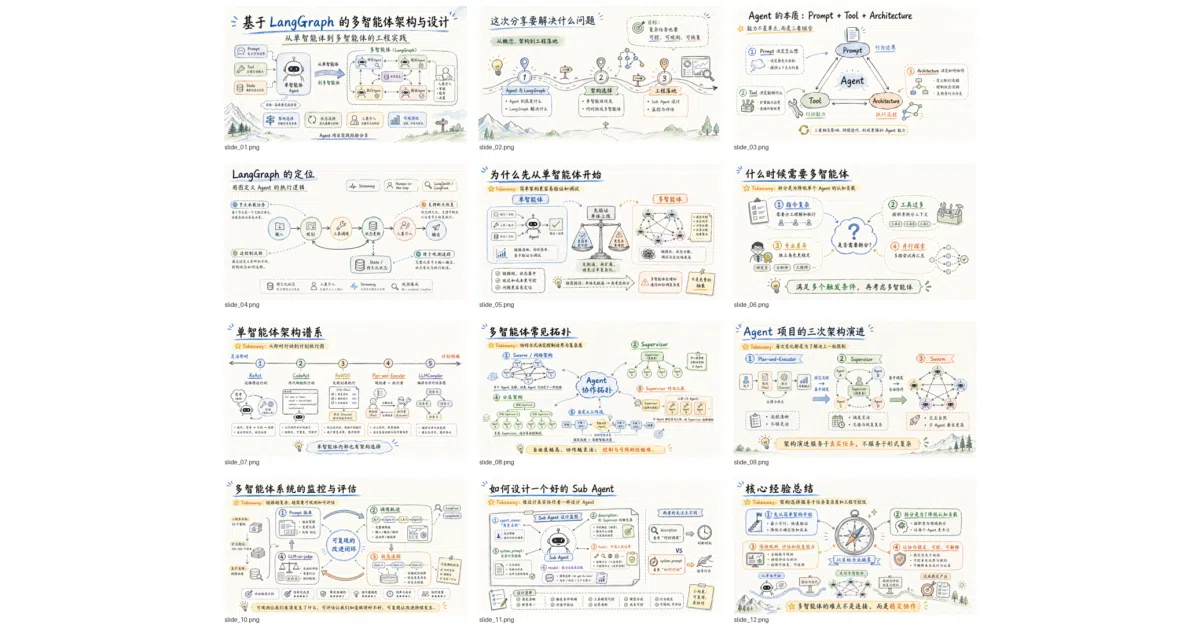
The codex-ppt-skill repository arrives at a different moment. It assumes that the latest image models, specifically OpenAI’s gpt-image-2, can now render legible typography, respect spatial hierarchies, and maintain a visual style across multiple frames. Instead of fighting with the Office Open XML specification to place vector shapes and text boxes, the skill treats each slide as a 16:9 image generated by the model, then wraps those images in a .pptx container using a local assembly script. The deck looks good because it is, essentially, a sequence of high-resolution screenshots of slides that never existed as editable objects in the first place.
This approach is only viable because of two parallel developments. The first is the model itself: gpt-image-2 includes what OpenAI describes as a thinking phase for layout planning, resulting in more accurate compositions and readable text rendering. The second is the emergence of agent skills—reusable markdown workflows, typically defined in a SKILL.md file, that instruct coding agents like Codex, Claude Code, OpenClaw, and Hermes Agent how to execute complex multi-step tasks. The repository is essentially a structured conversation protocol that sits between your source material and the image model, orchestrating the planning, generation, and packaging of a presentation.
Slides as Raster, Not Vector
Most AI presentation tools, whether SaaS platforms like Felo Slides or built-in assistants like Microsoft Copilot in PowerPoint, generate native PPTX structures: individual text boxes, shape layers, and master-slide references. This preserves editability, but it also inherits the limitations of the underlying template engine. Complex layouts, custom typography, and consistent visual themes are hard to guarantee when an LLM is indirectly manipulating XML.
codex-ppt-skill takes the opposite bet. It generates each slide as a standalone image—typically at 2K or 4K resolution—and deposits it in an origin_image directory before assembly. The final PowerPoint file is a sequence of these images, one per page. The README is explicit about the trade: this is a whole-page image style presentation, suitable for strong visual expression, but the page elements themselves are not directly editable after generation.
To soften that blow, the author offers a companion skill, image-to-editable-ppt-skill, which attempts to reconstruct the image deck into a genuinely editable PowerPoint file. The two are designed as a pipeline: one handles visual fidelity, the other handles downstream modification. It is a frank admission that no single format currently satisfies both needs.
The skill ships with ten built-in visual styles—ranging from clean professional and McKinsey to hand-drawn technical explanation and e-ink magazine—that users select before generation begins. More importantly, it allows users to upload reference images, PDFs, or existing decks so the agent can analyze color palettes, typography, and layout rhythms, then clone that style for new content. Satisfied users are encouraged to save these extracted styles into a local references directory, turning the skill into a personal style library that improves with use.
A Workflow, Not a Button
Where the project distinguishes itself from a simple generate a deck prompt is its staged workflow. The skill does not attempt to produce a finished presentation in a single shot. Instead, it forces a sequence of human-in-the-loop confirmations: first an outline.md locking in page count and bullet points, then a visual style selection, then a backend selection (Codex’s built-in image tool versus a third-party gpt-image-2 API endpoint), and finally a single-page sample for approval. Only after the user signs off on the sample does the agent proceed to generate the full set of slides, often dispatching sub-agents to handle individual pages in parallel.
This conservatism is deliberate. The README notes that generating an entire deck at once invites rework and deviation. By front-loading the decisions about structure, style, and rendering backend, the skill reduces the risk of generating nineteen acceptable slides and one catastrophic outlier. After generation, the sub-agents perform a self-check on text clarity, style consistency, and content completeness, with the ability to regenerate specific pages that fail inspection. The system also produces a speech.md file that is embedded into the PowerPoint notes, giving the presenter a ready-made script tied to each image slide.
The author is notably honest about the complexity this universality introduces. Because the skill attempts to support multiple agents, multiple image backends, and both parallel and single-threaded execution paths, the default flow is slightly complex and carries instability or redundancy. The recommended path is to treat the repository not as a finished product but as a starting template: once a user knows their preferred backend and style, they should ask their agent to strip away the unused branches and hardcode their preferences. It is a rare admission in open-source AI tooling that the general-case solution is intentionally over-engineered, and that the real value lies in the fork.
Skills as Personal Infrastructure
The repository is best understood within the broader ecosystem of agent skills. Platforms like Codex, Claude Code, and OpenClaw have begun supporting SKILL.md files as a lightweight standard for packaging prompts, guardrails, and local scripts into reusable units. A skill is less like a traditional software library and more like a detailed standard operating procedure that an agent can follow repeatedly.
Compared to commercial alternatives such as Felo Slides or 2Slides—which are API-driven services that return editable PPTX files or PDFs—codex-ppt-skill is local, model-agnostic, and unapologetically hackable. It does not require a subscription to a slide-generation SaaS, though it does need access to an image model capable of producing the slides. Users can point it at OpenAI-compatible endpoints or third-party providers via a base URL and custom model name. The configuration is stored outside the project directory, keeping API keys out of version control.
This positions the skill as personal infrastructure rather than a platform product. The documentation is written in Chinese, and the example use cases—technical article sharing, thesis defense, courseware, research project reporting—suggest an audience of academics, developers, and technical writers who need to convert dense text into visually unified decks without surrendering control to a black-box service.
The Tradeoffs You Can’t Script Away
The image-native approach is not without its friction. Because the output slides are raster images, file sizes are larger than vector-native decks, and last-minute text edits require regenerating the entire page or running the secondary editable conversion skill. The reliance on gpt-image-2 or a compatible endpoint means the workflow is gated behind access to a capable image model; the optional companion skill for higher-resolution generation via Codex member login adds yet another integration point.
There is also the matter of assembly. The final .pptx is produced by a local Python script, not by the agent itself. This means the user’s environment must handle the image-to-deck packaging step. It is a small barrier, but it reinforces that this tool is aimed at technically literate users who are comfortable with agent-assisted workflows rather than purely conversational AI consumers.
Where This Fits
The project sits at an interesting intersection. On one side, there is the rise of agent skills as a new packaging format for AI workflows—lightweight, markdown-based, and portable across coding agents. On the other, there is the shift in document generation away from structured markup and toward image-native rendering, driven by the sudden competence of large-scale image models at typography and layout.
Manus Slides and other platforms have also integrated gpt-image-2 for direct slide generation, but they tend to wrap the capability in a proprietary editing interface. codex-ppt-skill offers a more transparent, if more manual, path: you own the outline, you own the style references, and you own the assembly script. The presentation is a local artifact, not a cloud document.
The unresolved tension, of course, is between visual fidelity and editability. The skill resolves this not by choosing one, but by bifurcating the pipeline—image generation first, editable reconstruction second. Whether that two-step dance becomes the standard pattern for agent-generated documents, or merely a transitional hack until native PPTX rendering catches up, depends on how quickly structured layout engines improve. For now, the repository makes a compelling case that the best way to get a beautiful deck from an agent is to stop asking it to edit slides, and start asking it to paint them.
Sources
- Anyone here using AI to create presentations? can AI agents help?
- Introducing ChatGPT Images 2.0 - OpenAI
- Powerpoint skill? : r/codex - Reddit
- Agent Skills - AI Presentation Generation Skills - 2Slides
- gpt image 2 for presentation slides is actually insane : r/ChatGPT
- Generate slide decks | Codex use cases - OpenAI Developers
- Automating PowerPoint Generation with AI: A Learn Live Series ...
- ChatGPT Image Generation for Presentations - YouTube
- Felo Slides Skill for Codex | AI Presentation Maker
- AI Agent Skills Explained - Generate a slide deck in minutes
- Introducing GPT Image 2 on Manus Slides
- 10 Best AI PPT Skills for OpenClaw in 2026 (Ranked & Tested) - Felo