ningbainb/deepseek-harness-desktop
Windows AI coding cockpit bundles DeepSeek Harness and its runtime
It stuffs the entire DeepSeek Harness web stack, local runtime, and remote dev tools into one Windows installer.
Not currently ranked — collecting fresh signals.
star history
What it does
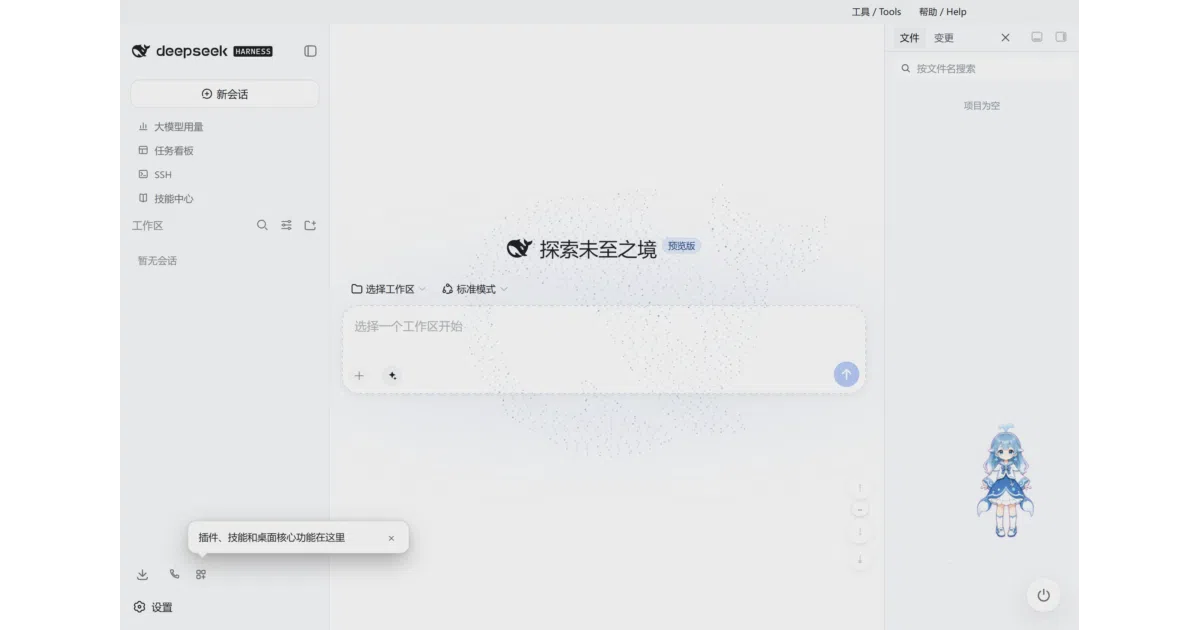
DeepSeek Harness Desktop is an Electron-based Windows application that acts as a self-contained host for the DeepSeek Harness AI coding ecosystem. It bundles the web interface, local DSH runtime, Git integration, file previews, and plugin management so you can run the entire stack after downloading a single .exe. The app targets Windows 10/11 x64 and uses a separate desktop profile to avoid clobbering existing DSH configurations.
The interesting bit
The project treats Windows as a first-class citizen in a world where most AI coding tools lean heavily on CLI or browser tabs. It adds genuinely desktop-native flourishes—like a whale-girl desk pet, particle themes, and a system-tray presence—alongside hardcore utilities such as SSH/SFTP remote clusters, mobile remote control via QR code, and a Value Mode V2 that delegates sub-tasks to cheaper models to save API costs.
Key highlights
- Bundled runtime: Ships with its own Node.js, Git, and DSH runtime components; claims zero manual dependency setup.
- Cost-control routing:
Value Mode V2uses an expert main model to delegate sub-tasks to a cheaper secondary model, with a guided setup wizard. - Plugin safety: Installs and updates plugins in an isolated environment first, checks compatibility and dependencies, then atomically activates or rolls back.
- Remote access: Includes SSH terminal/SFTP, port forwarding, multi-host execution, and a mobile remote interface via QR code (LAN or tunneled).
- Import compatibility: Can read-only scan and import Claude Code or Codex project histories into Harness workspaces, stripping sensitive tokens and paths.
- Desktop extras: Task board with cron scheduling, Git graph visualization, 11 skins, a desktop pet, and QQ Bot integration.
Caveats
- Windows-only: Explicitly supports Windows 10/11 x64; no mention of macOS or Linux builds.
- Telemetry nudge: Version 3.5.0 introduces a one-time GitHub Star prompt after upgrading, and official builds send fixed-vocabulary anonymous result statistics.
- Chinese-first community: Primary documentation and support (QQ group, sponsorship via 爱发电) are heavily China-centric, though an English README exists.
Verdict Worth a look if you are a Windows developer who wants a single, opinionated desktop environment for DeepSeek Harness without wrestling with Node.js and Git setup. Skip it if you are on macOS or Linux, or if you prefer to keep your AI tools in the terminal and browser.
Frequently asked
- What is ningbainb/deepseek-harness-desktop?
- It stuffs the entire DeepSeek Harness web stack, local runtime, and remote dev tools into one Windows installer.
- Is deepseek-harness-desktop open source?
- Yes — ningbainb/deepseek-harness-desktop is open source, released under the BSD-3-Clause license.
- What language is deepseek-harness-desktop written in?
- ningbainb/deepseek-harness-desktop is primarily written in JavaScript.
- How popular is deepseek-harness-desktop?
- ningbainb/deepseek-harness-desktop has 883 stars on GitHub.
- Where can I find deepseek-harness-desktop?
- ningbainb/deepseek-harness-desktop is on GitHub at https://github.com/ningbainb/deepseek-harness-desktop.