matsui528/sis
Image search in 2 Python scripts, no GPU required
A dead-simple visual search engine that extracts VGG16 features and serves them over Flask, built to teach rather than scale.
Not currently ranked — collecting fresh signals.
star history
What it does
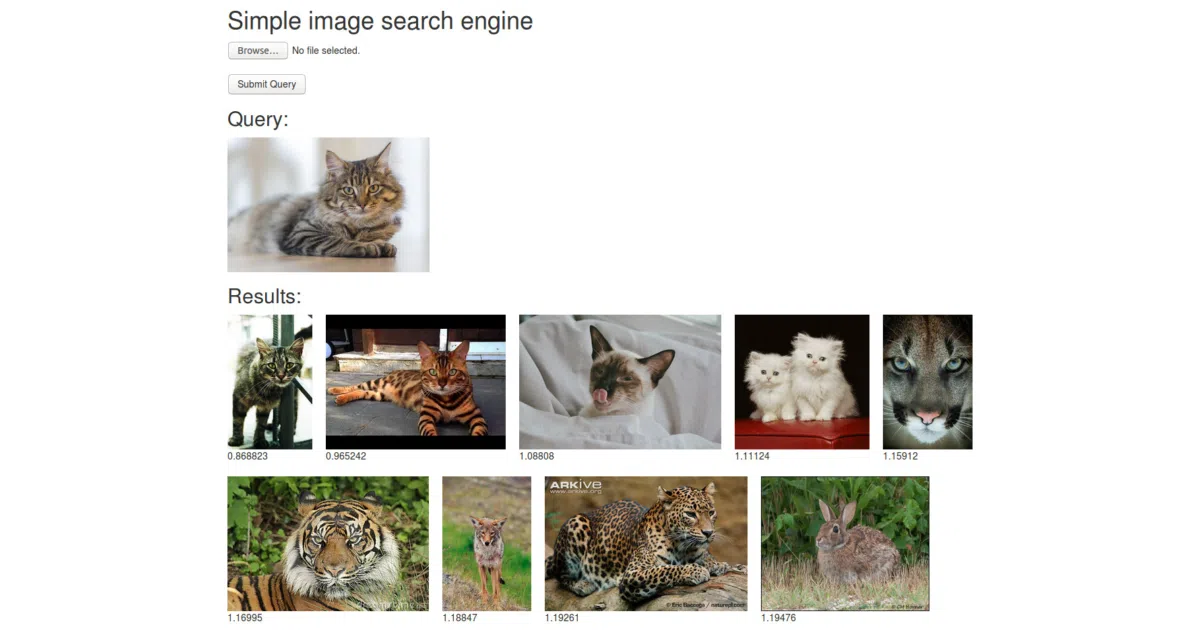
Drop a folder of JPGs into static/img, run offline.py to extract 4096-dimensional VGG16 fc6 features, then run server.py to get a Flask web interface. Upload a query image and the server brute-forces the nearest neighbors by linear scan. No GPU needed; tested on Ubuntu 18.04 and WSL2.
The interesting bit The whole system is intentionally primitive — linear scan, no indexing, no approximate nearest neighbors — because it was built for a CVPR 2020 tutorial on implementing retrieval from scratch. The pedagogical value is the point; the performance is not.
Key highlights
- Two-script architecture:
offline.pyfor feature extraction,server.pyfor serving - Uses Keras VGG16 with ImageNet weights; first run downloads weights automatically
- Includes AWS EC2 deployment notes (open port 5000, use m5.large or similar)
- Suggests uWSGI + nginx or AWS AppRunner for “advanced” deployment
- Live demo and tutorial slides/video available
Caveats
- Linear scan means search slows linearly with database size; no ANN in sight
- Only
.jpgfiles supported; format flexibility unclear - Flask’s built-in server is not production-ready; the README nudges you toward uWSGI/nginx
Verdict Grab this if you’re teaching or learning image retrieval basics and want something you can read in an afternoon. Skip it if you need a production search backend — this is a learning skeleton, not a skeleton you should ship.
Frequently asked
- What is matsui528/sis?
- A dead-simple visual search engine that extracts VGG16 features and serves them over Flask, built to teach rather than scale.
- Is sis open source?
- Yes — matsui528/sis is open source, released under the MIT license.
- What language is sis written in?
- matsui528/sis is primarily written in Python.
- How popular is sis?
- matsui528/sis has 778 stars on GitHub.
- Where can I find sis?
- matsui528/sis is on GitHub at https://github.com/matsui528/sis.