lightly-ai/lightly-studio
A Rust-backed data curation tool that runs on your laptop
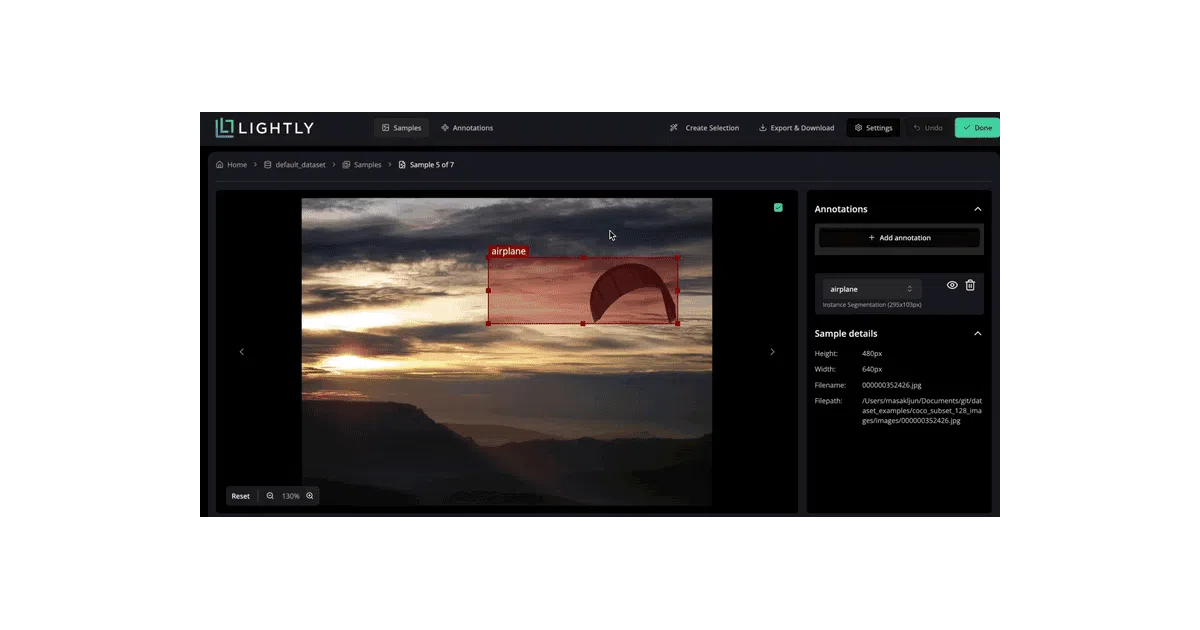
LightlyStudio is an open-source Python tool for curating, annotating, and managing computer-vision datasets without shipping data to the cloud.
Not currently ranked — collecting fresh signals.
star history
What it does
LightlyStudio wraps dataset exploration, filtering, and annotation review into a local web UI. You point it at image folders, video directories, or existing COCO/YOLO datasets; it indexes them into an embedded DuckDB database and starts a GUI server on localhost. The pitch is keeping everything on-premise—no cloud upload required, though it can read from S3, GCS, or Azure if asked.
The interesting bit
The team wrote performance-critical parts in Rust, which is unusual for a Python data tool. They claim you can work with COCO and ImageNet on an M1 MacBook Pro with 16 GB RAM. The database is just a local .db file, so sessions survive restarts and you can append new data incrementally without re-indexing everything.
Key highlights
- Supports images, video, and multi-modal data (captions, image+text pairs)
- Imports COCO, YOLO, and ImageNet; exports back to standard formats
- Cloud storage via
fsspec(S3, GCS, Azure) with optional dependency install - Embeddable in Jupyter and Google Colab via iframe/kernel port tricks
- Python 3.9–3.14, cross-platform (Windows, Linux, macOS)
Caveats
- Several features are marked “support in progress” (🛠️): classification visualization, 3D point clouds, text handling, and keypoints are entirely unsupported (❌)
- Cloud-hosted annotations only work for COCO object detection and segmentation masks; other importers expect local files
- The README is heavy on quickstart snippets and light on architecture or embedding methodology
Verdict
Worth a look if you need a self-hosted, browser-based dataset browser for computer-vision work and prefer not to pay for cloud labeling platforms. Skip it if you need keypoint annotation, 3D point-cloud support, or a mature, fully-baked feature set today.
Frequently asked
- What is lightly-ai/lightly-studio?
- LightlyStudio is an open-source Python tool for curating, annotating, and managing computer-vision datasets without shipping data to the cloud.
- Is lightly-studio open source?
- Yes — lightly-ai/lightly-studio is open source, released under the Apache-2.0 license.
- What language is lightly-studio written in?
- lightly-ai/lightly-studio is primarily written in Python.
- How popular is lightly-studio?
- lightly-ai/lightly-studio has 898 stars on GitHub.
- Where can I find lightly-studio?
- lightly-ai/lightly-studio is on GitHub at https://github.com/lightly-ai/lightly-studio.