kaiwaehner/kafka-streams-machine-learning-examples
Machine learning models need a ride to production. Kafka Streams is the bus.
A collection of Java examples wiring popular ML frameworks into Kafka Streams for real-time inference.
Not currently ranked — collecting fresh signals.
star history
What it does
This repo is a set of Java/Maven examples showing how to run pre-trained machine learning models inside Kafka Streams applications. Each module demonstrates a different framework—H2O gradient boosting, TensorFlow CNNs, DeepLearning4J neural networks, Keras models imported via DL4J—applied to tasks like flight-delay prediction and image recognition. Unit tests use an embedded single-node Kafka cluster, so you can run them without setting up a full broker.
The interesting bit
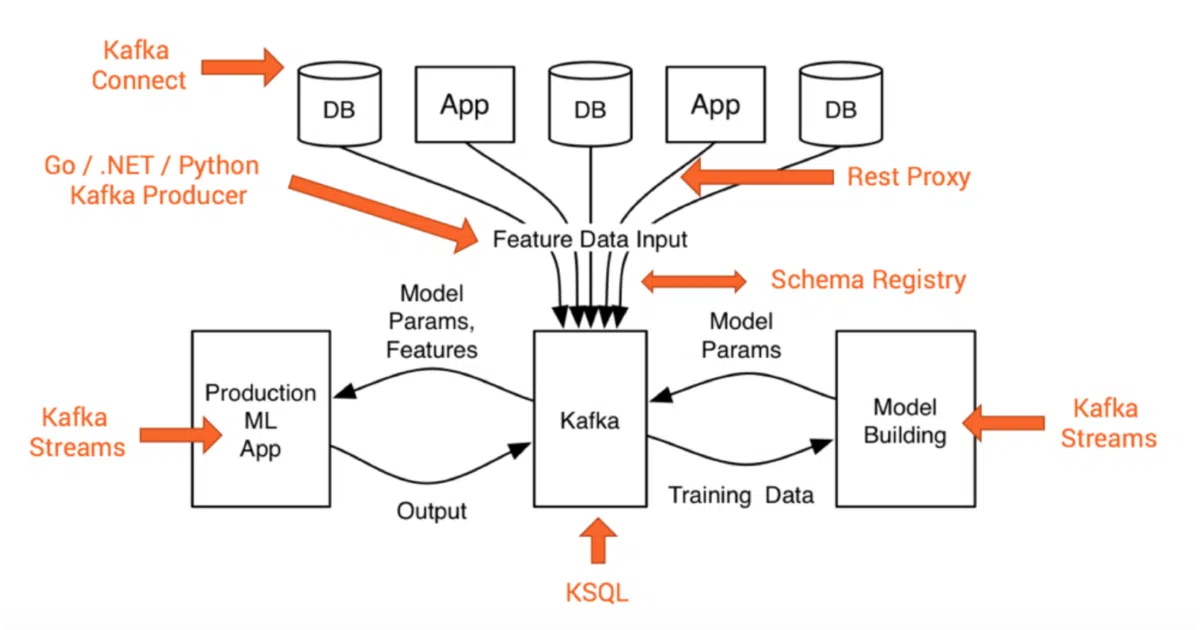
The project treats Kafka Streams as generic ML infrastructure: the same stream-processing layer deploys, executes, and monitors models built in Python, Java, or whatever framework your data scientists prefer. The generated models are bundled in the repo, which bloats the download but means the examples run with zero external setup.
Key highlights
- H2O GBM and Deep Learning models for flight-delay prediction
- TensorFlow CNN for image recognition
- DL4J neural network for Iris flower classification
- Keras model (TensorFlow backend) deployed via DL4J’s Import Model API
- Compatible with Kafka Streams 1.1 through 2.5; built for Java 8
- Self-contained unit tests with embedded Kafka cluster
Caveats
- Windows is explicitly unsupported; Mac and Linux only
- The examples are intentionally simple and lightweight—more “hello world” than production pipeline
- Running the main implementations requires manual Kafka cluster setup and topic creation
Verdict
Worth a look if you’re a Java engineer trying to bridge the gap between data science experiments and streaming production. Skip it if you need end-to-end model training, automated deployment, or a managed ML platform.
Frequently asked
- What is kaiwaehner/kafka-streams-machine-learning-examples?
- A collection of Java examples wiring popular ML frameworks into Kafka Streams for real-time inference.
- Is kafka-streams-machine-learning-examples open source?
- Yes — kaiwaehner/kafka-streams-machine-learning-examples is open source, released under the Apache-2.0 license.
- What language is kafka-streams-machine-learning-examples written in?
- kaiwaehner/kafka-streams-machine-learning-examples is primarily written in Java.
- How popular is kafka-streams-machine-learning-examples?
- kaiwaehner/kafka-streams-machine-learning-examples has 913 stars on GitHub.
- Where can I find kafka-streams-machine-learning-examples?
- kaiwaehner/kafka-streams-machine-learning-examples is on GitHub at https://github.com/kaiwaehner/kafka-streams-machine-learning-examples.