juggler-ai/juggler
An AI coding agent that ditches chat for a Finder-style tree
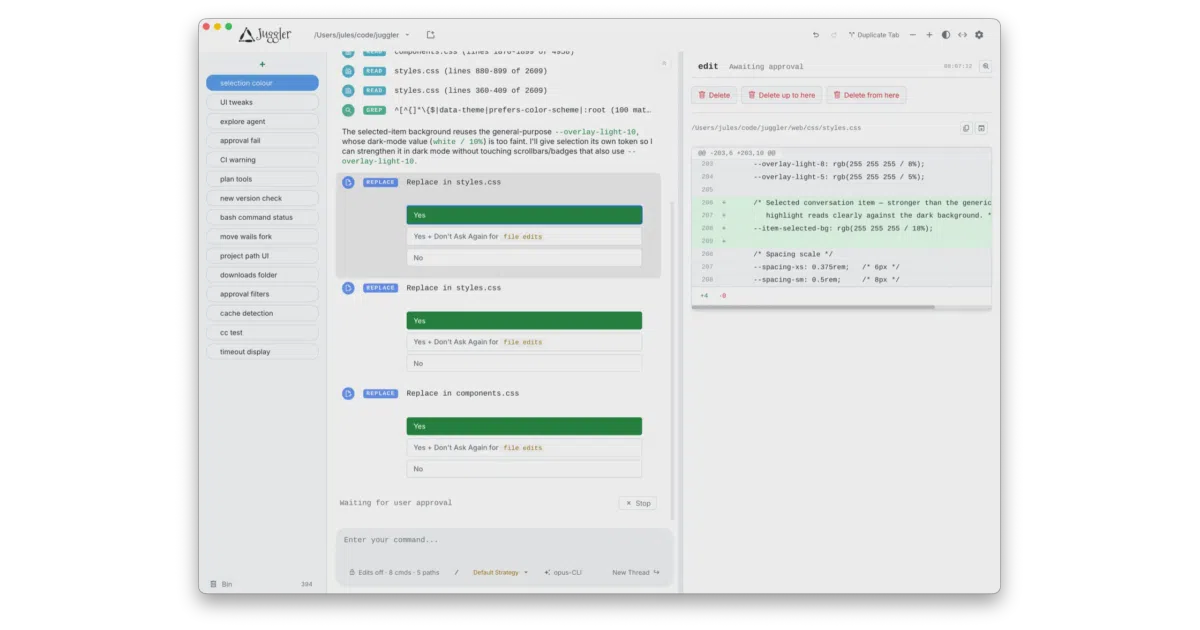
Juggler is a visual workbench for developers who want to inspect, branch, and edit what an LLM is doing instead of scrolling through an irreversible chat transcript.
Velocity · 7d
+3.9
★ / day
Trend
↗accelerating
star history
What it does Juggler is a graphical AI coding agent that replaces the usual terminal chat with a native desktop interface. It lets you drive LLMs through a visual layout where tool calls, thread branches, and context items are arranged in inspectable Miller columns. The session is structured as a collaborative Yjs document, so you can fork conversations into sub-threads, backtrack, and edit the tree directly rather than scrolling through a linear transcript.
The interesting bit
The unusual angle is that almost every behavior is a JavaScript extension—from read-file tools to LLM orchestration strategies—so the UI and logic are user-replaceable rather than baked in. Under the hood it is a Go server (no Electron) that syncs state across desktop apps and browser tabs, letting multiple clients observe or steer the same session from different machines.
Key highlights
- Tree-structured sessions: branch, compare, and rewrite conversation history instead of doom-scrolling.
- Miller-column UI: Finder-style columns expose tool calls, approvals, and raw context without digging through collapsible chat bubbles.
- Extension architecture: context items, slash commands, and LLM loop strategies are all JavaScript plugins you can inspect or fork.
- Multi-client sync: the same session can be viewed and controlled from the native desktop app, local browsers, or remote clients attached to the headless server.
- Broad model support: plugs into Claude Code, OpenAI, Gemini, Ollama, OpenRouter, Deepseek, and others.
Caveats
- Open-source builds are limited to local and LAN access; internet-facing remote control is only available in the official distribution binaries.
- LAN sessions have no password protection, so enabling public mode exposes full agent control to anyone on the network.
Verdict Worth exploring if you want granular visibility into an AI agent’s tool calls and prefer a branching tree to a linear chat. Look elsewhere if you need to host an internet-facing agent from source alone, or if a headless CLI is already sufficient.
Frequently asked
- What is juggler-ai/juggler?
- Juggler is a visual workbench for developers who want to inspect, branch, and edit what an LLM is doing instead of scrolling through an irreversible chat transcript.
- Is juggler open source?
- Yes — juggler-ai/juggler is open source, released under the AGPL-3.0 license.
- What language is juggler written in?
- juggler-ai/juggler is primarily written in JavaScript.
- How popular is juggler?
- juggler-ai/juggler has 804 stars on GitHub and is currently accelerating.
- Where can I find juggler?
- juggler-ai/juggler is on GitHub at https://github.com/juggler-ai/juggler.