iOfficeAI/AionUi
One Desktop App to Herd Claude, Codex, and Twenty Other AI Agents
It exists to unify the growing zoo of AI CLI agents into a single desktop coworking platform that can also generate your PowerPoint decks.
Velocity · 7d
+22
★ / day
Trend
↘cooling
star history
What it does
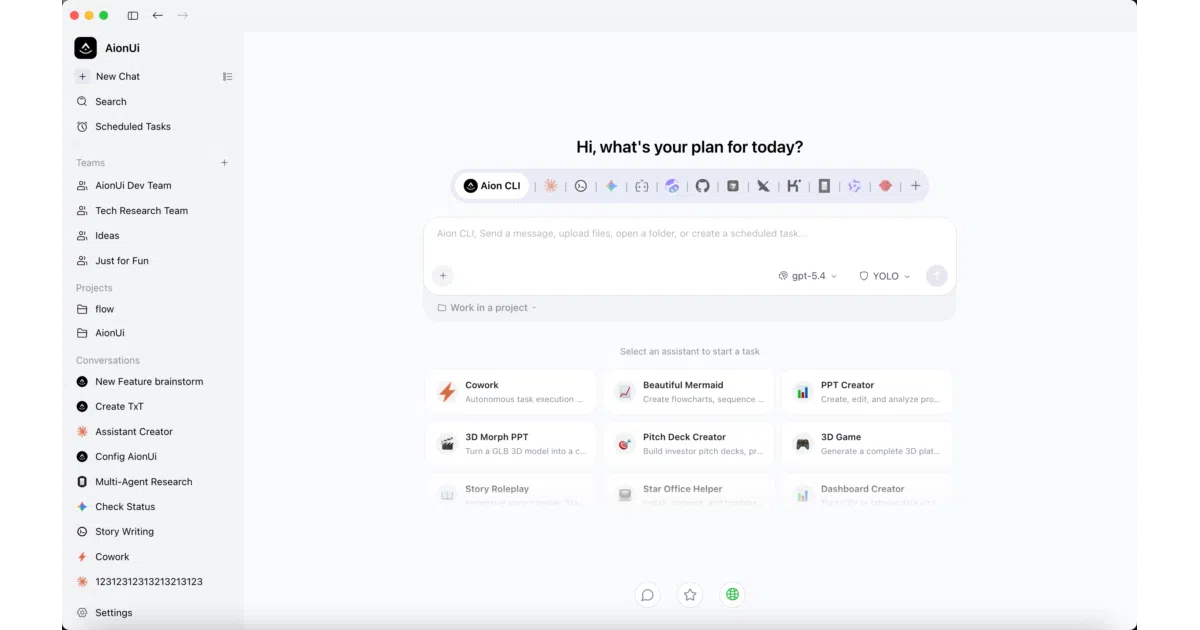
AionUi is a cross-platform desktop app that acts as a unified control panel for AI agents. It bundles its own built-in agent engine—handling file access, web search, and tool use—while auto-detecting and orchestrating external CLI agents like Claude Code, Codex, and OpenClaw in parallel sessions. It also generates editable Office documents (PPT, Word, Excel) through an integrated OfficeCLI backend.
The interesting bit
The Team Mode is where it gets weirdly ambitious: a Leader agent decomposes tasks and delegates them to Teammate agents via ACP (Agent Communication Protocol), all sharing a workspace and syncing MCP tool configurations automatically. It is essentially trying to build a middle-management layer for bots, complete with permission dialogs and an async mailbox.
Key highlights
- Built-in agent works out of the box with any API key (Gemini, OpenAI, Anthropic, Ollama, etc.); no separate CLI installation required
- Auto-detects 20+ external CLI agents and unifies them under one interface with shared MCP tool management
- Team Mode enables parallel multi-agent collaboration with a Leader-Teammate hierarchy and shared file workspace
- Includes 21 specialized assistants for Office workflows—Morph PPT animations, academic paper writing, Excel modeling—via
OfficeCLI - Supports 24/7 unattended automation via Cron and remote access through WebUI plus Telegram, Lark, DingTalk, or WeChat
Verdict
Developers already running multiple AI CLI tools and wishing they could schedule unattended tasks or generate actual PowerPoint decks should look here. If you just want a lightweight chat client, this is overbuilt.
Frequently asked
- What is iOfficeAI/AionUi?
- It exists to unify the growing zoo of AI CLI agents into a single desktop coworking platform that can also generate your PowerPoint decks.
- Is AionUi open source?
- Yes — iOfficeAI/AionUi is open source, released under the Apache-2.0 license.
- What language is AionUi written in?
- iOfficeAI/AionUi is primarily written in TypeScript.
- How popular is AionUi?
- iOfficeAI/AionUi has 33.8k stars on GitHub and is currently cooling off.
- Where can I find AionUi?
- iOfficeAI/AionUi is on GitHub at https://github.com/iOfficeAI/AionUi.