iAmCorey/kooky
A macOS terminal that treats AI agents as first-class citizens
Kooky is a macOS terminal that stops AI coding agents from vanishing into tab sprawl by giving them dedicated launchers, live status readouts, and branch-isolated workspaces.
Not currently ranked — collecting fresh signals.
star history
What it does
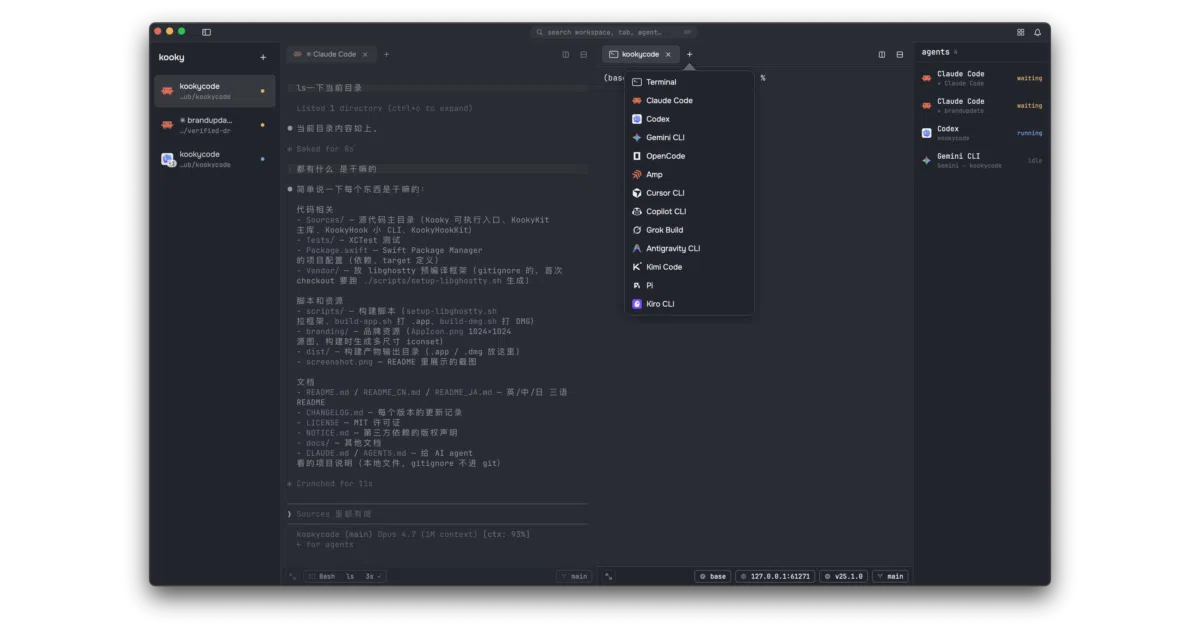
Kooky is a macOS terminal emulator written in SwiftUI that wraps the GPU-accelerated libghostty rendering engine in a workspace-centric interface. It behaves like a traditional terminal with vertical tabs and split panes, but every pane is wired to track AI agent state, git context, and local environment variables in real time. The app launches a dozen different coding agents—from Claude Code to Gemini CLI—instantly from a menu, and surfaces which agent is running, waiting for input, or has failed without you hunting through tabs.
The interesting bit The unusual part is that it inverts the typical terminal relationship: instead of you babysitting the shell, the terminal babysits the agent. It tracks per-agent activity in the sidebar with color-coded dots, auto-resumes Claude conversations across restarts, and even lets you right-click a log line to spawn a new agent tab with that text preloaded as the first prompt. The git worktree integration means you can park Claude on a feature branch while you keep main running in another pane, all without touching the command line.
Key highlights
- One-click launch for 12 AI agents (Claude Code, Codex, Gemini CLI, Cursor CLI, etc.) with auto-resume for Claude sessions.
- Live agent activity readout in the sidebar and status bar: running, waiting, idle, or failed, plus real-time tool tracking for Claude and Pi.
- Native git worktree support: create branch-isolated workspaces from the sidebar, or let kooky auto-detect existing worktrees on launch.
- Clickable environment pills in the pane status bar for one-click Node version or git branch switching, plus live diff counts and proxy status.
- SwiftUI-native, local-only state: no accounts, no telemetry, no cloud sync, with full window restoration across launches.
Caveats
- macOS 14+ only; no Windows or Linux builds exist.
- The distributed release is adhoc-signed and not notarized, so expect a Gatekeeper warning on first launch.
- Building from source requires Xcode 26+ and a manual fetch of the
libghosttyframework dependency.
Verdict Developers who live in macOS and juggle multiple AI agents or complex git branching will find kooky replaces their terminal and project manager in one app. If you are not on macOS, not using AI coding agents, or need a notarized binary from an identified developer today, look elsewhere.
Frequently asked
- What is iAmCorey/kooky?
- Kooky is a macOS terminal that stops AI coding agents from vanishing into tab sprawl by giving them dedicated launchers, live status readouts, and branch-isolated workspaces.
- Is kooky open source?
- Yes — iAmCorey/kooky is open source, released under the MIT license.
- What language is kooky written in?
- iAmCorey/kooky is primarily written in Swift.
- How popular is kooky?
- iAmCorey/kooky has 653 stars on GitHub.
- Where can I find kooky?
- iAmCorey/kooky is on GitHub at https://github.com/iAmCorey/kooky.