e2b-dev/open-computer-use
Open-source LLMs get their own sandboxed desktop
It gives open-source LLMs a secure, sandboxed Linux desktop they can click, type, and shell into while you watch.
Not currently ranked — collecting fresh signals.
star history
What it does
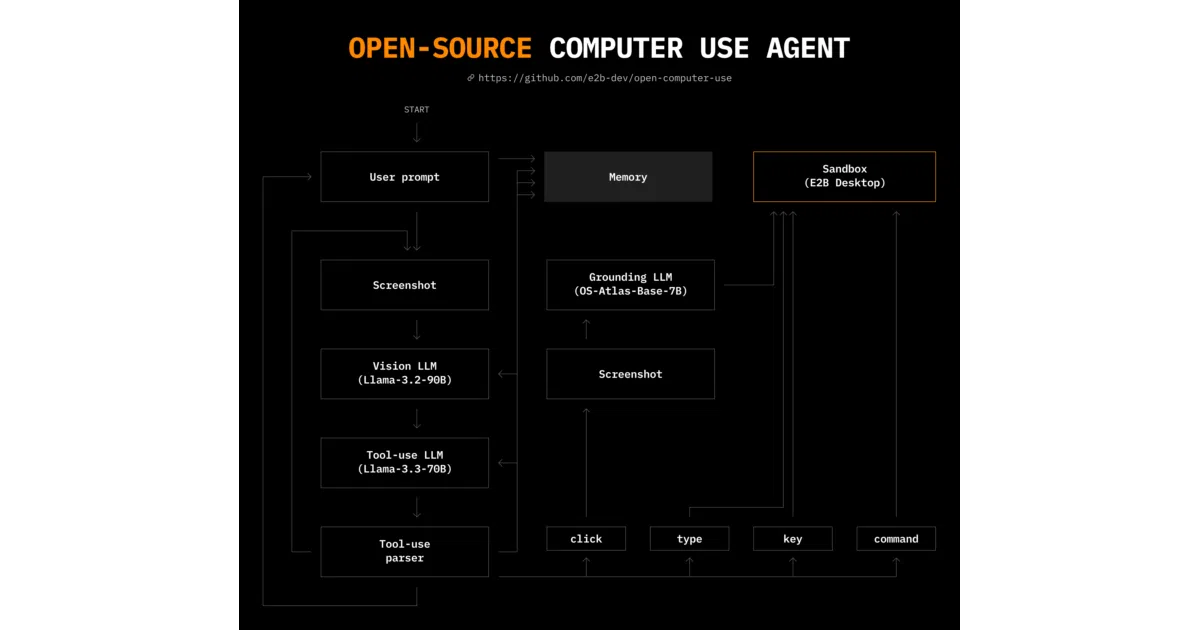
Open Computer Use spins up a cloud Linux desktop inside an E2B sandbox and hands the keyboard, mouse, and terminal to an LLM agent. A local web interface live-streams the sandbox display so you can watch the model work, pause it, and inject new instructions mid-task. It is built to swap models easily rather than marrying one proprietary API.
The interesting bit
Instead of relying on a single closed model, the project splits responsibilities across a vision model, an action model, and a grounding model (like OS-Atlas or ShowUI), all wired together through a simple provider pattern. That means you can mix a cheap Groq Llama for actions with a heavyweight GPT-4o for vision, or vice versa, without rewriting the agent logic.
Key highlights
- Supports 10+ LLMs across Groq, OpenAI, Anthropic, Google, Mistral, DeepSeek, Moonshot, and others via pluggable providers.
- Uses OS-Atlas or ShowUI for UI grounding, so the model knows where to click on the screen.
- Live-streams the sandbox display to the client with a pause-and-prompt loop for human oversight.
- Runs inside E2B’s Desktop Sandbox, so the agent operates in an isolated, ephemeral environment.
- Designed to work with any OS, though it currently ships with Ubuntu.
Caveats
- You will need an E2B API key plus API keys for whichever LLM providers you enable in
config.py; the bill of materials can add up quickly. - HuggingFace Spaces providers require a Hugging Face token specifically to bypass Gradio rate limits.
- It currently runs on Ubuntu; support for other operating systems is theoretical for now.
Verdict
Worth a look if you want to experiment with AI computer use without betting on a single vendor, or if you need an observable, sandboxed agent for automation research. Skip it if you are after a polished, end-user product or trying to avoid juggling multiple API keys.
Frequently asked
- What is e2b-dev/open-computer-use?
- It gives open-source LLMs a secure, sandboxed Linux desktop they can click, type, and shell into while you watch.
- Is open-computer-use open source?
- Yes — e2b-dev/open-computer-use is open source, released under the Apache-2.0 license.
- What language is open-computer-use written in?
- e2b-dev/open-computer-use is primarily written in Python.
- How popular is open-computer-use?
- e2b-dev/open-computer-use has 2.4k stars on GitHub.
- Where can I find open-computer-use?
- e2b-dev/open-computer-use is on GitHub at https://github.com/e2b-dev/open-computer-use.