deepseek-ai/DeepSeek-OCR-2
DeepSeek’s new OCR model sizes images dynamically, claims causal flow
It converts document images and PDFs into markdown, dynamically budgeting visual tokens across resolution crops.
Not currently ranked — collecting fresh signals.
star history
What it does
DeepSeek-OCR 2 is a vision-language model for document understanding. Feed it an image or PDF and it emits markdown or plain text via prompts like <|grounding|>Convert the document to markdown. The repo provides inference wrappers for both vLLM and Hugging Face Transformers, targeting CUDA environments with flash-attention and specific PyTorch builds.
The interesting bit
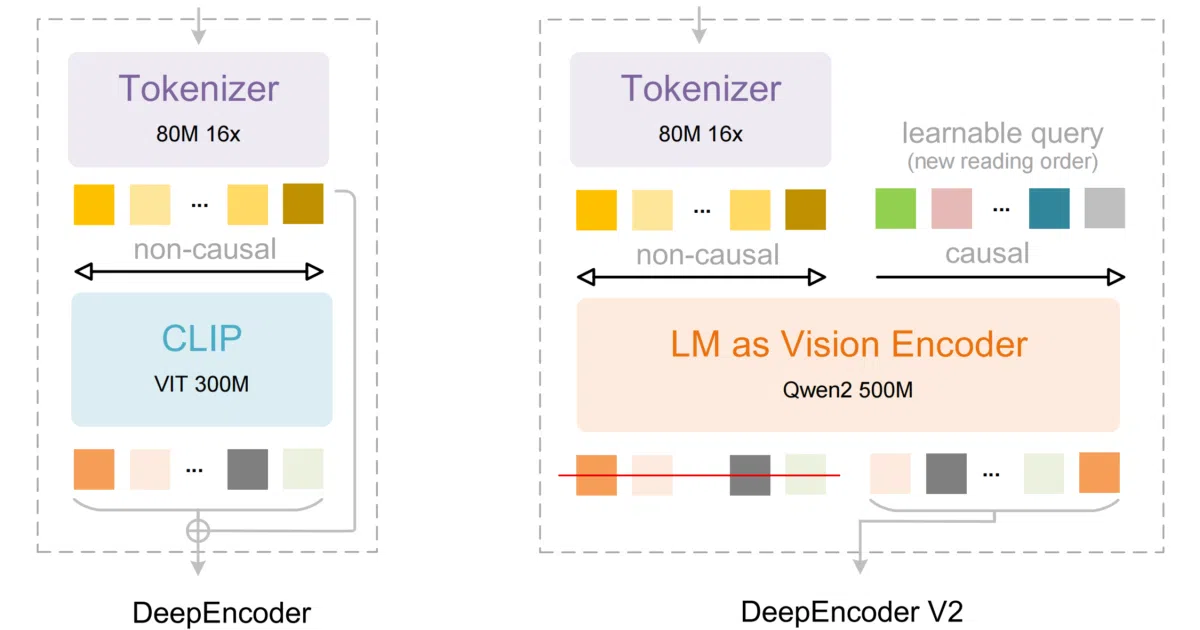
The README touts “Visual Causal Flow” and “human-like visual encoding” but never defines either term, leaving the actual architectural novelty as an exercise for the reader. What is concrete is the dynamic resolution handling: the model defaults to a variable grid of up to six 768×768 crops plus one 1024×1024 base image, translating to a flexible visual token budget of 144 tokens per small crop plus 256 for the base.
Key highlights
- Outputs structured markdown or layout-free text depending on the prompt template.
- Supports both single-image streaming and concurrent PDF batch processing.
- Dynamic resolution default: up to six 768×768 crops and one 1024×1024 base image, mapped to (0–6)×144 + 256 visual tokens.
- Ships with standalone inference scripts for vLLM and Transformers, plus batch evaluation against OmniDocBench v1.5.
- Requires a narrow dependency stack: CUDA 11.8, PyTorch 2.6.0, flash-attn 2.7.3, and a specific vLLM wheel.
Caveats
- The README never explains what “Visual Causal Flow” actually means or how it differs from standard visual encoding.
- Dependency pinning is tight; the install notes explicitly address version conflicts between vLLM and transformers.
Verdict
Best suited for developers running CUDA hardware who need markdown or plain text from scanned documents. Less appealing if you need clear architectural documentation or a loose dependency stack.
Frequently asked
- What is deepseek-ai/DeepSeek-OCR-2?
- It converts document images and PDFs into markdown, dynamically budgeting visual tokens across resolution crops.
- Is DeepSeek-OCR-2 open source?
- Yes — deepseek-ai/DeepSeek-OCR-2 is open source, released under the Apache-2.0 license.
- What language is DeepSeek-OCR-2 written in?
- deepseek-ai/DeepSeek-OCR-2 is primarily written in Python.
- How popular is DeepSeek-OCR-2?
- deepseek-ai/DeepSeek-OCR-2 has 3.1k stars on GitHub.
- Where can I find DeepSeek-OCR-2?
- deepseek-ai/DeepSeek-OCR-2 is on GitHub at https://github.com/deepseek-ai/DeepSeek-OCR-2.