crynta/terax-ai
A 7 MB terminal that wants to replace your IDE
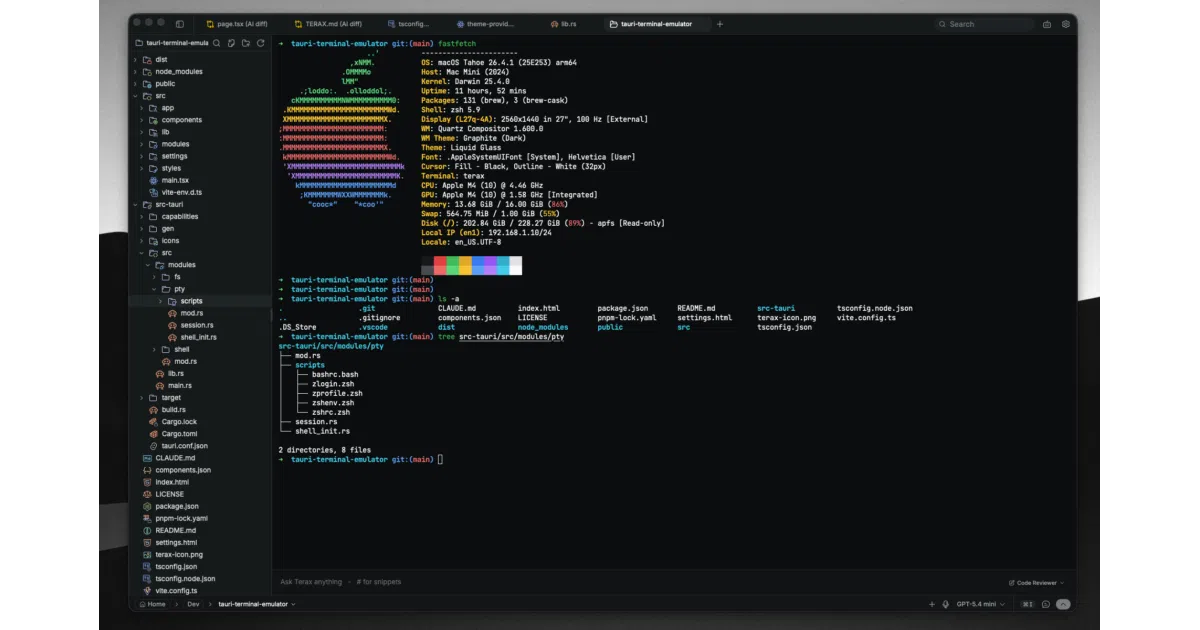
Terax shrinks a terminal, code editor, git GUI, web preview, and AI agent into a single 7 MB desktop app.
Velocity · 7d
+22
★ / day
Trend
↗accelerating
star history
What it does
Terax is a desktop workspace built in Tauri 2 and Rust that wraps a native PTY terminal (via xterm.js and a WebGL renderer) alongside a CodeMirror 6 editor, file explorer, source-control panel with a real git graph, web preview pane, and an agentic AI sidebar. It runs on macOS, Linux, and Windows—including first-class WSL support—and clocks in at roughly 7–8 MB on disk. No account or telemetry required.
The interesting bit
Instead of gluing a terminal into an IDE, Terax starts from the terminal and bolts the rest of the workflow around it, using your own API keys or fully local models (Ollama, LM Studio, MLX) and storing them in the OS keychain. The AI can read, write, grep, and run bash commands with approval gating, while the editor shows diffs hunk-by-hunk.
Key highlights
- Native multi-tab terminal with split panels, true-color, and per-tab WSL environments on Windows.
- CodeMirror 6 editor with Vim mode, inline AI autocomplete, and hunk-level diff acceptance.
- Git panel with lane-rendered commit graphs, staging, and upstream-aware push.
- BYOK or fully offline AI via a side-panel that supports OpenAI, Anthropic, Groq, DeepSeek, and generic OpenAI-compatible endpoints.
- Custom in-app themes, background images with blur/opacity, and a Catppuccin file explorer.
Caveats
- Windows Defender SmartScreen flags the installer on first run because the binaries aren’t code-signed yet.
- Linux AppImage requires FUSE, and Wayland sessions may need a renderer workaround to avoid glitches.
Verdict
Developers who live in the terminal but want AI assistance, a proper editor, and git visualization without the bloat of a full IDE should try this. If you are already happy with VS Code or JetBrains and their integrated terminals, Terax is probably a lateral move.
Frequently asked
- What is crynta/terax-ai?
- Terax shrinks a terminal, code editor, git GUI, web preview, and AI agent into a single 7 MB desktop app.
- Is terax-ai open source?
- Yes — crynta/terax-ai is open source, released under the Apache-2.0 license.
- What language is terax-ai written in?
- crynta/terax-ai is primarily written in TypeScript.
- How popular is terax-ai?
- crynta/terax-ai has 9.4k stars on GitHub and is currently accelerating.
- Where can I find terax-ai?
- crynta/terax-ai is on GitHub at https://github.com/crynta/terax-ai.