ccch1mneyyy/dsh-TUI
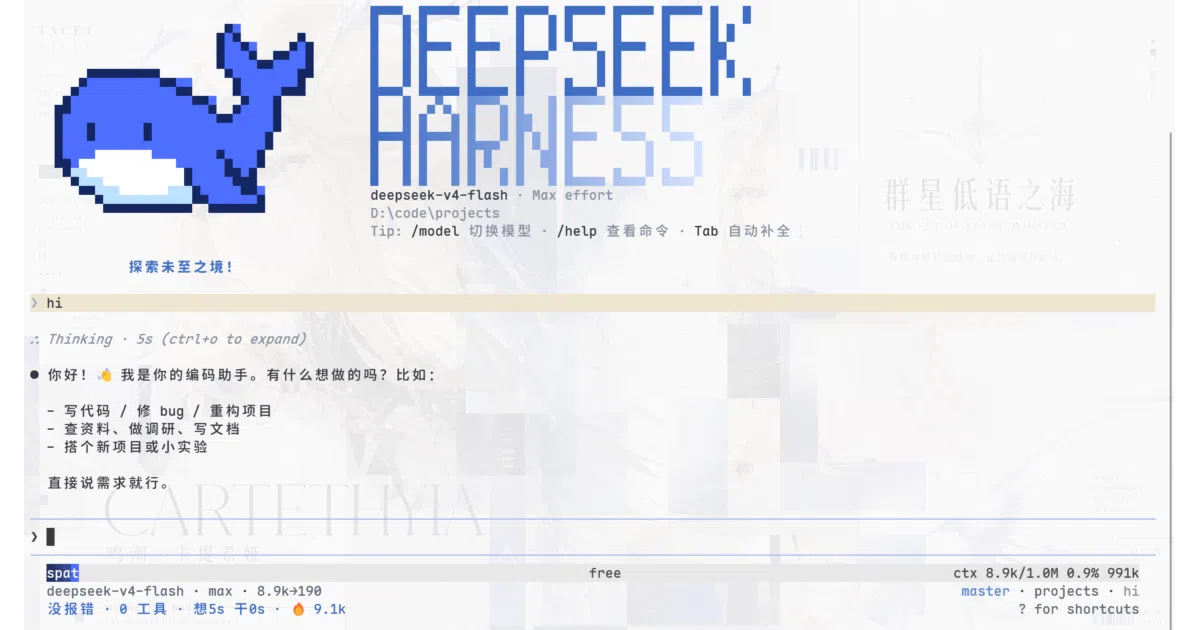
DeepSeek Harness gets a terminal UI with pixel whales
A zero-core-patch plugin that gives DeepSeek Harness a full-screen, mouse-capable terminal interface with real-time telemetry and session rewind.
Velocity · 7d
+50
★ / day
Trend
↘cooling
star history
What it does
dsh-TUI is a terminal UI plugin for DeepSeek Harness, the DeepSeek coding-agent framework. It renders a full-screen, mouse-capable interface inside your terminal—complete with a pixel-art whale header, streaming markdown, and real-time telemetry like TPS meters and context progress bars. The plugin mounts onto the official dsh CLI without modifying core code, handling all presentation while DSH keeps control of model calls, tool execution, and session persistence.
The interesting bit
The project treats the terminal as a first-class canvas rather than a fallback. It uses a ported Ink/Yoga React renderer with layout-level virtualization—offscreen messages collapse into height placeholders so rendering stays O(visible window) even as sessions grow long—and implements double-Esc “time rewind” to fork or roll back conversations mid-flight.
Key highlights
- Pixel-art branding and “Gentle Mist Blue” palette that auto-detects terminal background (OSC 11) to pick light or dark themes
- Real-time working status line, TPS gauge with sparkline history, and context progress bars showing token usage segments
- Mouse support including drag-to-select with OSC 52 clipboard integration, and Explorer file-path paste via
Ctrl+V - Session rewind/fork via double-
Esc, plus slash commands for compaction, export, model switching, and DSH-native skills like/auditand/review - Long-session optimizations: event-driven diff rendering, message virtualization, and bounded caching to cap memory growth
Caveats
- Several slash commands (
/vim,/connect,/hooks,/memory) are intentionally stubbed because DSH lacks equivalent mechanisms behind them - Windows users get
danger-full-accessfile access with no sandbox backend available, so sensitive environments need extra caution - Switching models mid-session forks the conversation rather than swapping in place, leaving the old session behind in
/resume
Verdict
Terminal-native developers who want DeepSeek Harness to feel like a first-class CLI app rather than a Web UI afterthought will find this a polished stopgap. If you are already happy with the official Web interface or need fully sandboxed Windows support, this plugin adds friction rather than value.
Frequently asked
- What is ccch1mneyyy/dsh-TUI?
- A zero-core-patch plugin that gives DeepSeek Harness a full-screen, mouse-capable terminal interface with real-time telemetry and session rewind.
- Is dsh-TUI open source?
- Yes — ccch1mneyyy/dsh-TUI is open source, released under the MIT license.
- What language is dsh-TUI written in?
- ccch1mneyyy/dsh-TUI is primarily written in TypeScript.
- How popular is dsh-TUI?
- ccch1mneyyy/dsh-TUI has 4.2k stars on GitHub and is currently cooling off.
- Where can I find dsh-TUI?
- ccch1mneyyy/dsh-TUI is on GitHub at https://github.com/ccch1mneyyy/dsh-TUI.