byjlw/video-analyzer
Automated video recaps from keyframes and whispered audio
It exists because humans shouldn't have to scrub video to figure out what happens.
Not currently ranked — collecting fresh signals.
star history
What it does
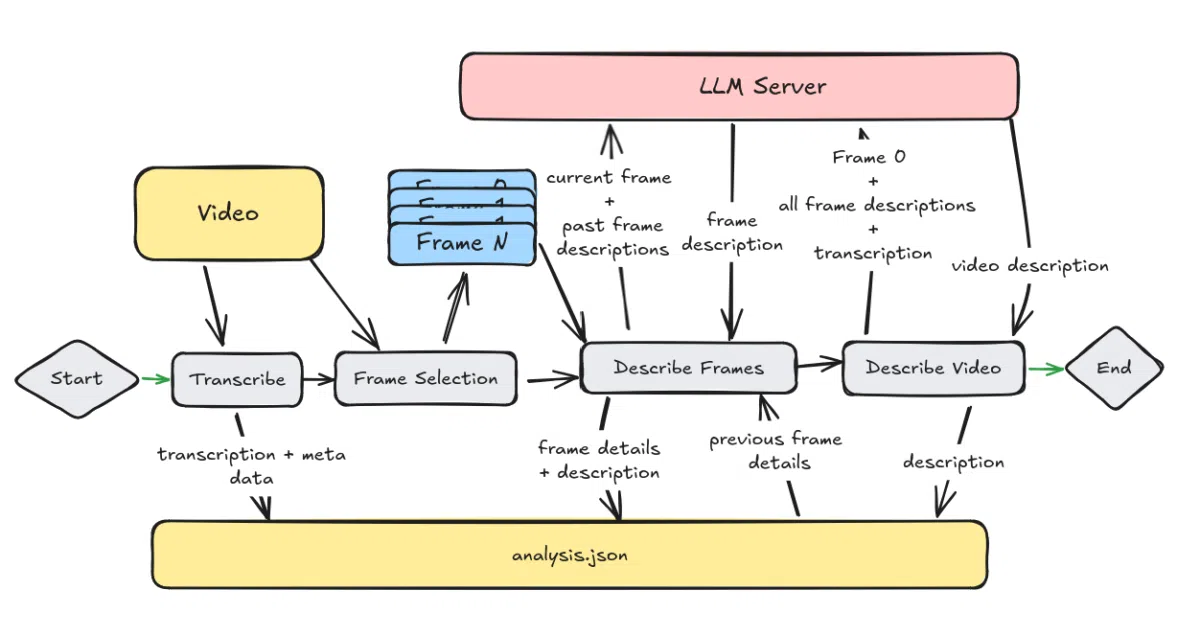
video-analyzer is a Python pipeline that ingests a video file, extracts key frames with OpenCV, transcribes audio with Whisper, and feeds the frames through a vision LLM (defaulting to Llama 3.2 11B via Ollama). It then stitches the per-frame analyses and the transcript into a chronological, natural-language description of the video, outputting everything as structured JSON. You can run it entirely offline on capable hardware, or route requests to any OpenAI-compatible API for speed.
The interesting bit
The pipeline carries context forward: each frame analysis includes details from previous frames, so the model maintains chronological continuity rather than treating shots as isolated images. There is also a companion prompt-tuning tool, video-analyzer-tune, that uses DSPy MIPROv2 to optimize the frame-analysis and reconstruction prompts for your specific content without touching the core package. That is a rare level of introspection for a simple CLI tool.
Key highlights
- Runs fully offline via Ollama, or swaps to cloud APIs like OpenRouter and OpenAI for faster turnaround.
- Feeds sequential frame context into the vision model so descriptions progress logically through time.
- Gracefully degrades on poor-quality audio using Whisper confidence checks.
- Highly configurable through cascading CLI arguments, user config files, and default configs.
- Ships with a separate prompt-tuning utility to auto-optimize instructions for your video genre.
Caveats
- Local mode is resource-hungry: the README recommends 32 GB RAM and a GPU with 12 GB VRAM (or a 32 GB Apple M-series machine).
- The default output path is written as
output\analysis.jsonwith a Windows-style backslash, which may look out of place on Unix systems. - Prompt tuning is split into a separate package,
video-analyzer-tune, and requires manually curating ideal outputs before DSPy can optimize.
Verdict
Worth a look if you need searchable text summaries of video archives and already run Ollama or an OpenAI-compatible endpoint. Skip it if you expect real-time streaming analysis or lack the RAM and GPU to run vision models locally without cloud backup.
Frequently asked
- What is byjlw/video-analyzer?
- It exists because humans shouldn't have to scrub video to figure out what happens.
- Is video-analyzer open source?
- Yes — byjlw/video-analyzer is open source, released under the Apache-2.0 license.
- What language is video-analyzer written in?
- byjlw/video-analyzer is primarily written in Python.
- How popular is video-analyzer?
- byjlw/video-analyzer has 1.5k stars on GitHub.
- Where can I find video-analyzer?
- byjlw/video-analyzer is on GitHub at https://github.com/byjlw/video-analyzer.