alchaincyf/fanbox
A macOS mission control for agent-induced sprawl
FanBox is a macOS cockpit for developers who let AI agents loose on their filesystem and need to see what actually changed.
Not currently ranked — collecting fresh signals.
star history
What it does
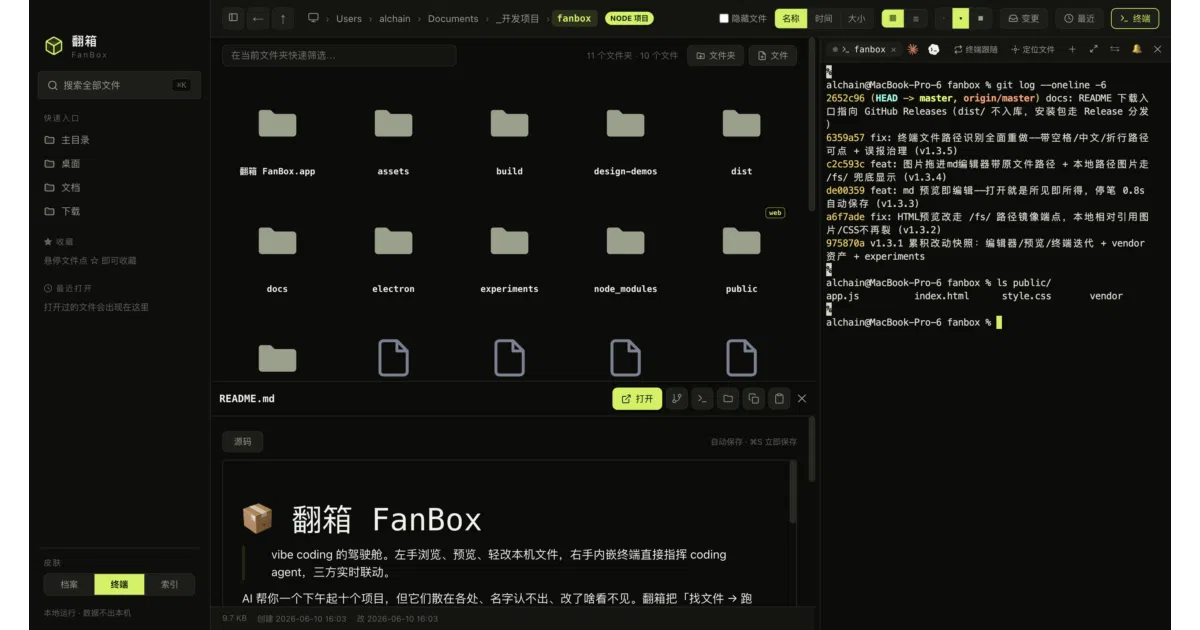
FanBox is a macOS app that pins a file browser, an embedded terminal, and live previews into a single window. You browse local projects on the left, run Claude Code or Codex in a real terminal on the right, and watch the middle light up every time an agent touches a file. It keeps project history, lets you resume agent sessions, and offers lightweight previews for Markdown, HTML, images, and even HEIC files without leaving the app.
The interesting bit
The UI goes heavy on situational awareness: files glow and ripple when agents write to them, a follow mode tracks and previews live edits as they happen, and a session timeline lets you scrub back through an agent’s session like a DVR. It even aggregates changes across multiple projects into a single change inbox so parallel agent runs don’t turn into parallel headaches.
Key highlights
- Real embedded terminal via
node-ptyandxterm.jswith WebGL rendering; Claude Code, vim, and htop run without glitching, including CJK wide characters. - Three distinct interface skins—Volt, Archive, and Index—that swap entire palettes, typography, and terminal ANSI themes, not just accent colors.
- Clickable file paths in terminal output open directly in FanBox, with boundary detection verified by filesystem
statrather than string guessing. - AI-assisted cleanup proposes reorganization from metadata only, waits for human approval per move, and maintains a rollback log with one-click undo.
- Local-first with no cloud, no accounts, and zero runtime dependencies.
Caveats
- Explicitly macOS Apple Silicon only; no other platforms are mentioned in badges or release notes.
- The provided README source truncates mid-feature, so details on some terminal integrations remain incomplete.
Verdict
Worth a look if you’re deep into vibe coding with Claude Code or Codex and tired of context-switching between Finder and iTerm. If you don’t use coding agents or you aren’t on macOS Apple Silicon, there’s nothing here for you.
Frequently asked
- What is alchaincyf/fanbox?
- FanBox is a macOS cockpit for developers who let AI agents loose on their filesystem and need to see what actually changed.
- Is fanbox open source?
- Yes — alchaincyf/fanbox is open source, released under the MIT license.
- What language is fanbox written in?
- alchaincyf/fanbox is primarily written in JavaScript.
- How popular is fanbox?
- alchaincyf/fanbox has 1k stars on GitHub.
- Where can I find fanbox?
- alchaincyf/fanbox is on GitHub at https://github.com/alchaincyf/fanbox.