VisoMasterFusion/VisoMaster-Fusion
A face-swap app that actually ships with tests and a conscience
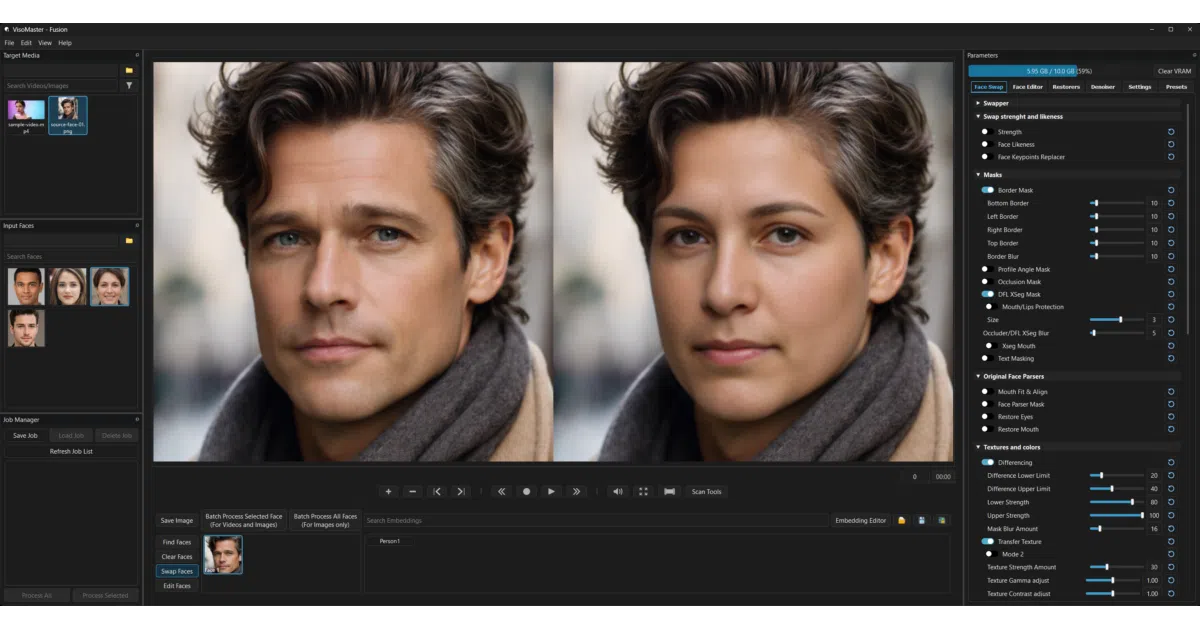
VisoMaster Fusion wraps a pile of AI models into a Windows desktop app for video face swapping, then adds the features everyone else skips: job queues, VR180 support, and a unit-test suite that runs without a GPU.
Not currently ranked — collecting fresh signals.
star history
What it does
VisoMaster Fusion is a Windows desktop application for AI-powered face swapping and enhancement across images, videos, and live webcam feeds. It bundles multiple swapper models (Inswapper128, SimSwap, GhostFace, DeepFaceLive DFM, and others) behind a graphical workflow with timeline markers, batch job management, and output controls for multi-segment renders.
The interesting bit
The project is essentially a polished integration layer — it combines the original VisoMaster work with community mods for VR180, a Job Manager, and a ReF-LDM denoiser, then wraps the whole thing in a portable launcher that downloads Python 3.12, PyTorch, CUDA, TensorRT, and model files on first run. The maintainers also bolted on a test suite covering VR math, face masks, serialization, and job validation that runs headless without Qt or a GPU, which is almost unheard-of in this corner of open-source.
Key highlights
- Portable launcher with self-update, repair, dependency check, and model optimization tools
- Multi-face workflows with source face cards, saved embeddings, similarity thresholding, and optional ByteTrack tracking
- VR180 support and ReF-LDM denoiser with single-step and DDIM modes
- Job Manager for saving workspaces and running batches unattended
- TensorRT default provider with CUDA and CPU fallbacks
- Eleven built-in themes including OLED-Black, Nord, and Gruvbox
Caveats
- Windows 10/11 only; Nvidia GPU strongly recommended (6 GB VRAM minimum, 8–12 GB for heavier work)
- Requires internet on first run and 20–30 GB disk space
- CPU inference works but is “much slower” per the README
Verdict
Worth a look if you need a packaged, feature-heavy face-swap workflow on Windows and don’t want to hand-roll your own model pipeline. Skip it if you’re on Linux, GPU-poor, or allergic to binary downloads that phone home on first launch.
Frequently asked
- What is VisoMasterFusion/VisoMaster-Fusion?
- VisoMaster Fusion wraps a pile of AI models into a Windows desktop app for video face swapping, then adds the features everyone else skips: job queues, VR180 support, and a unit-test suite that runs without a GPU.
- Is VisoMaster-Fusion open source?
- Yes — VisoMasterFusion/VisoMaster-Fusion is open source, released under the GPL-3.0 license.
- What language is VisoMaster-Fusion written in?
- VisoMasterFusion/VisoMaster-Fusion is primarily written in Python.
- How popular is VisoMaster-Fusion?
- VisoMasterFusion/VisoMaster-Fusion has 973 stars on GitHub.
- Where can I find VisoMaster-Fusion?
- VisoMasterFusion/VisoMaster-Fusion is on GitHub at https://github.com/VisoMasterFusion/VisoMaster-Fusion.