SakuraMathcraft/LaTeXSnipper
A desktop math workshop: from screenshot to solved equation
LaTeXSnipper bundles screenshot OCR, handwriting recognition, symbolic computation, and Office plugins into a single offline desktop app so you can actually use the math you capture.
Not currently ranked — collecting fresh signals.
star history
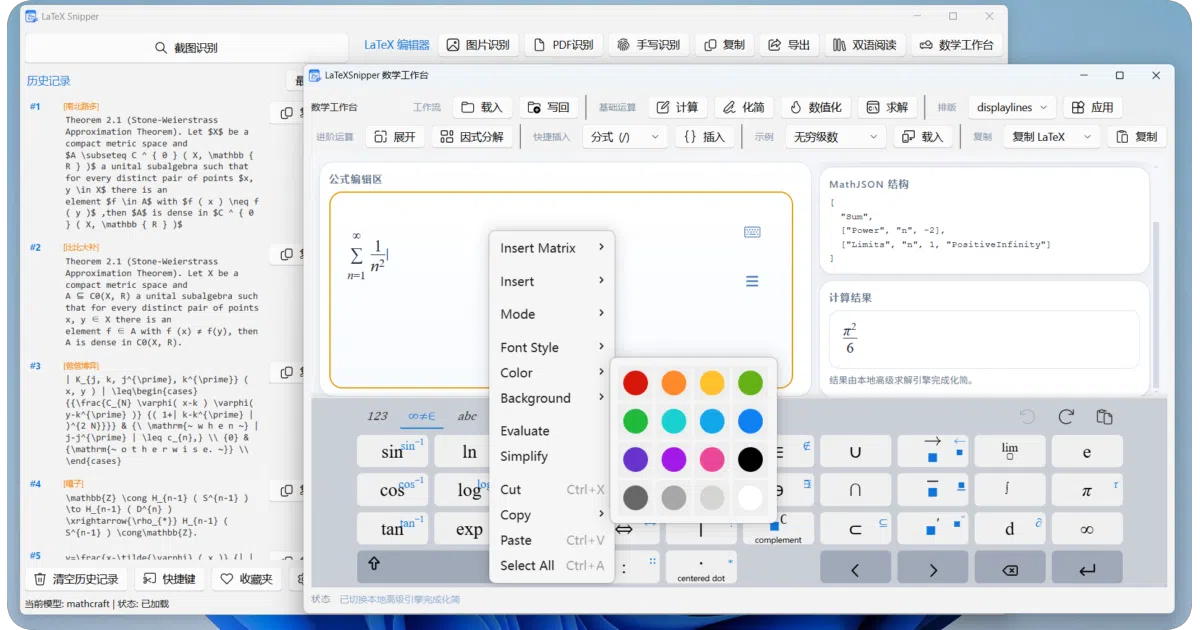
What it does LaTeXSnipper is a desktop application for Windows, Linux, and macOS that ingests math from screenshots, PDF pages, or handwriting and converts it into editable LaTeX. It provides a dedicated math workbench for editing expressions with a virtual keyboard, running symbolic computations like simplify or solve, and exporting the results to around twenty formats including Markdown, MathML, SVG, and native Microsoft Office formats.
The interesting bit The project’s real trick is a Windows Office plugin that does not just paste a picture but inserts native OMML formulas into Word and PowerPoint with full metadata, automatic numbering, and renumbering—while keeping the original LaTeX source intact for later edits. For privacy-conscious users, the recognition stack and computation engine can run entirely offline.
Key highlights
- Recognizes printed formulas, mixed text, PDF pages, and freehand handwriting via MathCraft OCR.
- Edits expressions in a
MathLivemath-field with live preview and a virtual symbol keyboard. - Exports to built-in LaTeX, MathML, HTML, SVG, and Word OMML; an optional
PANDOClayer adds Word, PowerPoint, ODT, EPUB, PDF, Typst, and plain text. - Windows Office plugin supports OLE formula insertion, local vector rendering, automatic numbering, and screenshot capture directly from Word or PowerPoint.
- Runs offline for both OCR and computation; light and dark themes available across all windows.
Caveats
- Windows is the primary release target with a bundled Python runtime; Linux and macOS rely on a locally installed Python between 3.10 and 3.13, and macOS requires granting Screen Recording permission.
- Several export formats—including Word, PowerPoint, PDF, and Typst—are only available after installing an optional Pandoc dependency layer, and PDF export additionally needs a separate LaTeX engine.
- The Office plugin is Windows-only and targets desktop Office 2019 through Microsoft 365; it does not support web or mobile versions.
Verdict Worth a look if you regularly transcribe math from papers, slides, or whiteboards into documents and need the result to be editable rather than a static image. Skip it if you are looking for a simple command-line converter or a purely browser-based tool.
Frequently asked
- What is SakuraMathcraft/LaTeXSnipper?
- LaTeXSnipper bundles screenshot OCR, handwriting recognition, symbolic computation, and Office plugins into a single offline desktop app so you can actually use the math you capture.
- Is LaTeXSnipper open source?
- Yes — SakuraMathcraft/LaTeXSnipper is open source, released under the GPL-3.0 license.
- What language is LaTeXSnipper written in?
- SakuraMathcraft/LaTeXSnipper is primarily written in Python.
- How popular is LaTeXSnipper?
- SakuraMathcraft/LaTeXSnipper has 1k stars on GitHub.
- Where can I find LaTeXSnipper?
- SakuraMathcraft/LaTeXSnipper is on GitHub at https://github.com/SakuraMathcraft/LaTeXSnipper.