MuiseDestiny/zotero-gpt
ChatGPT moves into your reference manager
A Zotero plugin that lets you query, summarize, and automate research papers without leaving your library.
Not currently ranked — collecting fresh signals.
star history
What it does
This is a Zotero plugin that embeds a GPT chat window directly inside the reference manager. You can ask questions about selected PDF text, summarize papers from their abstracts, or search your entire library using natural language. It supports OpenAI’s gpt-3.5-turbo and gpt-4, with configurable API keys, endpoints, and temperature settings.
The interesting bit
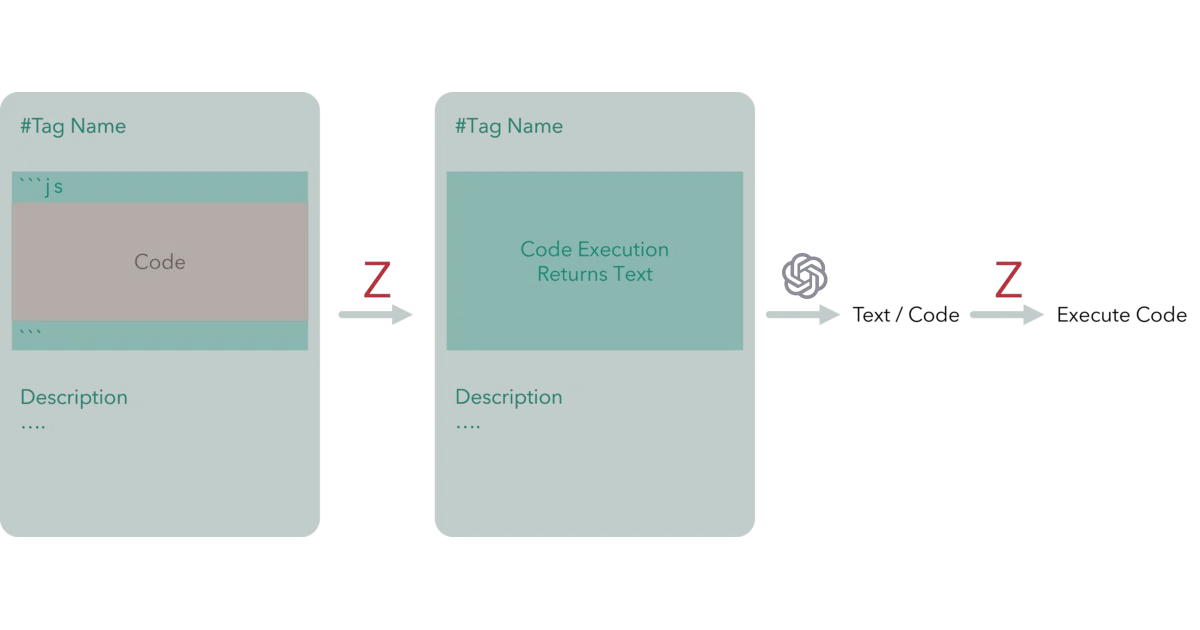
The real hook is “command tags” — reusable buttons you create with a mix of plain text and JavaScript snippets that pull live data from Zotero (like ${Meet.Zotero.getPDFSelection()}). The code executes, gets replaced by its output, and the whole thing ships to GPT. It’s a crude but effective way to script your own research automations without building a full integration.
Key highlights
- One-click summaries, Q&A on PDFs or abstracts, and library search via customizable tags
- Real-time markdown rendering with LaTeX/MathJax support in the reply window
- Floating, resizable, repositionable chat window with zoom and copy-to-clipboard
- Works with both Zotero 6 and Zotero 7; integrates with the Better Notes plugin
- Chat history navigable with arrow keys; error messages surface when API calls fail
Caveats
- Requires bringing your own OpenAI API key; no local model support mentioned
- The README’s “How to use” section has an unchecked download link, suggesting the install path may not be fully maintained
- Command tag creation involves memorizing
Ctrl+R/Ctrl+Sshortcuts and long-press interactions that aren’t exactly discoverable
Verdict
Grad students and researchers already living in Zotero who want to stop copy-pasting paper snippets into ChatGPT will get immediate value. If you don’t use Zotero or already have a preferred AI reading workflow, this is just another browser tab you don’t need.
Frequently asked
- What is MuiseDestiny/zotero-gpt?
- A Zotero plugin that lets you query, summarize, and automate research papers without leaving your library.
- Is zotero-gpt open source?
- Yes — MuiseDestiny/zotero-gpt is open source, released under the AGPL-3.0 license.
- What language is zotero-gpt written in?
- MuiseDestiny/zotero-gpt is primarily written in TypeScript.
- How popular is zotero-gpt?
- MuiseDestiny/zotero-gpt has 7.5k stars on GitHub.
- Where can I find zotero-gpt?
- MuiseDestiny/zotero-gpt is on GitHub at https://github.com/MuiseDestiny/zotero-gpt.