Linzaer/Face-Track-Detect-Extract
Face extraction pipeline that skips the awkward profile shots
A practical Python tool that detects, tracks, and cherry-picks the best frontal face from crowded video frames for training data or recognition backends.
Not currently ranked — collecting fresh signals.
star history
What it does
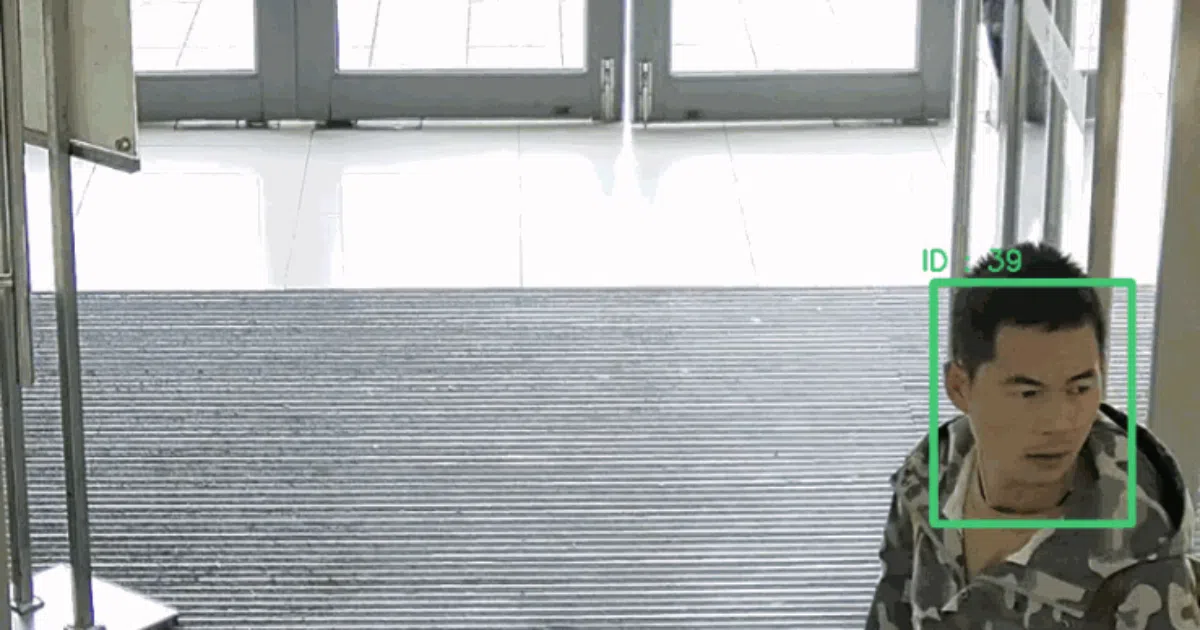
Feed it video with multiple people; it detects faces via MTCNN, tracks them across frames with a Kalman filter (via SORT), and outputs only the “optimal” face per person—meaning frontal poses, not side glances. Extracted faces land in ./facepics, optionally with 5 landmarks drawn on.
The interesting bit
The “optimal face” selection is the practical hook. Rather than dumping every detected frame, it filters for quality—useful when you’re building a clean training set and don’t want CNNs learning from half-profile noise. The README is admirably direct about this being glue code: MTCNN + SORT + some heuristics, wired together for a specific pipeline job.
Key highlights
- MTCNN detection + Kalman/SORT tracking for multi-face persistence across frames
- Automatic filtering: excludes side faces, picks the best frontal shot per tracked identity
- Optional 5-point face landmark overlay via
--face_landmarks - Explicitly pitched for two jobs: CNN training set curation and face recognition backend feeding
- Python 3.5+, TensorFlow, Numba, OpenCV stack
Caveats
- README doesn’t specify how “optimal” is scored—pose angle? detection confidence? both? The logic isn’t visible
- No mention of performance numbers, GPU requirements, or batch processing limits
- Output directory is hardcoded to
./facepics; no config file or CLI path override shown
Verdict
Worth a look if you’re currently hand-curating face training data from video or need a preprocessing step before recognition. Skip it if you need real-time streaming at scale or want fine-grained control over quality thresholds—the README keeps those details to itself.
Frequently asked
- What is Linzaer/Face-Track-Detect-Extract?
- A practical Python tool that detects, tracks, and cherry-picks the best frontal face from crowded video frames for training data or recognition backends.
- Is Face-Track-Detect-Extract open source?
- Yes — Linzaer/Face-Track-Detect-Extract is open source, released under the MIT license.
- What language is Face-Track-Detect-Extract written in?
- Linzaer/Face-Track-Detect-Extract is primarily written in Python.
- How popular is Face-Track-Detect-Extract?
- Linzaer/Face-Track-Detect-Extract has 622 stars on GitHub.
- Where can I find Face-Track-Detect-Extract?
- Linzaer/Face-Track-Detect-Extract is on GitHub at https://github.com/Linzaer/Face-Track-Detect-Extract.