JCodesMore/ai-website-cloner-template
Reverse-engineer websites by unleashing AI agents in parallel
A Next.js template that turns AI coding agents into a website reconstruction crew, complete with design-token extraction and parallel worktree builds.
Feature · 30 Jun 2026
How a Next.js Template Became the Assembly Line for AI Clones
This template orchestrates AI agents into a pipeline that reverse-engineers live websites into componentized Next.js code.
Read the in-depth article →
Velocity · 7d
+59
★ / day
Trend
↘cooling
star history
What it does
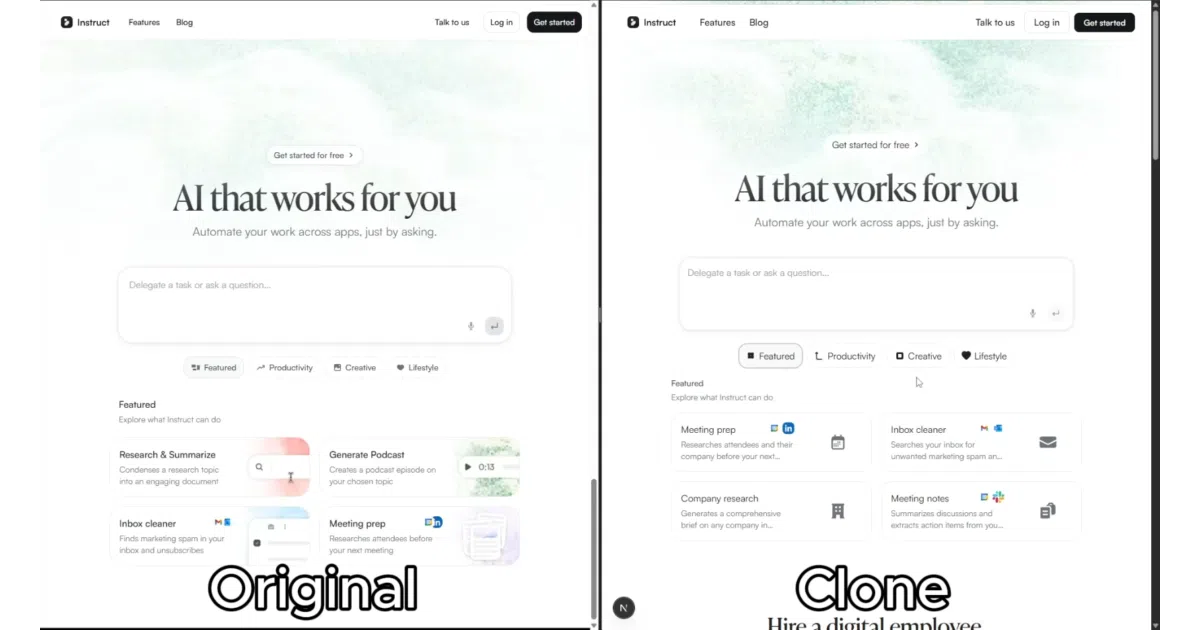
This is a Next.js 16 boilerplate wrapped around a detailed prompt chain. You feed it a target URL through an AI coding agent, and the template orchestrates the agent to screenshot the site, extract design tokens and assets, write per-component specs into docs/research/components/, and dispatch parallel builder agents in isolated git worktrees. Once the sections are built, it merges them and runs a visual diff against the original. It is essentially scaffolding plus a very specific instruction set for cloning UIs.
The interesting bit
Instead of asking one AI to memorize an entire website, the project treats reconstruction like an assembly line. A reconnaissance phase captures exact getComputedStyle() values, interaction states, and responsive breakpoints, then farms out parallel builds to separate agents—each working from a frozen spec in its own worktree. The boring orchestration layer is the whole product here.
Key highlights
- Supports a wide roster of agents: Claude Code (recommended with Opus 4.7), Cursor, Codex CLI, GitHub Copilot, Windsurf, Gemini CLI, Cline, and others.
- The pipeline covers reconnaissance, foundation setup, component spec writing, parallel worktree builds, and visual QA.
- Built on Next.js 16, React 19, TypeScript strict, Tailwind CSS v4 with oklch tokens, and shadcn/ui primitives.
- Two source-of-truth files—
AGENTS.mdand.claude/skills/clone-website/SKILL.md—sync platform-specific instructions automatically.
Caveats
- Not a standalone tool: it requires a separate AI coding agent and Node.js 24+; the template does nothing on its own.
- The README explicitly prohibits deceptive use and warns that some sites block scraping, so this is strictly for sites you own or have permission to clone.
- The onboarding guidance is inconsistent: one version of the README tells users to create a repository from the template, while another version says to clone the repository directly.
Verdict
Best for developers migrating a site they own from WordPress or Webflow into a modern React stack, or recovering lost source code. Skip it if you want a scraper that works without an AI agent in the loop.
Frequently asked
- What is JCodesMore/ai-website-cloner-template?
- A Next.js template that turns AI coding agents into a website reconstruction crew, complete with design-token extraction and parallel worktree builds.
- Is ai-website-cloner-template open source?
- Yes — JCodesMore/ai-website-cloner-template is open source, released under the MIT license.
- What language is ai-website-cloner-template written in?
- JCodesMore/ai-website-cloner-template is primarily written in TypeScript.
- How popular is ai-website-cloner-template?
- JCodesMore/ai-website-cloner-template has 37.4k stars on GitHub and is currently cooling off.
- Where can I find ai-website-cloner-template?
- JCodesMore/ai-website-cloner-template is on GitHub at https://github.com/JCodesMore/ai-website-cloner-template.