HKUDS/nanobot
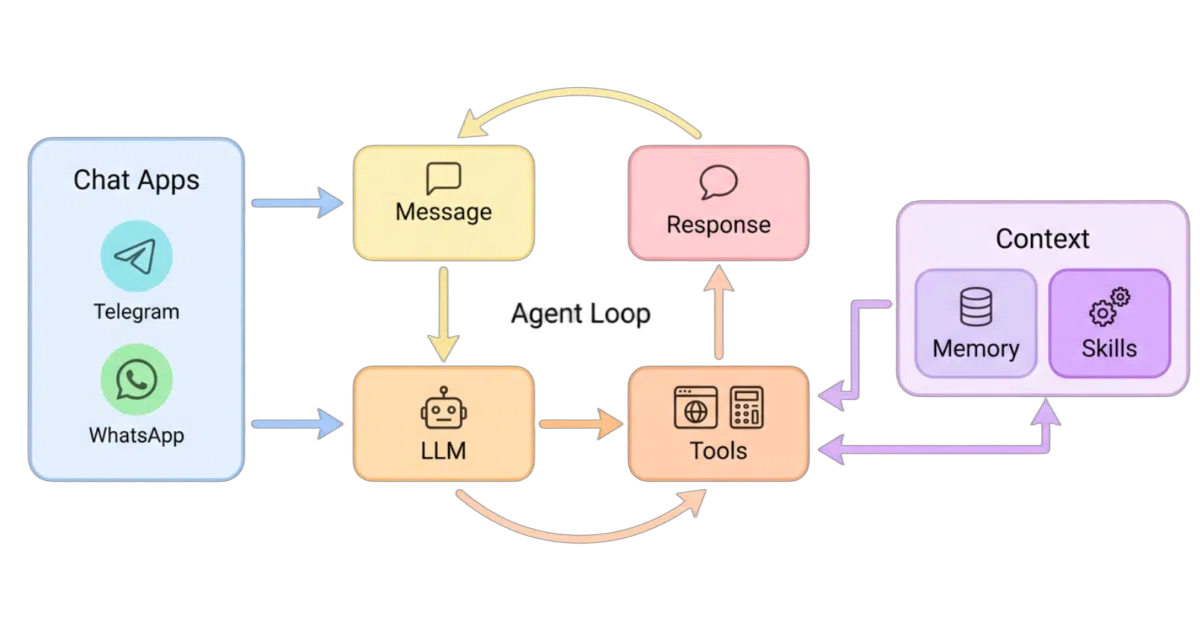
An ultra-lightweight agent that lives in your chat apps
nanobot keeps the agent loop tight and deploys it wherever your team already talks.
Velocity · 7d
+28
★ / day
Trend
→steady
star history
What it does nanobot is a self-hostable AI agent runtime that packages a compact core with the infrastructure long-running agents actually need: a built-in WebUI, tool use, memory, model routing, and sandboxed execution. You connect it to an LLM provider and it can maintain sustained objectives, edit files, and respond to you inside Telegram, Discord, Slack, Feishu, WeChat, or a local browser window.
The interesting bit
The project deliberately replaced litellm with native openai and anthropic SDKs to keep the dependency tree shallow. Its WebUI is shipped inside the Python wheel itself, so the workbench frontend requires no separate build step.
Key highlights
- Bundled WebUI with project workspaces, live file-edit tracking, and model context controls.
- Native MCP support, sandboxed shell execution, and cron-style reminders.
- Broad provider support with automatic fallback models when a primary endpoint fails.
- Cross-channel sessions spanning Telegram, Discord, Slack, Feishu, WeChat, WhatsApp, Matrix, and others.
/goalcommand lets the agent hold long-horizon objectives across multiple conversation turns.
Verdict Good fit if you want a hackable, self-hosted agent that lives in your existing chat infrastructure rather than a proprietary cloud. Skip it if you need a managed, zero-config SaaS or a purely terminal-based coding agent.
Frequently asked
- What is HKUDS/nanobot?
- nanobot keeps the agent loop tight and deploys it wherever your team already talks.
- Is nanobot open source?
- Yes — HKUDS/nanobot is open source, released under the MIT license.
- What language is nanobot written in?
- HKUDS/nanobot is primarily written in Python.
- How popular is nanobot?
- HKUDS/nanobot has 49.4k stars on GitHub and is currently holding steady.
- Where can I find nanobot?
- HKUDS/nanobot is on GitHub at https://github.com/HKUDS/nanobot.