Edwardxlai/easyread
The paper translator that refuses to hide the original PDF
EasyRead translates English papers into typeset Chinese page by page — and keeps the original one click away, because a translation you can't check is a translation you can't trust.
Feature · 04 Oct 2026
The Paper Translator That Throws the PDF Away
EasyRead treats academic translation as a typesetting problem rather than an overlay problem — and keeps every note, highlight, and conversation on your own disk.
Read the in-depth article →
Velocity · 7d
+60
★ / day
Trend
↗accelerating
star history
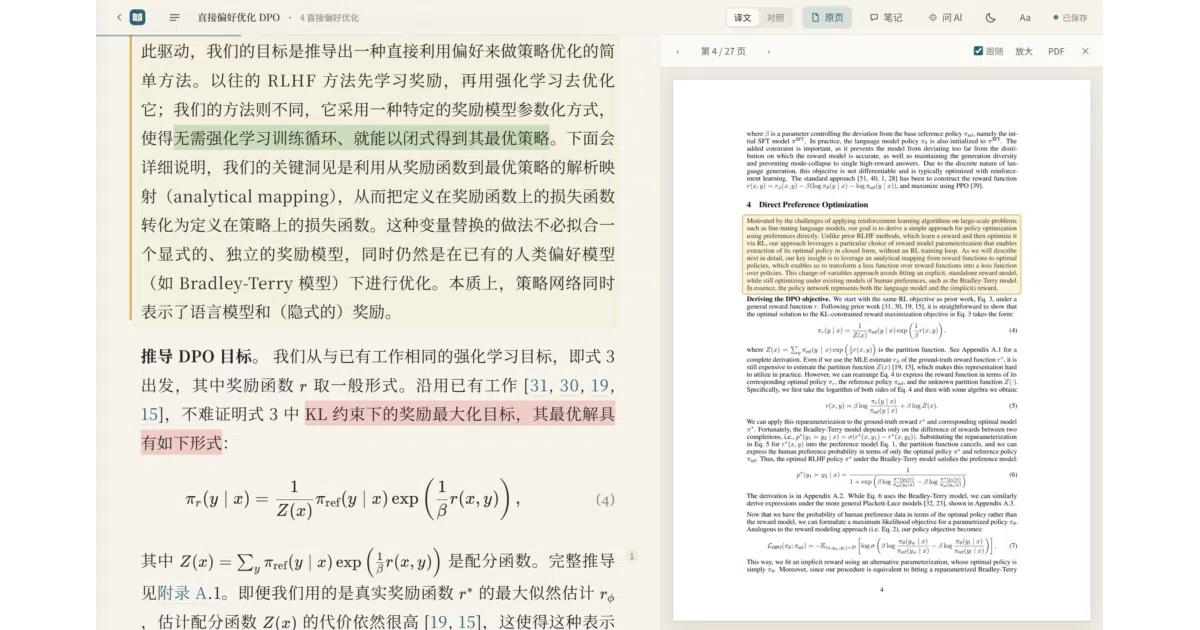
What it does EasyRead accepts any PDF — or an arXiv ID, DOI, or a link from OpenReview, ACL, NeurIPS, bioRxiv or PMC, in which case it fetches the public PDF plus authors, year and venue — and translates it into Chinese in the background, page by page. The output is typeset like a book rather than a wall of machine text: KaTeX formulas re-laid from the original, three-line tables, references left in English; translated pages are readable while the rest still shows the original. Around the translator sits a reference manager — categories, stars, reading progress, citations in GB/T 7714, APA and BibTeX, single-file offline HTML export — plus an annotation layer of highlights, notes and questions. Under the hood it’s a local Python service with a web UI (an Electron shell for the desktop builds), listening only on localhost.
The interesting bit
The design keeps translation and commentary strictly separate: the body carries only the faithful translation, and the AI’s explanations sit in the margin, so you always know which sentence is the paper’s. Every paragraph can be checked against the English original, and the original-page view follows your reading position, framing the paragraph you’re on. It also ships a CLI and a skill file (skill/paper-reading/SKILL.md), so agents like Claude Code or Codex can read your notes, answer them beside the relevant paragraphs, or re-translate specific pages themselves.
Key highlights
- Comparison mode: each paragraph followed by its English, plus an original-page view that tracks your position and outlines the current paragraph.
- Ask-AI panel with streaming answers, multiple conversations and per-conversation model choice — Claude, GPT (Codex), DeepSeek, local Ollama, or any OpenAI-compatible endpoint; questions can quote several paragraphs and even find your color-coded highlights.
- Annotations with an exit: four-color highlights, notes and questions compile in reading order and export as Markdown; fix a term in the glossary and it’s replaced across the whole text.
- Engine flexibility with accounting: Claude Code and Codex CLI run on an existing subscription with no API key, Ollama or LM Studio make it fully offline, and every translation and answer logs its token use — including Claude subscription quota windows.
- Edits are treated as precious: changes are held in the browser until the local service confirms they’re on disk, and if the translation provider later revises a paragraph you’ve edited, it prompts rather than overwrites.
Caveats
- The installers are unsigned — Windows SmartScreen will object, and the macOS build is temporarily signed without notarization, so first launch involves some ceremony.
- Translation quality is engine-dependent, and the README’s own ranking puts Claude Code first (it checks formulas against page images) — implying the cheaper paths give up some quality.
- Whole-paper translation asks for confirmation past 60 pages by default: a sensible guard, and a fair reminder that long papers cost real tokens.
Verdict If you read English papers and think in Chinese, this covers the entire pipeline — translation, verification, annotation, library — in one local app, and the original-always-in-reach design is the right instinct. Other target languages exist (Japanese, Korean, Spanish, French, German), but the citation formats and provider list make clear who this is for.
Frequently asked
- What is Edwardxlai/easyread?
- EasyRead translates English papers into typeset Chinese page by page — and keeps the original one click away, because a translation you can't check is a translation you can't trust.
- Is easyread open source?
- Yes — Edwardxlai/easyread is open source, released under the MIT license.
- What language is easyread written in?
- Edwardxlai/easyread is primarily written in Python.
- How popular is easyread?
- Edwardxlai/easyread has 1.4k stars on GitHub and is currently accelerating.
- Where can I find easyread?
- Edwardxlai/easyread is on GitHub at https://github.com/Edwardxlai/easyread.