Edwardxlai/easyread · 04 Oct 2026 · Feature
The Paper Translator That Throws the PDF Away

Giulia Conti
Editor
EasyRead treats academic translation as a typesetting problem rather than an overlay problem — and keeps every note, highlight, and conversation on your own disk.
Edwardxlai/easyread
★670 stars
Reading a research paper in a language you didn’t grow up in has always been an act of degradation. You either read slowly in the original, or you feed the PDF to a translator and watch the layout die: columns collapse, equations become ASCII soup, figure captions wander off to live with strangers. The commercial tools have largely accepted this as the price of admission. When Immersive Translate ranked the top AI translators for academic papers, it weighted “PDF layout preservation” at thirty points out of a hundred — the industry’s implicit consensus being that the best you can hope for is a translation that breaks the original document as gently as possible.
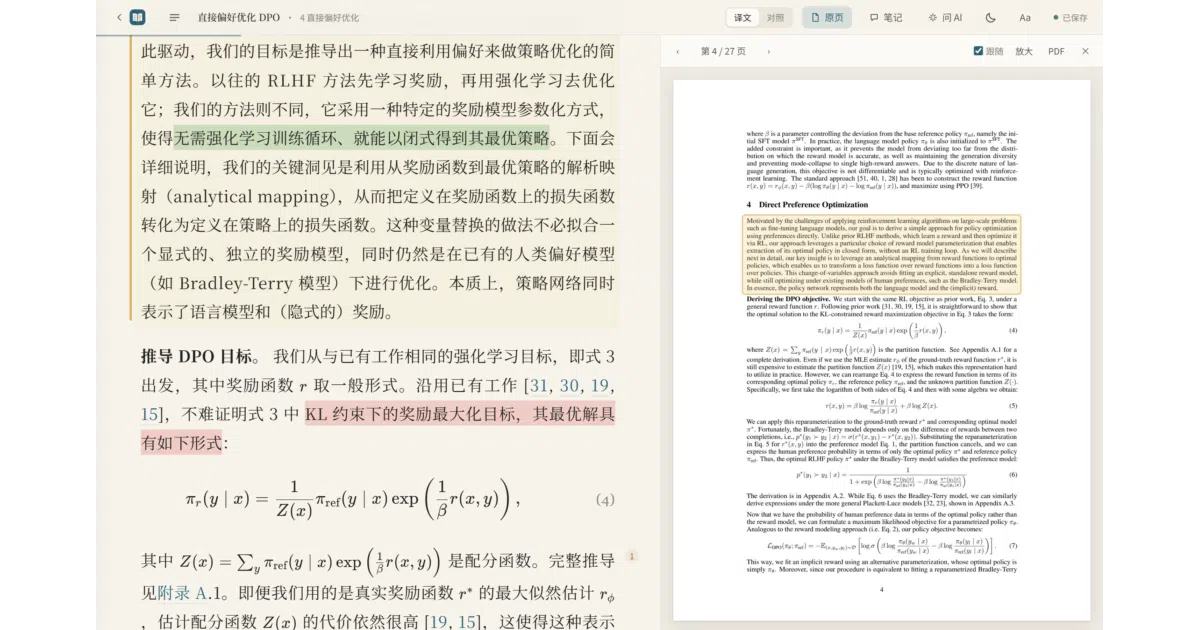
EasyRead, a small open-source project by Edwardxlai, makes the opposite bet: don’t preserve the PDF at all. Throw it away and rebuild the paper.
Rebuild, don’t overlay
The core insight is unglamorous and correct: a translated paper should read like a book that was typeset in the target language, not like a foreign document wearing a translation as a costume. EasyRead’s output is a re-laid-out document — Chinese body text in a serif face with comfortable line width and leading, mathematical formulas re-rendered with KaTeX rather than mangled through a text pipeline, tables rebuilt as proper three-line academic tables, and references left in the original language where they belong.
The original PDF doesn’t disappear; it becomes a reference artifact. A side-by-side mode puts the English source under each translated paragraph, and an original-page view tracks your reading position, even drawing a box around where the current paragraph sits on the raw page. The translation is the primary object; the PDF is the audit trail. That inversion — treating the source as the annotation rather than the target — is the whole trick, and it’s the thing overlay-based tools structurally cannot do.
An epistemic firewall between translation and commentary
The second design decision deserves more attention than it will probably get. EasyRead keeps AI-generated explanation strictly out of the translated body text. The main text holds only the faithful translation; the model’s answers, summaries, and commentary live in the margin, visually and structurally separate. At a glance, you always know which sentence is the paper’s and which is the machine’s editorializing.
This sounds like a minor UI preference. It isn’t. The failure mode of every “chat with your PDF” tool is the blending of source and inference — the model’s paraphrase of a claim becomes, in the reader’s memory, the claim itself. EasyRead’s margin discipline is a hallucination containment strategy disguised as layout. You can ask the AI questions against selected paragraphs, drag multiple passages into a conversation, even ask it about the relationships between formulas you’ve highlighted in specific colors — and the answers still live in the margin, quotable and exportable but never mistaken for the paper.
The boring part is the point
Under the hood, EasyRead is aggressively unfashionable, and that appears to be deliberate. The backend is Python standard library plus PDF-processing libraries. The frontend is plain HTML, CSS, and JavaScript with no build step. There is no database: each paper is a folder containing the original PDF, page images, and a handful of JSON files — translations, your notes, AI discussions, conversation logs. The project documents its reasoning for JSON-over-database in its design notes, and the practical consequence is that your entire research library is a directory tree you can back up, diff, or drop into the sync folder of whatever cloud service you already pay for. The service listens only on localhost. Nothing phones home because there is nothing to phone home to.
The data-integrity behavior is similarly old-school in the best way. Edits you make in the browser are held there until the local service confirms they’ve been written to disk. If the translation provider later revises a paragraph you’ve personally edited, EasyRead notices and prompts rather than silently overwriting your work. These are the kinds of guarantees that sound boring until the day they save you.
Bring your own model — all of them
EasyRead is model-agnostic to an almost indecent degree. The recommended path is Claude Code, which uses an existing subscription rather than an API key and — according to the project — consults the original page images to verify formulas, which is a genuinely sensible use of multimodal capability for a translation task. Beyond that: Codex CLI with a ChatGPT account; direct API connections to DeepSeek, Zhipu, Alibaba, Kimi, SiliconFlow, and ModelScope for users in mainland China; OpenAI, Anthropic, Gemini, OpenRouter, Groq, and Cerebras for everyone else; local Ollama or LM Studio for fully offline operation; and any OpenAI-compatible endpoint, including relay services, for the stubbornly self-hosted. The project claims a twenty-page paper costs a few mao via DeepSeek, and free options exist on several routes.
Two smaller touches stand out. Every translation and every AI answer is logged with its token cost, and Claude subscribers can see their five-hour and seven-day quota burn — a small act of transparency that most tools wrapping LLMs conspicuously avoid. And when a page fails mid-translation due to rate limits or network trouble, the scheduler skips it, keeps translating the rest, and offers a one-click retry of just the failures. Boring reliability engineering, again.
The agent hook
The most forward-looking feature is also the quietest: a command-line interface. EasyRead exposes its library to the terminal — list the collection, import a paper, check the status of translations and pending questions, write a discussion into the margins, export a self-contained HTML file. The project ships a skill definition so that agent tools like Claude Code and Codex can operate the reader directly: reading your notes and unanswered questions, writing their responses next to the relevant paragraphs, or retranslating specific pages on request.
This inverts the usual relationship between reading tools and AI. Most products put the model inside the app and let you talk to it through a chat box someone else designed. EasyRead makes the reading environment itself programmable — your highlights, notes, and open questions become structured state that an external agent can read and act upon. Whether this pattern generalizes beyond the Claude Code demographic is an open question, but as a demonstration of what “agent-native” software might look like for a mundane desktop task, it’s more convincing than most.
ASD-STE100, honestly labeled
A curious detail: the question-answering panel offers an optional mode borrowing principles from ASD-STE100, the aerospace industry’s controlled-English standard — short sentences, active voice, consistent terminology — applied to simplified Chinese answers, with professional terms, formulas, and numerical values preserved. The project is scrupulously honest about what this is and isn’t: it explicitly states that the mode draws on the standard’s principles for Chinese writing assistance and does not certify output as conforming to the English standard. Long answers are excerpted with the basis of the response declared. In a field where products routinely slap “STE-certified” on anything with short sentences, the disclaimer is almost charming.
Where it sits, and where it rubs
Context matters here. The AI translation market is crowded and mostly browser-shaped: Immersive Translate claims twenty million users with a side-by-side bilingual overlay model; DeepL dominates European-language quality; enterprise platforms like Lokalise sell governed, RAG-grounded localization pipelines to product teams. EasyRead competes with none of them directly. It’s a desktop-local, reader-first, annotation-centric tool whose closest analogues are reference managers and PDF readers, not translation services. The translation is the entry point; the library management, the four-color highlighting, the citation export in GB/T 7714, APA, and BibTeX, the single-file offline HTML you can send to a colleague who has nothing installed — that’s the actual product.
The rough edges are visible and worth naming. The name is a liability: “Easyread” is also a children’s phonics subscription running $198 a month, and “Easy Read” is an established accessibility format in the UK for people with learning disabilities — anyone searching for this tool wades through literacy programs and NHS guidance before finding a GitHub repository. The installers are unsigned — Windows will warn you, and macOS requires the familiar quarantine-attribute ritual the README documents with unusual care, including an honest note that a “damaged” file might actually be damaged. Offline HTML exports are chunky, roughly ten megabytes for a twenty-seven-page paper, because the page images are bundled in; and annotations made inside an exported file live only in that browser until merged back through a JSON round-trip. The project is Chinese-first, with an English README but a Chinese-primary community, and the contributor list is small — five named people, which is either a limitation or evidence of how much a focused design can accomplish with modest manpower.
What the sources here cannot establish is scale. There are no star counts, download numbers, or adoption anecdotes in the available material — only a release cadence, a cross-platform test badge, and a changelog that suggests steady, unspectacular momentum. Whether EasyRead is quietly spreading through Chinese research groups or remains a connoisseur’s tool is genuinely unclear, and anyone claiming a hype wave should be asked for receipts.
Outlook
The interesting question isn’t whether EasyRead wins the paper-translation category — a category its own participants admit is commoditized. It’s whether the project’s three commitments — rebuild instead of overlay, separate translation from inference, keep the data as plain files an agent can manipulate — point at a broader template for how reading software should behave in an era of cheap models. The JSON-per-paper format and the agent-facing CLI are the load-bearing pieces. If external tools start treating a personal research library as a programmable surface rather than a walled garden, EasyRead will have been an early, modest proof. If not, it remains a very good way to read arXiv in Chinese — which, to be fair, is what it set out to be.
Sources
- Easyread Homepage 260323
- 10 Best AI Translators for Academic Papers (2026)
- Is AI in anyway useful while reading research papers? : r/PhD
- Easyread System Free Trial
- The best AI translation tools in 2026
- AI Powered Research Paper Translation
- Helping Children Learn To Read with Synthetic Phonics
- Using AI for Translation | Academic Skills Kit
- Using AI to Read Technical Research Papers
- What is Easy Read?
- thesis-help: best AI tool for reading research papers and extracting ...
- AI for translations?