z91772524-ai/pojia-next
One exe, fifteen AI clients, your system prompt instead of theirs
A Windows GUI tool that swaps the hidden built-in prompts of 15 AI coding clients with your own persona file — with backups, rollback, and a passphrase to prove it worked.
Collecting fresh signals — velocity needs a few days of history.
collecting data…
star history
What it does
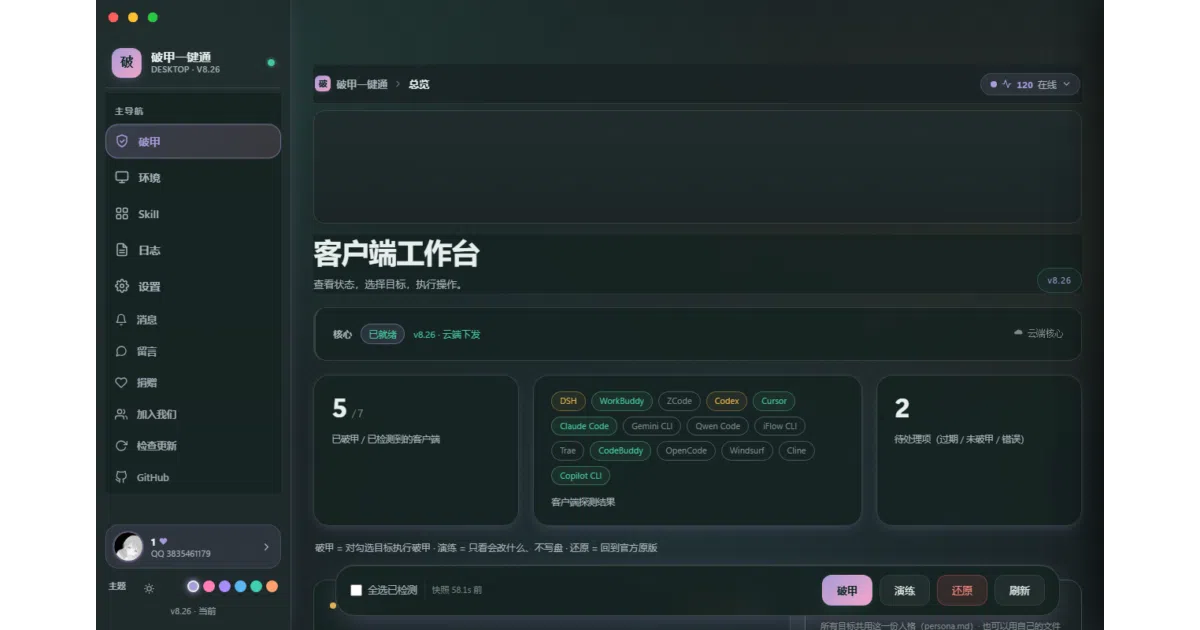
Every AI client (Cursor, Claude Code, Codex, DSH, WorkBuddy, Gemini CLI, and ten more) ships a built-in system prompt you can’t edit — the “rules” the model silently follows. 破甲一键通 (“one-click armor-breaker”) replaces those local prompt files with your own persona.md, applied identically across all fifteen clients. It’s a single-file Windows exe with a native GUI: no Python install, no command line. It only patches text files — no package removal, no registry or service changes.
The interesting bit
The verification trick is genuinely smart: instead of asking the model “what mode are you in” (which just invites it to agree with you), you send a fixed passphrase — 破甲自检 — and expect exactly one canned reply. That’s a real falsifiable test for prompt injection, not vibes. The tool also credits its lineage openly: the core technique comes from a family of dsh-purge projects, all MIT-attributed.
Key highlights
- Fully managed flow since v8.26: kills the client process, injects, restarts it automatically, with live step-by-step status
- Every change is backed up first; one-click restore to the official original
- “演练” (dry-run) mode shows exactly which files would be touched, writing zero bytes
- Core logic makes zero network requests (asserted in CI); GUI only touches localhost plus downloads you explicitly trigger
- Environment tab detects missing runtimes (Python, Node, WebView2, ADB) and installs them from official sources
Caveats
- This sits squarely in a gray zone of the clients’ terms of service — the README itself warns your account is at your own risk
- Source code is no longer distributed with the repo; only the finished exe ships in Releases, so “open source” here means the license and process, not auditable code in-tree
- The exe is unsigned, so SmartScreen will complain; the README points to hash verification as the workaround
- First launch requires entering a QQ group number for online verification — an odd gate for a tool that otherwise emphasizes local-first operation
Verdict
Worth a look if you run several of these clients and want one consistent persona across all of them, and you accept the ToS risk. Skip it if you need auditable source or are wary of gray-area client modification.
Frequently asked
- What is z91772524-ai/pojia-next?
- A Windows GUI tool that swaps the hidden built-in prompts of 15 AI coding clients with your own persona file — with backups, rollback, and a passphrase to prove it worked.
- Is pojia-next open source?
- Yes — z91772524-ai/pojia-next is open source, released under the MIT license.
- What language is pojia-next written in?
- z91772524-ai/pojia-next is primarily written in Python.
- How popular is pojia-next?
- z91772524-ai/pojia-next has 1k stars on GitHub.
- Where can I find pojia-next?
- z91772524-ai/pojia-next is on GitHub at https://github.com/z91772524-ai/pojia-next.