yuvalsuede/ai-component-generator
ChatGPT as your junior frontend intern
A thin Next.js wrapper that turns natural language into copy-paste UI components via OpenAI's API.
Not currently ranked — collecting fresh signals.
star history
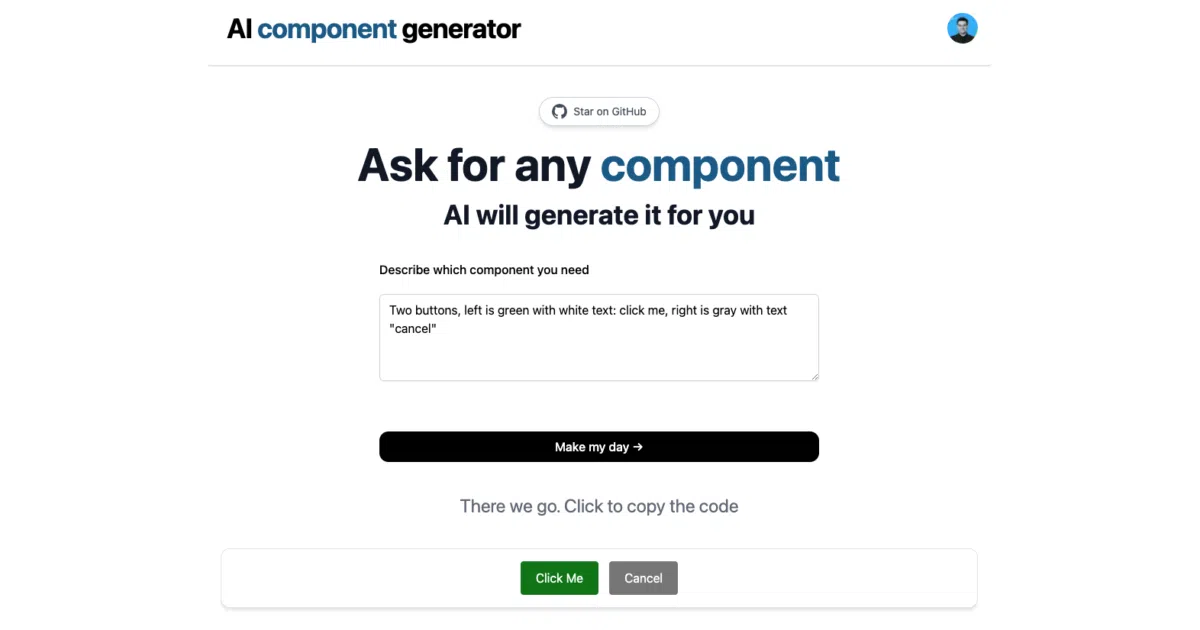
What it does You type a description like “a 200×100 light-purple button with text on it.” The app fires that to the ChatGPT API through a Vercel Edge function, streams back the response, and dumps HTML or framework-specific code (Tailwind, Next.js, React, Material UI) into your clipboard. It’s a browser-based prompt engineering playground with a copy button attached.
The interesting bit
The whole “secret sauce” is visible in one handler file: the author hard-codes a few-shot example using the assistant role to teach GPT-3.5-turbo the exact output format—complete Next.js component first, then a follow-up nudge for Material-UI-styled HTML. That’s it. No fine-tuning, no AST parsing, no sandboxed preview. Just prompt gravity doing the work.
Key highlights
- Built with Next.js + TailwindCSS, deploy-to-Vercel in one click
- Supports HTML, Tailwind CSS, Next.js, React.js, or Material UI export
- Streams GPT responses via Vercel Edge functions for (theoretically) lower latency
- Few-shot prompting is exposed and editable in
/api/generate.ts - MIT licensed, 1,352 stars
Caveats
- The README’s own screenshot alt text still says “Twitter Bio Generator,” suggesting this repo was forked or rebranded without cleanup
- No visible error handling for malformed GPT output—you get what the model gives you
- Requires bringing your own OpenAI API key; no rate-limiting or cost controls mentioned
Verdict Grab this if you want a quick, hackable demo of LLM-to-code workflows or a starting point for an internal design-tool prototype. Skip it if you need reliable, production-grade component generation—this is essentially a polished prompt template with a web UI.
Frequently asked
- What is yuvalsuede/ai-component-generator?
- A thin Next.js wrapper that turns natural language into copy-paste UI components via OpenAI's API.
- Is ai-component-generator open source?
- Yes — yuvalsuede/ai-component-generator is an open-source project tracked on heatdrop.
- What language is ai-component-generator written in?
- yuvalsuede/ai-component-generator is primarily written in TypeScript.
- How popular is ai-component-generator?
- yuvalsuede/ai-component-generator has 1.3k stars on GitHub.
- Where can I find ai-component-generator?
- yuvalsuede/ai-component-generator is on GitHub at https://github.com/yuvalsuede/ai-component-generator.