youyuge34/Anime-InPainting
Paint over anime scars with an OpenCV paintbrush
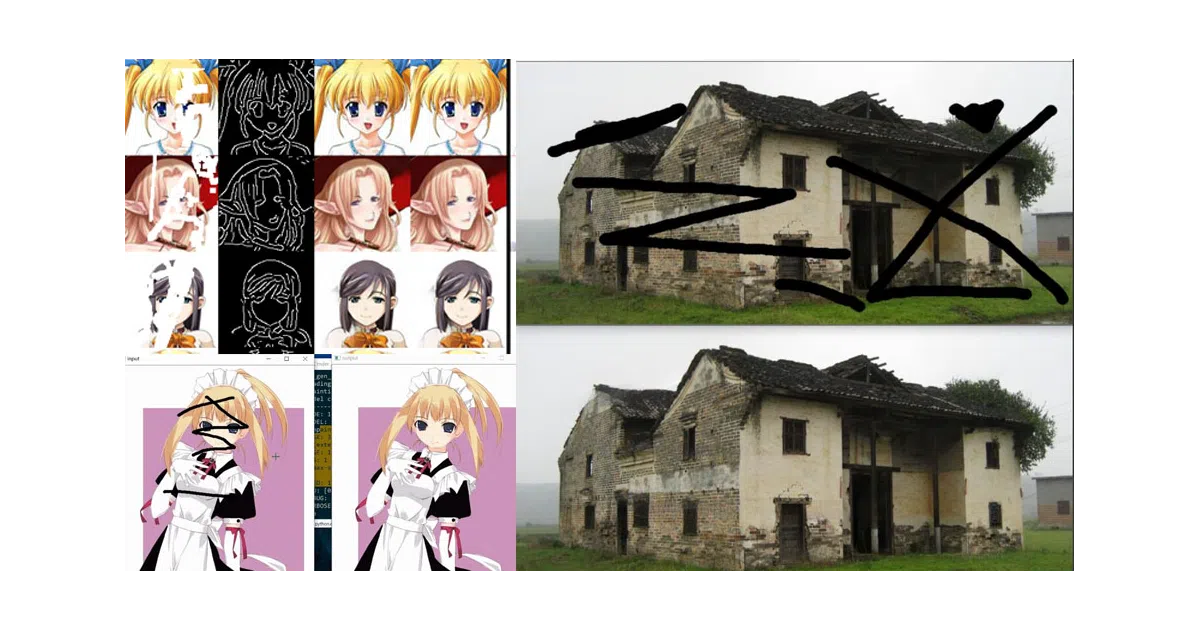
A practical OpenCV frontend that turns the Edge-Connect inpainting model into an interactive repair tool for anime artwork.
Not currently ranked — collecting fresh signals.
star history
What it does This project wraps the Edge-Connect deep-learning inpainting model in an OpenCV-based interactive tool. You paint over damaged or masked regions of anime images with a brush; the backend fills them in using edge-aware generative adversarial networks. It also bundles training optimizations like auto-saving weights and a condensed training phase.
The interesting bit The value is in the glue: the author turned a research codebase into something you can actually operate with mouse clicks and hotkeys. There’s even an optional “edge window” mode where you manually sketch structure lines to guide the reconstruction — half automation, half artist control.
Key highlights
- Interactive inpainting via
python tool_patch.pywith brush controls ([/]for size,n/efor patch modes) - Optional edge-editing window to manually guide the GAN’s structural understanding
- Training workflow improvements: auto-save/load weights, merged fast-training phase, CPU/GPU toggle in config
- Pre-trained weights available (anime face dataset), though the README warns these struggle with full-body shots
- CC BY-NC 4.0 license — non-commercial use only
Caveats
- The pre-trained model is tuned for anime faces, not whole characters; broader scenes need custom training
- Keys
0and1are listed as “Todo” in the manual — unfinished UI features still visible in the source - PyTorch 1.0 required; 0.4 explicitly breaks
Verdict Worth a look if you need to batch-restore or interactively repair anime-style artwork and want a GUI rather than notebook cells. Skip it if you need commercial licensing or production-grade generalization beyond the provided face-trained weights.
Frequently asked
- What is youyuge34/Anime-InPainting?
- A practical OpenCV frontend that turns the Edge-Connect inpainting model into an interactive repair tool for anime artwork.
- Is Anime-InPainting open source?
- Yes — youyuge34/Anime-InPainting is an open-source project tracked on heatdrop.
- What language is Anime-InPainting written in?
- youyuge34/Anime-InPainting is primarily written in Python.
- How popular is Anime-InPainting?
- youyuge34/Anime-InPainting has 1.1k stars on GitHub.
- Where can I find Anime-InPainting?
- youyuge34/Anime-InPainting is on GitHub at https://github.com/youyuge34/Anime-InPainting.