xingkongliang/skills-manager
Taming the sprawl of AI agent skills across 15+ tools
It treats AI agent skill files like a package library, syncing them across 15+ coding tools so you can stop copy-pasting markdown into scattered folders.
Velocity · 7d
+49
★ / day
Trend
↘cooling
star history
What it does
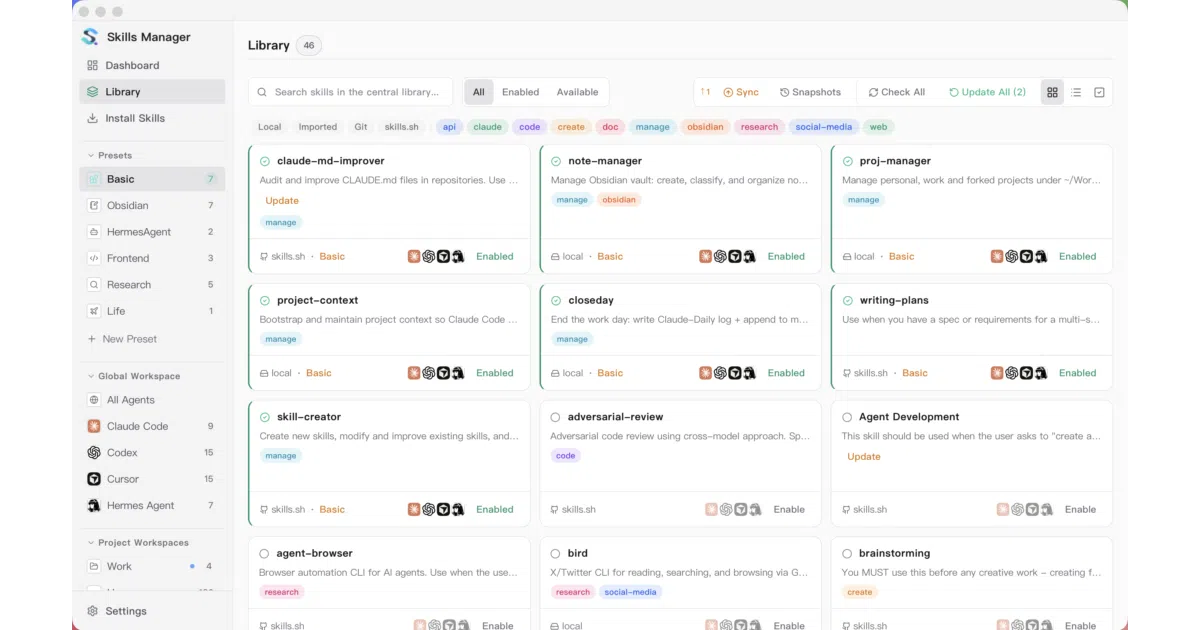
Skills Manager is a Rust-backed desktop app built with Tauri 2 and React that centralizes AI agent “skills” — the markdown instruction files that tell tools like Cursor or Claude Code how to behave. It ingests skills from Git repos, local folders, .zip archives, or the skills.sh marketplace into a single library under ~/.skills-manager, then syncs them to any of 15+ supported agents via symlink or copy. The app tracks upstream updates, tags skills for filtering, and manages both global per-agent folders and project-local skill directories.
The interesting bit
The architecture treats presets as one-time copy groups rather than live syncs: you build reusable skill sets, then deploy them to specific agents or projects on demand. It also version-controls the skill library through Git with snapshot restore, while keeping metadata in a local SQLite database that can be rebuilt from the files — a clean separation that keeps backup repos free of app state.
Key highlights
- Supports 15+ tools including Cursor, Claude Code, Codex, GitHub Copilot, Windsurf, and Gemini CLI, plus custom tool paths you define in Settings
- Presets let you toggle entire skill groups on or off per agent scope with a single click
- Project Workspaces manage nested, project-local skill directories and sync bidirectionally with the central library
- Built-in Git backup with automatic pull/commit/push and snapshot version history for multi-machine sync
- Includes a CLI that shares the same Rust core and SQLite database as the desktop app
- Skills can be installed from Git repos, local paths,
.zip/.skillarchives, or the marketplace with optional AI-powered search
Caveats
- The SQLite database is excluded from Git backup, so metadata must be rebuilt or migrated separately when moving to a new machine
- Preset activation is a one-time copy, not a live subscription; editing a preset does not automatically update skills already deployed to agent folders
- HTTPS Git remotes typically require a Personal Access Token for push access
Verdict
Grab it if you juggle multiple AI coding assistants and want to stop manually curating scattered skills folders. Skip it if you only use one tool or keep prompts inline — this solves a file-management problem, not a prompt-engineering one.
Frequently asked
- What is xingkongliang/skills-manager?
- It treats AI agent skill files like a package library, syncing them across 15+ coding tools so you can stop copy-pasting markdown into scattered folders.
- Is skills-manager open source?
- Yes — xingkongliang/skills-manager is open source, released under the MIT license.
- What language is skills-manager written in?
- xingkongliang/skills-manager is primarily written in Rust.
- How popular is skills-manager?
- xingkongliang/skills-manager has 6.8k stars on GitHub and is currently cooling off.
- Where can I find skills-manager?
- xingkongliang/skills-manager is on GitHub at https://github.com/xingkongliang/skills-manager.