x007xyz/flycut-caption
A React component that transcribes, edits, and exports subtitles without leaving the browser
Drop in a video, get AI-generated captions, tweak them visually, and export — all client-side.
Not currently ranked — collecting fresh signals.
star history
What it does
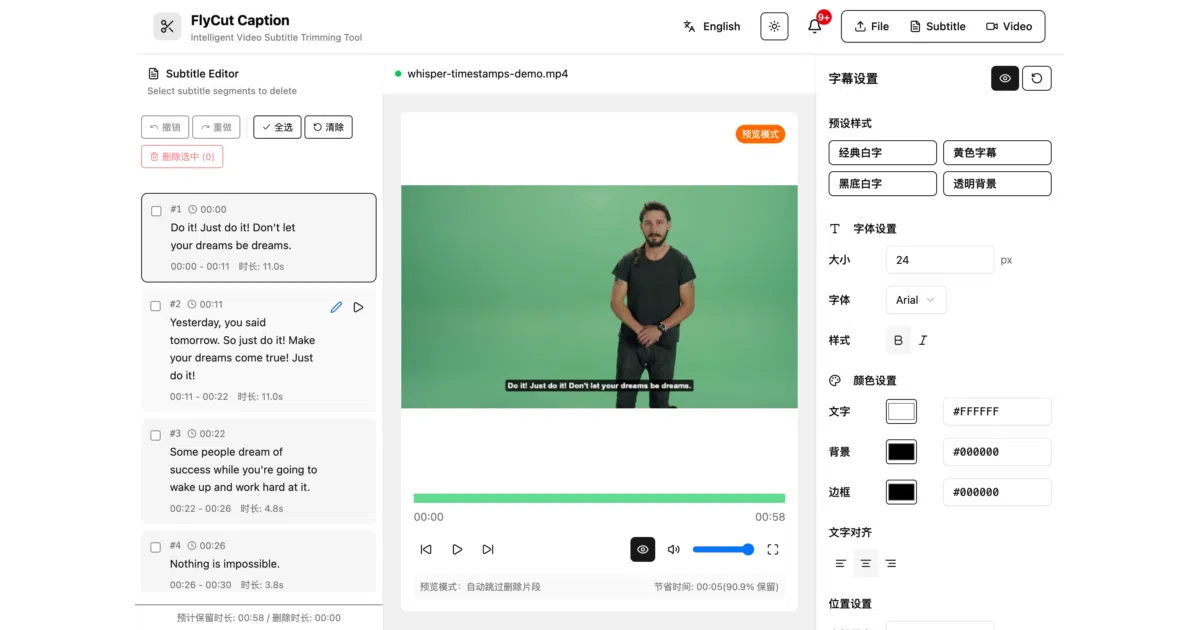
FlyCut Caption is a React component that wraps the entire subtitle workflow into one embeddable package: upload a video, run Whisper-based speech recognition locally in the browser, edit the resulting subtitle segments in a visual timeline, style them, and export to SRT, JSON, or a burned-in video. It targets React 19, ships with TypeScript definitions, and uses Tailwind CSS for its UI.
The interesting bit
The AI runs entirely in the browser via Hugging Face Transformers.js and Web Workers, meaning no backend or API keys are required for transcription. That is unusual for a tool in this category — most comparable projects either call a cloud service or require a local Python environment. The component also exposes a granular i18n API with built-in Chinese and English packs and a documented pattern for adding custom languages.
Key highlights
- Local Whisper inference via Transformers.js; no server round-trips for ASR
- Visual subtitle editor with segment selection, batch delete, undo/redo, and click-to-seek
- Real-time preview mode that skips deleted segments to simulate the final cut
- Subtitle styling controls (font, color, position, background, transparency) with WYSIWYG preview
- Exports SRT, JSON, or video with optional subtitle burn-in and quality settings
- Componentized i18n with
localeprop andonLanguageChangecallback for external sync
Caveats
- Only two built-in language packs (Chinese and English); others require manual construction of the full locale object
- Browser-based AI inference will be slower and more memory-constrained than a GPU-backed server; the README does not quantify this
- Video export is handled client-side, so performance and format support depend on the browser’s capabilities
Verdict
Worth a look if you need a drop-in subtitle editor for a React app and want to avoid backend infrastructure or third-party transcription bills. Less compelling if you are already invested in a server-side video pipeline or need production-grade rendering speed.
Frequently asked
- What is x007xyz/flycut-caption?
- Drop in a video, get AI-generated captions, tweak them visually, and export — all client-side.
- Is flycut-caption open source?
- Yes — x007xyz/flycut-caption is an open-source project tracked on heatdrop.
- What language is flycut-caption written in?
- x007xyz/flycut-caption is primarily written in TypeScript.
- How popular is flycut-caption?
- x007xyz/flycut-caption has 1.7k stars on GitHub.
- Where can I find flycut-caption?
- x007xyz/flycut-caption is on GitHub at https://github.com/x007xyz/flycut-caption.