victordibia/autogen-ui
AutoGen's official UI starter kit: more hello-world than product
A reference implementation showing how to wire AutoGen's multi-agent backend to a Next.js chat frontend, explicitly positioned as a jumping-off point rather than a finished tool.
Not currently ranked — collecting fresh signals.
star history
What it does
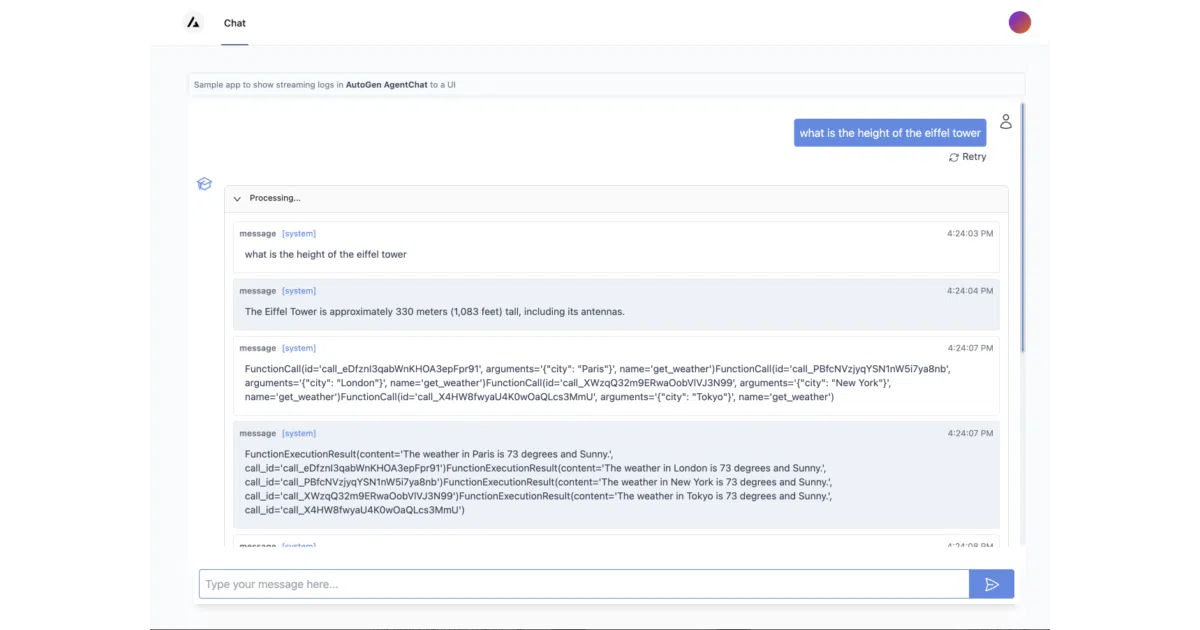
AutoGen UI is a minimal chat interface for Microsoft’s AutoGen multi-agent framework. A FastAPI backend exposes a single /generate endpoint that runs a predefined team of LLM agents against your prompt, then streams the results to a Next.js frontend. The whole thing is deliberately simple: one hardcoded agent team, no auth, no history database, no team switching from the UI.
The interesting bit
The project wears its limitations openly — the README literally says “this app is clearly just a starting point” and points you to AutoGen Studio for anything serious. That honesty is refreshing. What’s actually useful is seeing how the AgentChat API’s streaming fits into a modern web stack, with the manager class (autogenui.manager) handling the agent orchestration and the FastAPI layer dealing with SSE-style streaming to the client.
Key highlights
- Built against AutoGen 0.4x’s new AgentChat API (the README warns of future breaking changes)
- Agent team configuration lives in a JSON file (
notebooks/default_team.json) — editable, but not from the UI - Includes a tutorial notebook showing how to load custom team specs programmatically
- One-command install via
pip install autogenui, though you still need to wrangleOPENAI_API_KEYand frontend build steps - The author is literally the lead on AutoGen Studio, so this is effectively a stripped-down reference from the core team
Caveats
- No authentication, no authorization, no persistence — the README lists these as “ideas on how to extend it”
- Frontend requires manual rebuilds when you change backend hostname/port or modify frontend code; the CLI serves a precompiled bundle
- Python 3.9+ required; no mention of other LLM providers beyond OpenAI
Verdict
Grab this if you’re building a custom AutoGen interface and want to see how the streaming plumbing works in practice. Skip it if you need a ready-made tool — the README itself sends you to AutoGen Studio for that.
Frequently asked
- What is victordibia/autogen-ui?
- A reference implementation showing how to wire AutoGen's multi-agent backend to a Next.js chat frontend, explicitly positioned as a jumping-off point rather than a finished tool.
- Is autogen-ui open source?
- Yes — victordibia/autogen-ui is open source, released under the MIT license.
- What language is autogen-ui written in?
- victordibia/autogen-ui is primarily written in TypeScript.
- How popular is autogen-ui?
- victordibia/autogen-ui has 1k stars on GitHub.
- Where can I find autogen-ui?
- victordibia/autogen-ui is on GitHub at https://github.com/victordibia/autogen-ui.