umlx5h/LLPlayer
A video player that treats subtitles as study material
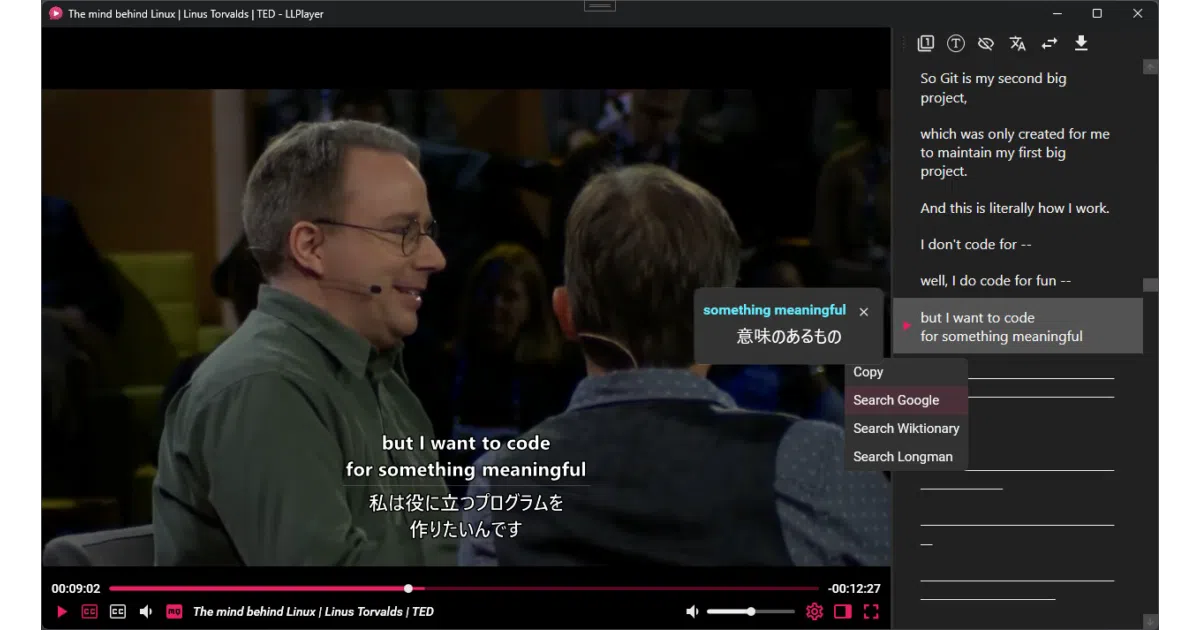
LLPlayer turns any video into interactive language-study material by overlaying dual subtitles, AI transcription, and instant translation.
Not currently ranked — collecting fresh signals.
star history
What it does
LLPlayer is a Windows desktop video player built specifically for language learners. It displays dual subtitles side-by-side, generates missing captions in real time using local Whisper speech recognition, and translates them on the fly through engines ranging from Google and DeepL to local LLMs like Ollama. It also extracts text from bitmap subtitles via OCR, supports online video through yt-dlp, and offers instant word lookup with customizable browser searches.
The interesting bit
Instead of wrestling with libmpv or libVLC, the author built the UI around Flyleaf—a .NET media library chosen because C# makes it easier to hack on. The result treats subtitles as first-class data: you can seek by subtitle line, export AI-generated captions to SRT, and pipe text into browser extensions such as Yomitan.
Key highlights
- Local-first AI: Whisper-based ASR and Tesseract/Microsoft OCR run entirely offline after the initial model download.
- Flexible dual-subtitle display with independent size, position, and language settings for primary and secondary tracks.
- Context-aware translation that feeds subtitle context to an LLM for more accurate results.
- Built-in cheat sheet and fully customizable keyboard shortcuts, with multiple keys allowed per action.
- Integrates with yt-dlp for online video playback and supports browser extensions for advanced word lookup.
Caveats
- Explicitly beta; the author warns of instability and breaking configuration changes during 0.X.X releases.
- Windows-only for now (Windows 10 v1903+ or Windows 11), with cross-platform support only a future roadmap item via Avalonia.
- Missing the Microsoft Visual C++ Redistributable (2022 or later) will not prevent launch, but ASR and OCR will crash until it is installed.
Verdict
Language learners who want to mine vocabulary from local files, YouTube videos, or anime raws will find this far more useful than a generic player. If you just want to watch movies without studying, stick with mpv or VLC—the author admits this is not trying to replace them.
Frequently asked
- What is umlx5h/LLPlayer?
- LLPlayer turns any video into interactive language-study material by overlaying dual subtitles, AI transcription, and instant translation.
- Is LLPlayer open source?
- Yes — umlx5h/LLPlayer is open source, released under the GPL-3.0 license.
- What language is LLPlayer written in?
- umlx5h/LLPlayer is primarily written in C#.
- How popular is LLPlayer?
- umlx5h/LLPlayer has 4.4k stars on GitHub.
- Where can I find LLPlayer?
- umlx5h/LLPlayer is on GitHub at https://github.com/umlx5h/LLPlayer.