uczltw6/trace-file-lineage
File Forensics That Distinguishes Proof From Hunches
It reconstructs which script, notebook, or AI agent produced a file, and is upfront about whether it actually knows or is just guessing.
Not currently ranked — collecting fresh signals.
star history
What it does
trace-file-lineage is a local CLI tool for Python and notebook workflows that answers two questions: where did an existing file come from, and where should a new one go? For files already on disk, it reads code, Git history, image metadata, and document structure to rank possible origins. For work in progress, it can wrap a command to record verified provenance. It is built for research code, data analysis, and the chaotic output of AI coding agents.
The interesting bit
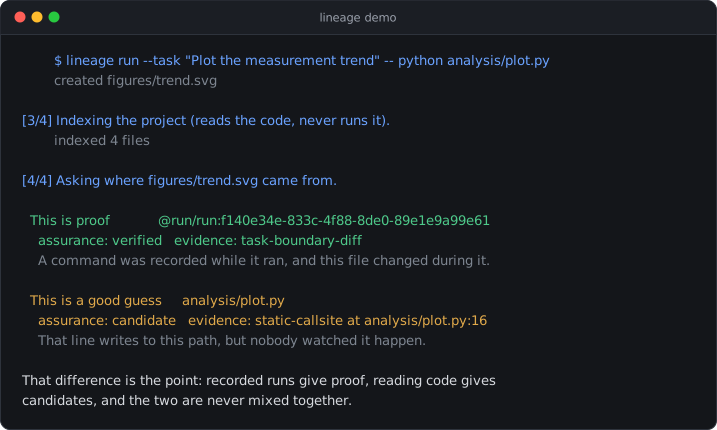
The tool refuses to pretend. It labels every answer with one of five certainty levels—from verified (we watched it happen) down to insufficient (we don’t know, and won’t pretend). Static code analysis that spots a path in a script is tagged as a guess, not proof, and no amount of weak signals ever gets promoted to certainty. The result is an interactive offline graph where solid arrows mean proof and dashed ones mean speculation.
Key highlights
- Retrospective mode needs no setup: it scans your workspace and ranks candidates with the evidence attached.
- Prospective mode wraps commands to record exactly what changed during a run, producing a manifest instead of 150 separate mysteries.
- Python and Jupyter notebooks are genuinely parsed—including common Pandas, Matplotlib, and
pathlibpatterns—rather than merely grepped. - An interactive browser graph runs fully offline; export to Mermaid if you prefer diagrams in your docs.
- Everything stays local: no account, no API key, no upload, and password-like arguments are automatically stripped from recorded commands.
Caveats
- It is explicitly not a general-purpose lineage platform: JavaScript and TypeScript get only a cautious static scan, other languages are searched rather than parsed, and runtime-built paths cannot be resolved.
- Experimental integrations for W3C PROV, DVC, and OpenLineage exist but are not validated against real third-party pipelines.
- The project is an early release (0.7.0) and commands may still change.
Verdict
Worth a look if you wrangle Python research code, Jupyter notebooks, or AI agents that litter your workspace with unexplained artifacts. Skip it if you need deep lineage across JavaScript/TypeScript codebases or a fully declarative pipeline system like DVC.
Frequently asked
- What is uczltw6/trace-file-lineage?
- It reconstructs which script, notebook, or AI agent produced a file, and is upfront about whether it actually knows or is just guessing.
- Is trace-file-lineage open source?
- Yes — uczltw6/trace-file-lineage is open source, released under the MIT license.
- What language is trace-file-lineage written in?
- uczltw6/trace-file-lineage is primarily written in Python.
- How popular is trace-file-lineage?
- uczltw6/trace-file-lineage has 66 stars on GitHub.
- Where can I find trace-file-lineage?
- uczltw6/trace-file-lineage is on GitHub at https://github.com/uczltw6/trace-file-lineage.