tinyhumansai/openhuman
A Desktop AI That Joins Your Meetings and Stashes Your Life in SQLite
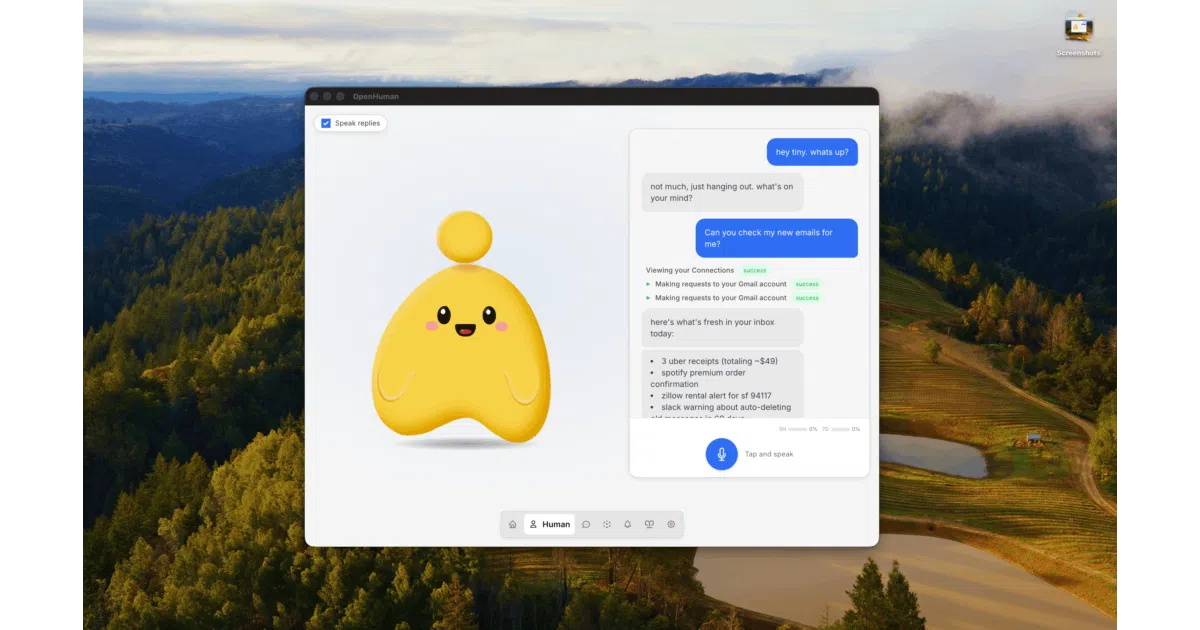
OpenHuman is a desktop-native agentic assistant that keeps a local memory vault of your digital life, compresses every token before it hits an LLM, and joins your Google Meet calls as a speaking mascot.
Velocity · 7d
+29
★ / day
Trend
↘cooling
star history
What it does
OpenHuman is a cross-platform desktop agentic assistant built in Rust that aims to live next to you while you work. It connects to over a hundred third-party services—Gmail, Slack, Notion, GitHub, and the rest—via one-click OAuth, then auto-fetches fresh data every twenty minutes into a local SQLite knowledge base. The agent surfaces through a desktop UI with a speaking mascot, handles voice input and output, and can even join Google Meet calls as a participant that remembers context across sessions.
The interesting bit
The project tries to split the difference between cloud convenience and local privacy: your Memory Tree, Obsidian-compatible Markdown vault, and workspace state stay on disk, but by default model routing, web search, OAuth handshakes, and integration proxies all flow through OpenHuman’s managed backend. That makes it less “fully local” than the branding suggests, though you can bring your own LLM, search, and Composio credentials if you want to untangle from the hosted services.
Key highlights
- Local-first memory: Incoming data is chunked into ≤3k-token Markdown fragments, scored, and folded into hierarchical summary trees stored in SQLite, with the same fragments mirrored as
.mdfiles in an Obsidian-compatible vault. - TokenJuice compression: Tool outputs, HTML pages, and search results are compressed—converted to Markdown, deduped, and summarized—before reaching any LLM; the docs claim this cuts cost and latency by up to 80%.
- Batteries-included toolset: Native web scraping, filesystem access, git operations, lint/test/grep, and voice (STT in, ElevenLabs TTS out with mascot lip-sync) are wired in without extra plugins.
- Managed-by-default integrations: 118+ connectors via Composio are proxied through the OpenHuman backend for OAuth and tool calls; real-time triggers and some hosted features still require the managed layer even in “custom” mode.
- Desktop-native UX: A UI-first onboarding flow with no terminal required, plus a persistent mascot that reacts to surroundings and keeps “thinking” in the background.
Caveats
- The project is early beta and the README explicitly warns to expect rough edges.
- The default path leans heavily on OpenHuman-hosted services for authentication, model routing, and search, so “private” is a configurable state, not the out-of-box experience.
- Linux users report AppImage crashes under Wayland, and the
.debpackage is the safer route on Debian/Ubuntu.
Verdict
Worth a look if you want a persistent desktop agent that auto-ingests your SaaS data into a local knowledge graph and don’t mind a managed backend handling the LLM plumbing. Skip it if you need a fully offline, air-gapped assistant from the first launch.
Frequently asked
- What is tinyhumansai/openhuman?
- OpenHuman is a desktop-native agentic assistant that keeps a local memory vault of your digital life, compresses every token before it hits an LLM, and joins your Google Meet calls as a speaking mascot.
- Is openhuman open source?
- Yes — tinyhumansai/openhuman is open source, released under the GPL-3.0 license.
- What language is openhuman written in?
- tinyhumansai/openhuman is primarily written in Rust.
- How popular is openhuman?
- tinyhumansai/openhuman has 42.3k stars on GitHub and is currently cooling off.
- Where can I find openhuman?
- tinyhumansai/openhuman is on GitHub at https://github.com/tinyhumansai/openhuman.