timoncool/YuE2-Studio
An AI song generator that hands you the sheet music
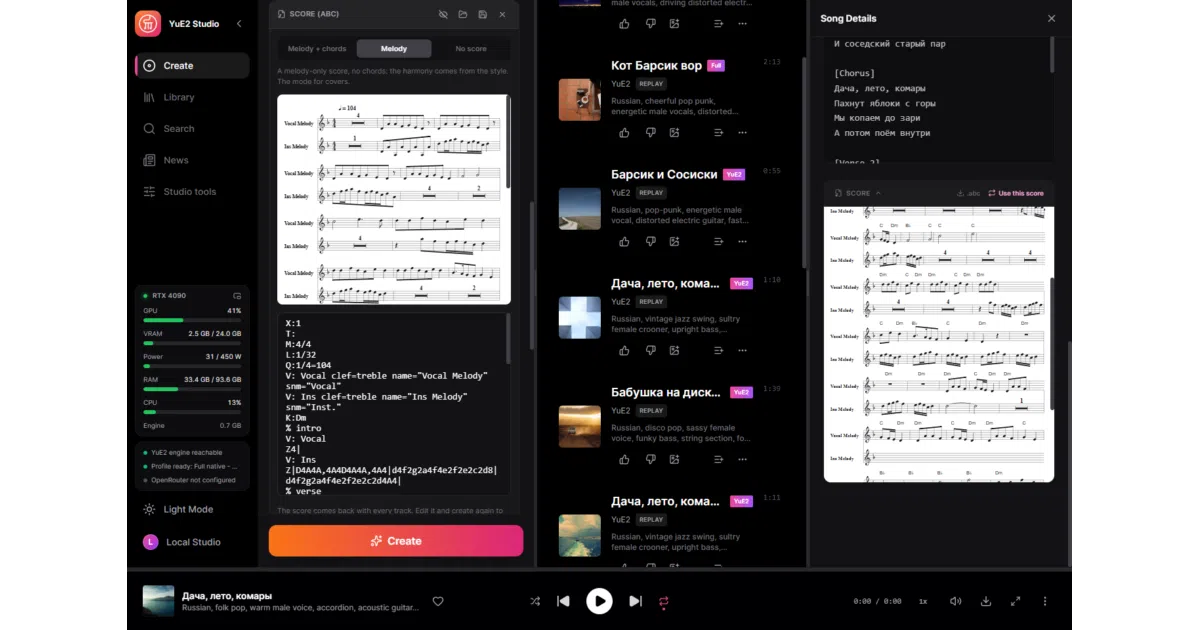
YuE2 Studio runs the open YuE2 song model locally on Windows and returns an editable score alongside the vocals — so you can change the performance without recomposing.
Collecting fresh signals — velocity needs a few days of history.
collecting data…
star history
What it does
YuE2 Studio wraps YuE2, the open song model from M-A-P, in a native Windows desktop app. You give it a style and lyrics; it composes a melody with chords as sheet music (ABC notation, engraved for reading), then performs the whole thing as a full song with vocals — up to ten minutes, offline, on an NVIDIA card with 6 GB+ VRAM. The runtime is Rust and React in a Tauri window over yue2.cpp, the C++/CUDA port of the model. No Python anywhere in the runtime path, which is the whole point: one installer, one executable.
The interesting bit
The score is a first-class output, not a curiosity. Edit the notes, tempo or key and re-render: the composition stays, only the sound changes. Every track also keeps its request and audio codes, so you can replay it bit-for-bit or re-render with a new seed and different settings without composing again. That’s a workflow most cloud music generators don’t offer at any price.
Key highlights
- Full songs with vocals from style + lyrics; a 3:38 song renders in about 46 seconds on an RTX 4090 with the Q8_0 set
- Covers via SheetSage2: transcribe a recording to a score, then have YuE2 sing it in your style
- Six-stem separation (HT-Demucs), any track to multi-instrument MIDI, word-level karaoke timing
- Train your own LoRA on your GPU with a three-step wizard, resumable after crashes
- An MCP server so an AI agent can drive the whole studio by itself
- Extras that range from practical (proxy support, FLAC/MP3 export) to nostalgic (a full skinned Winamp 2 mode with MilkDrop)
Caveats
- Windows-only; AMD and Intel via Vulkan are explicitly experimental
- Covers are fragile: new lyrics must match the original’s syllable count and stress placement, or the singing drifts off the tune, and transcription mistakes carry through
- The feature list is enormous — covers, training, MIDI editing, mastering — so expect a lot of surface area to learn
Verdict
For anyone who wants local, offline song generation with actual control over the composition — and a GPU to spare — this is a serious tool, not a toy. If you’re on macOS/Linux or want a minimal one-button generator, keep moving.
Frequently asked
- What is timoncool/YuE2-Studio?
- YuE2 Studio runs the open YuE2 song model locally on Windows and returns an editable score alongside the vocals — so you can change the performance without recomposing.
- Is YuE2-Studio open source?
- Yes — timoncool/YuE2-Studio is open source, released under the MIT license.
- What language is YuE2-Studio written in?
- timoncool/YuE2-Studio is primarily written in TypeScript.
- How popular is YuE2-Studio?
- timoncool/YuE2-Studio has 1.1k stars on GitHub.
- Where can I find YuE2-Studio?
- timoncool/YuE2-Studio is on GitHub at https://github.com/timoncool/YuE2-Studio.