th1nhhdk/local_ai_ocr
DeepSeek-OCR bottled for Windows, then unplugged from the internet
A portable Windows GUI that runs a local DeepSeek-OCR model so your PDFs and images never touch the network.
Not currently ranked — collecting fresh signals.
star history
What it does
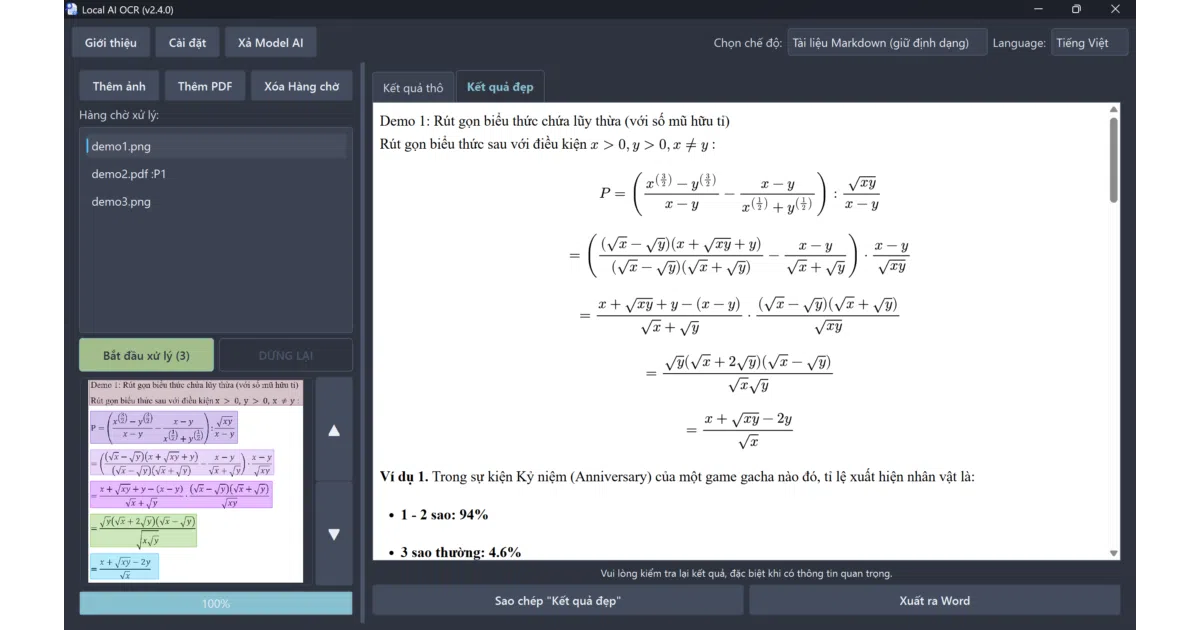
local_ai_ocr is a Windows desktop app that extracts text from images and PDFs using a local DeepSeek-OCR model. After a one-time download of roughly 6.67 GB of weights, it runs entirely offline, queuing up files and exporting formatted text or .docx files ready for Word. It supports Vietnamese, English, Chinese, Japanese, and others, and will fall back from GPU to CPU if your hardware is modest.
The interesting bit
The interface auto-detects whether to speak Vietnamese or English by checking if Cốc Cốc or Zalo is installed—a pragmatic localization strategy you don’t see every day. It also draws live bounding boxes over the document so you can watch the AI read, and automatically evicts the model from RAM after five minutes of idle time.
Key highlights
- Runs fully offline after initial setup; no cloud round-trips.
- Three extraction modes: Markdown-aware document parsing, layout-preserving “Free OCR,” and a faster standard mode.
- Exports directly to
.docxwhile attempting to keep tables and formatting intact. - Visual feedback during recognition with bounding boxes drawn around detected text regions.
- Auto GPU detection with CPU fallback; explicitly targets Nvidia GPUs with 8 GB+ VRAM but will try to use whatever is available.
Caveats
- The AI can get stuck in an infinite loop during processing, requiring a manual stop.
- Drag-and-drop file ordering is not preserved, and the README notes this as an unfixable software limitation.
- The “Markdown document” mode may fail to output anything on complex inputs, forcing a switch to “Free OCR” mode.
Verdict
Worth a look if you need private, local OCR on Windows and have the disk space and VRAM to spare. Skip it if you expect cloud-grade reliability or a polished cross-platform experience.
Frequently asked
- What is th1nhhdk/local_ai_ocr?
- A portable Windows GUI that runs a local DeepSeek-OCR model so your PDFs and images never touch the network.
- Is local_ai_ocr open source?
- Yes — th1nhhdk/local_ai_ocr is open source, released under the Apache-2.0 license.
- What language is local_ai_ocr written in?
- th1nhhdk/local_ai_ocr is primarily written in Python.
- How popular is local_ai_ocr?
- th1nhhdk/local_ai_ocr has 781 stars on GitHub.
- Where can I find local_ai_ocr?
- th1nhhdk/local_ai_ocr is on GitHub at https://github.com/th1nhhdk/local_ai_ocr.